Social Catfish opt-out: how to remove your listing, photos and contact details
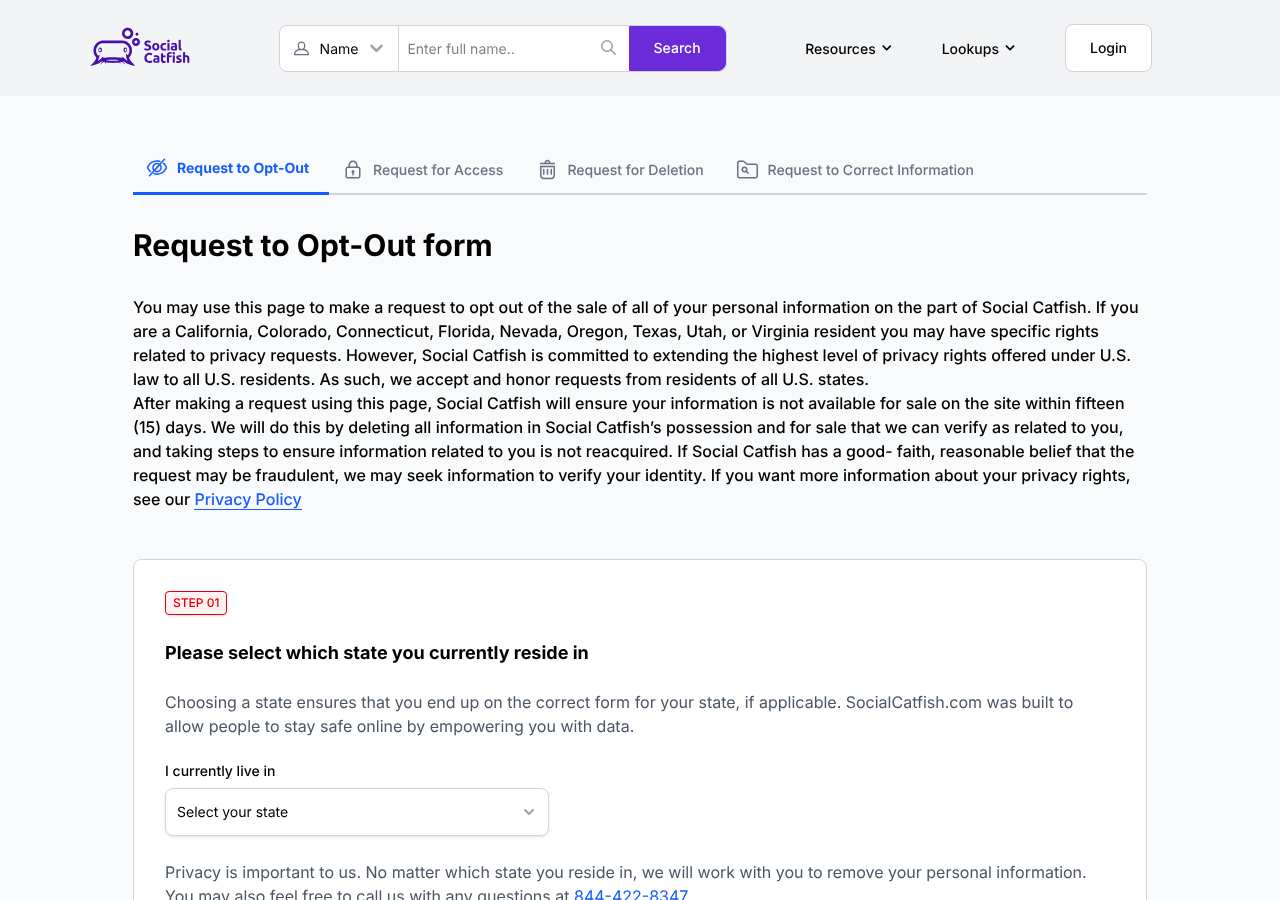
Go to socialcatfish.com/opt-out, keep the Opt-Out request selected and pick your state. Enter your first name, last name and an email address you control, add any Social Catfish profile links you found, complete the reCAPTCHA and click Submit Now. It is free and needs no account. Social Catfish says it will make your information unavailable for sale within 15 days. If the form fails, email privacyrequests@socialcatfish.com.
Reading current independent checks… See route evidence
Work through this with your agent
Give your agent the published steps, sources and read-only tools. It should check the current official process and ask before taking action.
Copies public guidance only. You still approve any request your agent submits.
View or select the instructions
Remove yourself from Social Catfish
8 steps. Use the official site in a normal browser and follow its current instructions if a human check fails.
- 01
Pick the right request
The opt-out page has four request types: Opt-Out, Access, Deletion and Correct Info. To come off Social Catfish's search results, use Opt-Out. Social Catfish says it deletes what it can verify as yours and takes steps to stop it being reacquired. The Deletion form is a separate privacy-law request, which its policy says is answered within 45 days, extendable to 90 with notice.
- 02
Find your listings first
Search your name and state on socialcatfish.com. The free results are enough to see whether you are listed; you do not need to buy a report. Its help article says to right-click your listing and copy the link address rather than open it. Copy a link for every listing that is you, and note old addresses, phone numbers and name variants.
- 03
Open the official opt-out page without a VPN
Go to socialcatfish.com/opt-out. It opens on the Opt-Out request, and the address ends in ?id=request_optout. Use a normal browser with your VPN off: the privacy policy lists hiding your IP address with a VPN as conduct that can make Social Catfish treat a request as fraudulent. Check the address bar shows socialcatfish.com before you type anything.
- 04
Choose your state and enter the required details
Step 01 asks which state you live in. Social Catfish says it accepts requests from residents of every U.S. state. Step 02 requires First Name, Last Name and Email Address. Use your real name and an email address you can check, because that is where confirmation messages and any verification questions are likely to arrive. These were the only mandatory fields when we loaded the page on October 5, 2026.
- 05
Add the optional details that help it match you
Paste each profile link you copied into the links field; the form says links speed up finding and removing your records. The optional section accepts a middle initial, an age range, other emails, phone numbers, other states you have lived in, and up to eight photos (jpg, gif, png or bmp, 5 MB each) or image URLs. The form says it does not store images and can block the exact images from image search results.
- 06
Tick the agent box only if it applies, then submit
Step 03 is a checkbox for submitting as an authorized agent of a third-party organization. Leave it unticked when you are filing for yourself. If you file for someone else, the policy says you must disclose that and provide proof of signed authorization. Complete the reCAPTCHA and click Submit Now. If a Duplicate Submission Detected box appears, you already sent this request type with that email; resubmit only if you have new links.
- 07
Answer any verification request
Social Catfish's help article describes a confirmation email with a verification link. Its policy also says it may ask for more proof of identity if it doubts a request, such as a driver's license or passport when you have no account. Only answer messages that clearly reply to your own request, send no more than it asks for, and treat any message that asks for payment as a scam. Keep every email as your record.
- 08
Re-check after 15 days
Search again after day 15 using each name variant, state, old address and phone number. If a listing remains, resubmit the exact link. If the form fails or nothing arrives, email privacyrequests@socialcatfish.com from the address you used, with your name, state and the listing links.
What the SocialCatfish opt-out page looked like when we checked
We loaded the opt-out page on socialcatfish.com on October 5, 2026 and it was up. The first screen asked for: First Name, Last Name, Email Address, Enter profile URL here... The page includes a reCAPTCHA check.
This is a dated record of what our browser saw, not a removal. We never submit requests from this page.
Continue with your next privacy task
Found your details on another site?
- TruePeopleSearch opt-out instructions
Use this guide if you find a matching listing on TruePeopleSearch. Check that site separately; a request elsewhere does not establish removal here.
- Unmask opt-out instructions
Use this guide if you find a matching listing on Unmask. Check that site separately; a request elsewhere does not establish removal here.
The source page changed, but Google still shows it
Choose between a Google personal-info request and refreshing an outdated result.
Read the how-toYou found more than one profile
Keep separate records of each matching URL so an extra listing is not missed.
Read the how-toThe confirmation email never arrived
Check the site's requirements before retrying a request or sharing more information.
Read the how-toRemind me to recheck SocialCatfish in 30 days
We'll send one reminder to verify the listing is actually gone. Confirm the email first; no ongoing marketing and no account required.
What is Social Catfish?
Social Catfish is a paid people-search and online-identity-verification service. It markets itself as a way to check whether someone you met online is real, and it sells name, email, phone, username, address and reverse-image searches. A free search shows whether it has results; the full report sits behind a paid membership. Its own disclaimer says it is not a consumer reporting agency, so reports are not meant for hiring, credit, insurance or tenant screening.
You do not need to have signed up to be in it. Social Catfish says its results come from data licensed from third-party consumer data resellers and from public websites, not from what searchers type into the site. That is why a listing can show an old address, a phone number or a photo you never gave it. The site advertises searching more than 200 billion records, and people who share a name can be mixed together, so check every listing carefully.
What a Social Catfish listing can show
- Full name, aliases and usernames
- Current and past home addresses
- Current and past phone numbers and email addresses
- Age or birth date, gender and marital status
- Profile photos and links to public social media profiles
- Education and job history
- Potential associates, which its help article describes as including relatives
Who runs Social Catfish, and which sites one request covers
Social Catfish is operated by SocialCatfish, LLC, which lists a Murrieta, California address and the phone number (844) 422-8347 on its site. It does not publish a parent company, and our research found no sister sites that share its opt-out, so a Social Catfish request covers socialcatfish.com only. Privacy Rights Clearinghouse lists it as a people-search data broker registered with the Vermont Secretary of State. Your details may also sit on other people-search sites, and each one needs its own request.
What is the socialcatfish.com opt-out removal process?
The socialcatfish.com opt-out removal process is one web form in three steps: choose your state, enter your name and email (plus optional listing links, other emails, phone numbers, photos and other states), then submit. Social Catfish commits to making your information unavailable for sale within 15 days and may ask you to verify your identity. When we loaded the page on October 5, 2026, it showed a state selector, required First Name, Last Name and Email Address fields, an optional profile-link field, an authorized-agent checkbox and a reCAPTCHA. It asked for no account or payment.
How long it takes
The opt-out page commits to making your information unavailable for sale within 15 days, and the privacy policy says Social Catfish aims to answer verified opt-out requests in the same time. Its published California figures for 2025 show an average opt-out response of 8.08 days. They also show 53,716 opt-out requests received, 39,155 complied with in whole or in part and 11,498 denied, so a request can fail when Social Catfish cannot match or verify you. Its help article says to expect 15 to 21 days. To confirm it worked, search your name again and open each old link. If a listing is live after 21 days, resubmit and email.
Social Catfish opt-out problems and fixes
The reCAPTCHA or Submit Now button will not work
Turn off your VPN, ad blockers and script blockers for socialcatfish.com, or try another browser. When we loaded the page on October 5, 2026 it showed a reCAPTCHA. The policy treats VPN use as a fraud signal, so do not retry through one.
No confirmation email arrived, or a Duplicate Submission box appeared
Check spam and promotions folders and confirm you typed the email correctly. The duplicate box means that email already sent this request type. Only resubmit if you have new listing links. Otherwise email privacyrequests@socialcatfish.com from the same address and ask for a status update.
My request was denied or Social Catfish asked for more proof
The policy says it can deny requests it cannot verify as yours or that look fraudulent, and for suspected fraud it says it will explain why. The policy describes an appeal by replying to the denial email with your reasons, answered within 45 days.
I am still listed after 15 days
Results can include many people with your name, and the policy says matching needs manual verification. Resubmit with the exact listing links, your middle initial, age range, old addresses and phone numbers, then email privacyrequests@socialcatfish.com with the same details.
My photo still turns up in the reverse image search
The form says it can block the exact images you submit, not look-alikes. Submit each version you find, such as crops and re-uploads, using up to eight files or image URLs per request. Resubmit if a new copy of the photo appears elsewhere.
I am still being billed or my account is still open
Opting out does not cancel a subscription or close an account. Social Catfish's help article says to cancel under Dashboard, Manage Account, then Payments and Subscriptions, or call (844) 422-8347, and to ask separately for account deletion.
I turned on Global Privacy Control and I am still listed
The privacy policy says it honors the signal only for data collected through the website, not for search results. Your listing is removed through the opt-out form, so submit it.
Send this to privacyrequests@socialcatfish.com
Subject: Request to opt out of the sale of my personal information
Hello, Under applicable state privacy laws, I request that Social Catfish opt me out of the sale of my personal information and delete the information it holds and offers for sale that relates to me. Name: [Full name] Email address: [Email] Location: [City, State] Listing URL: [Listing URL] Please confirm by email once this is complete, and tell me if you need anything further to verify the request. Thank you.
After you opt out of Social Catfish
Keep the confirmation email and a screenshot of your search results as your record. Social Catfish says it takes steps so removed information is not reacquired, but its data comes from licensed sources and public websites that refresh, and its help article warns that data can reappear. Search your name every two to three months and resubmit any new link. Work through other people-search sites too, since each keeps its own copy; that re-checking across brokers is what My Privacy Agent's Patrol plan automates.
Realistic scope
This guide explains how to request the action SocialCatfish publishes for its own site. Reading the guide or sending a request does not establish completed removal. Other sites and original public records are separate; recheck the specific socialcatfish.com page after the site's response and if the information appears again.
Not yet a filed-for-you target
This page documents SocialCatfish's published privacy route. My Privacy Agent Patrol does not file this site automatically yet. An exposure check uses configured sources and does not confirm that this specific site is included.
SocialCatfish opt-out FAQ
Is Social Catfish a legitimate company, and is its opt-out safe to use?
It is a real operating business, with caveats. SocialCatfish, LLC lists a Murrieta, California address and phone number on its site, and Privacy Rights Clearinghouse lists it as a registered people-search data broker. The Better Business Bureau profile shows it as not accredited, with accreditation revoked, so read the terms before you pay for anything. The opt-out form on socialcatfish.com is the official route and asks for your name and email, not payment or an account. Do not pay a third party to remove you.
How do I remove myself from Social Catfish?
Use the opt-out form at socialcatfish.com/opt-out. Choose Opt-Out, select your state, enter your name and email, add your listing links, complete the reCAPTCHA and submit. Social Catfish says it will make your information unavailable for sale within 15 days.
Is the Social Catfish opt-out free, and do I need an account?
It is free, and Social Catfish's policy says a request does not require an account. You never need to buy a membership or report to opt out. If you have no account, it may ask for extra proof of identity.
How long does the Social Catfish opt-out take?
The form promises 15 days. Social Catfish reports an average opt-out response of 8.08 days for California requests in 2025, and its help article says 15 to 21 days. Re-check on day 15 and resubmit if the listing is still live.
Why is my Social Catfish listing back?
Social Catfish licenses data from third-party resellers and public websites, so a refresh can bring back a record under a new link or name variant. Search again, then resubmit the new link and any variants you missed.
Does opting out of Social Catfish cancel my subscription?
No. Opt-out, subscription cancellation and account deletion are three separate processes. Cancel in your account or by calling (844) 422-8347, and ask for account deletion separately.
Does removing me from Social Catfish remove me from other people-search sites?
No. Our research found no sister sites that share Social Catfish's opt-out. Sites such as Spokeo, BeenVerified and Whitepages keep their own records and need their own requests.
Can I opt out of Social Catfish if I do not live in California?
Yes. The page and the privacy policy say Social Catfish honors opt-out requests from residents of all U.S. states, not only those with a state privacy law. Choose your state in step 01 of the form.
I am a police officer or judge. Is there a separate Social Catfish removal form?
Yes. The policy points active or retired law enforcement officers, judicial officers, other covered public servants and covered family members to socialcatfish.com/opt-out/?id=law_enforcement_optout. You verify your email and submit every URL. It can also remove just an email or phone number.
Related opt-outs to clear next
SouthCarolinaCourtRecords.us
People Search · southcarolinacourtrecords.us
Open guideSnoopstation
People Search · snoopstation.com
Open guideSouthCarolinaPublicRecords.com
People Search · southcarolinapublicrecords.com
Open guideSmartBackgroundChecks
People Search · smartbackgroundchecks.com
Open guideSouthDakotaCourtRecords.us
People Search · southdakotacourtrecords.us
Open guideSimpleContacts
People Search · simplecontacts.com
Open guideSources and review
Reviewed October 5, 2026 against Social Catfish's own pages and the sources below. Broker forms change often; if something here no longer matches, the official page wins.
- Social Catfish opt-out and privacy request form
- Social Catfish privacy policy (data sources, request rights, California metrics, law enforcement removal)
- Social Catfish help article: cancel, delete your account and opt out
- Better Business Bureau profile for Social Catfish
- Privacy Rights Clearinghouse data broker listing for Social Catfish, LLC
Review and change history
A content review or directory snapshot is reference history. A historical route observation does not establish submission, provider acceptance or removal, and does not establish a current working route. Current independent evidence has its own scope and expiry.
· Guide content reviewed against the published sources. This is the recorded review baseline; no earlier editorial change log is available.
· Historical route observation: reachable (HTTP 200). This describes only the page observed on that date; later steps and today's availability were not established by that observation.
Read current independent route evidence. That record reports its own scope, date, expiry and any gaps; this history does not renew verification.