SpyDialer opt-out: how to remove your info from Spy Dialer
Go to spydialer.com/consumers and click START. Pick your state, pass the robot check, then enter the names, phone numbers, email address and full street address tied to the records you want blocked, and confirm the removal. SpyDialer says consumers in all states can opt out. It publishes no processing time, the wizard itself takes about five minutes, and the site warns your details can reappear as it receives new public records.
Reading current independent checks… See route evidence
Work through this with your agent
Give your agent the published steps, sources and read-only tools. It should check the current official process and ask before taking action.
Copies public guidance only. You still approve any request your agent submits.
View or select the instructions
Remove yourself from SpyDialer
8 steps. Use the official site in a normal browser and follow its current instructions if a human check fails.
- 01
Search yourself first
Look up each phone number you use or have used on SpyDialer and note every name, email address and street address shown or tied to it. The wizard asks you to list each record you want blocked, so this prep work saves time and avoids a request that cannot be matched.
- 02
Open the Remove My Info page
Go to spydialer.com/consumers, or use the Remove My Info or Do Not Sell Or Share My Personal Information link in the site footer. The page says SpyDialer allows consumers in all states to opt out. Check the address bar says spydialer.com. Businesses have a separate Business Listing Removal page.
- 03
Click START and choose your state
Click START to open the wizard. State selection is required, so pick your state from the list. The wizard then asks you to confirm you are not a robot. Use a normal browser window with no VPN, and turn off ad blockers if the robot check does not appear.
- 04
Read the notice and continue
A privacy-law notice for your state may appear next. Read it, then continue. Independent guides say the opt-out works whether or not your state has a privacy law, and SpyDialer's page says consumers in all states can opt out.
- 05
Enter your names, phone numbers and email
Enter your first and last name, then each phone number and an email address. Required fields are highlighted in yellow. Add more names if you have used variants, such as a maiden name. Only enter details for records you actually want blocked.
- 06
Enter your full street address
The wizard says it needs your full street address to identify your records, even if the site does not display it, and that without it your request will not work. It also asks you to list every result you want blocked so SpyDialer can be sure it has identified your records.
- 07
Confirm the removal
Review what you entered, click Opt-Out My Info and answer the prompt asking whether you are sure you want to delete all your records. One independent guide says a success message follows, saying your submitted data has been blocked from future sharing. Take a screenshot of it.
- 08
Repeat and re-check
Search each phone number again after a few days. If your details are still there, run the wizard again with every name variant and the exact address. Then check openpeoplesearch.com separately. Set a reminder to search again every few months.
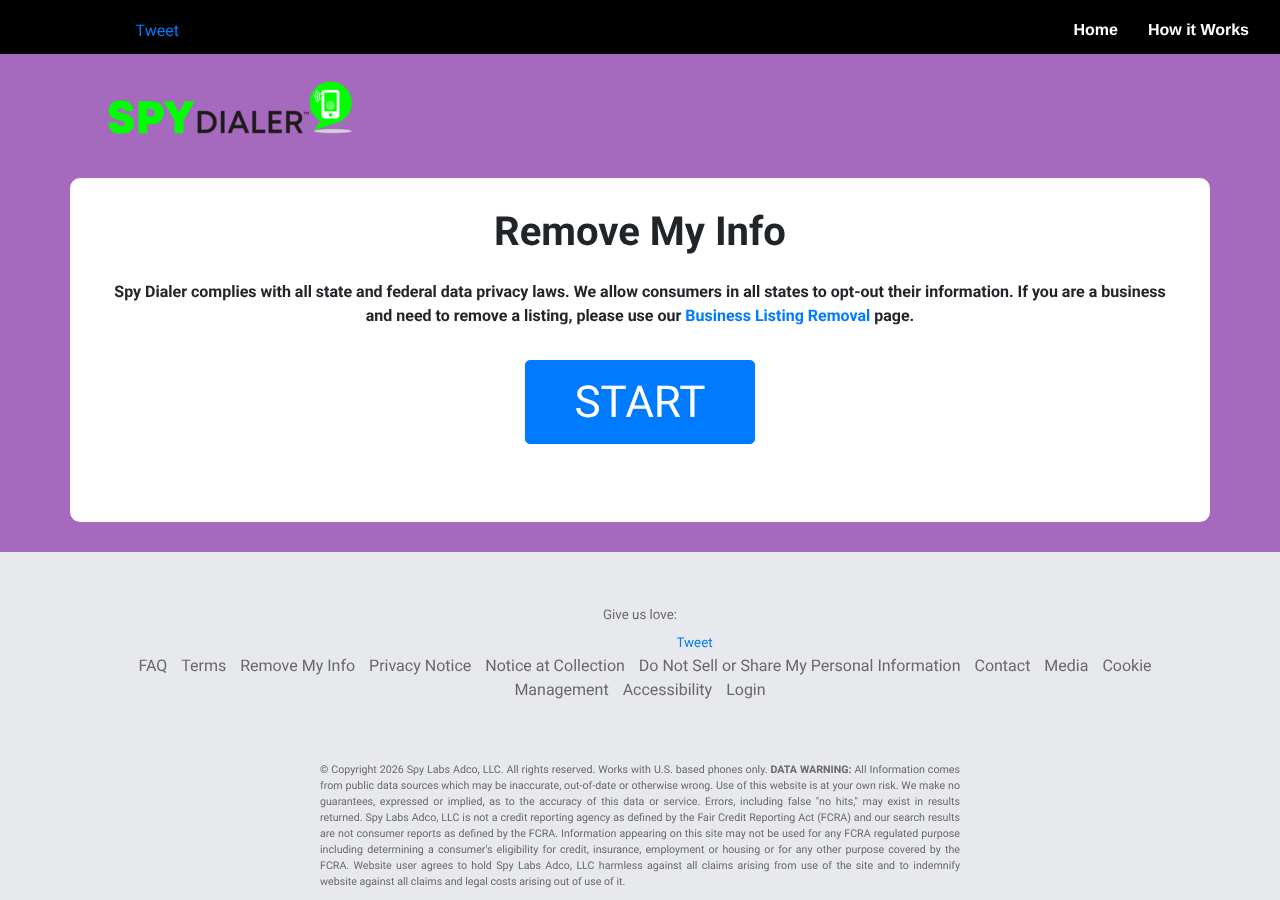
What the SpyDialer opt-out page looked like when we checked
We loaded the opt-out page on spydialer.com on October 5, 2026 and it was up.
This is a dated record of what our browser saw, not a removal. We never submit requests from this page.
Continue with your next privacy task
Found your details on another site?
- TruePeopleSearch opt-out instructions
Use this guide if you find a matching listing on TruePeopleSearch. Check that site separately; a request elsewhere does not establish removal here.
- Unmask opt-out instructions
Use this guide if you find a matching listing on Unmask. Check that site separately; a request elsewhere does not establish removal here.
The source page changed, but Google still shows it
Choose between a Google personal-info request and refreshing an outdated result.
Read the how-toYou found more than one profile
Keep separate records of each matching URL so an extra listing is not missed.
Read the how-toThe confirmation email never arrived
Check the site's requirements before retrying a request or sharing more information.
Read the how-toRemind me to recheck SpyDialer in 30 days
We'll send one reminder to verify the listing is actually gone. Confirm the email first; no ongoing marketing and no account required.
What is SpyDialer?
SpyDialer is a reverse-phone lookup site. Type in a phone number and it tells you who the number is registered to, and visitors can also search by name, address or email. Many people use it to identify a spam caller or an unknown text. The site says it has gathered information on billions of phone numbers.
SpyDialer says everything it publishes comes from public data sources and data suppliers, and warns that it may be inaccurate or out of date. It also says it is not a consumer reporting agency under the Fair Credit Reporting Act, so it should not be used for employment, credit or housing decisions. You never signed up for it, so a number you have kept for years can show a name, partial address and other details you never gave SpyDialer.
What a SpyDialer listing can show
- The name a phone number is registered to
- A partial address, with the full address withheld
- Email addresses linked to the number
- Voicemail greeting recordings for the number
- Spam-caller labels
- Photos from social profiles, where matched
Who runs SpyDialer, and which sites one request covers
SpyDialer's privacy notice names Spy Labs Adco, LLC as the operator and does not publish a street address. We found no parent company. Our research shows the same removal template on openpeoplesearch.com, so the two sites look related, but we could not confirm that a SpyDialer request covers OpenPeopleSearch. Treat it as a separate request and check it yourself.
What is the spydialer.com opt-out removal process?
The spydialer.com removal process is a short wizard rather than a single form. The Remove My Info page at spydialer.com/consumers has a START button that opens the wizard. You pick your state, confirm you are not a robot, enter your names, phone numbers, email address and full street address, and review the records that match. A final prompt asks whether you are sure you want to delete all your records. When we loaded the page on October 5, 2026 it showed the START button and no form fields; the fields appear inside the wizard.
How long it takes
SpyDialer does not publish how long a removal takes, and the pages we read do not mention a confirmation email, only on-screen messages. The wizard itself takes about five minutes. Search each number again after a few days. If your details are still showing, rerun the wizard with every name variant and your exact address, or call (866) 834-2579, the opt-out number in SpyDialer's privacy notice.
SpyDialer opt-out problems and fixes
The wizard says it cannot identify my records
Enter your full street address, every phone number and every name variant you have used. The wizard says it needs your full address to identify records even if the site does not show it, and that your request will not work without it.
The robot check does not load
Turn off your VPN, ad blockers and privacy extensions, or try another browser on a normal home or mobile connection. When we loaded spydialer.com/consumers on October 5, 2026 the page opened and showed the START button with no bot challenge.
I did not get a confirmation email
The pages we read do not mention a confirmation email. The wizard confirms on screen instead, so take a screenshot of the success message before you leave the page.
My number still shows after a few days
Rerun the wizard with every name, phone number and address variant tied to the number. If it is still live, call (866) 834-2579, the opt-out number in SpyDialer's privacy notice, and mention the date of your online request.
The listing is for a business, not a person
Use the Business Listing Removal page that the Remove My Info page links to for business listings. The consumer wizard is for personal information.
My info appeared again after I opted out
SpyDialer says it regularly receives new public records, so your information may appear in its products again. Run the wizard again, and keep a screenshot of each success message.
After you opt out of SpyDialer
SpyDialer's privacy notice says opting out does not remove data from its original source and that your information may appear in its products again as new public records arrive. Re-check every two to three months by searching each number you use. The same number is often on other reverse-phone sites, including OpenPeopleSearch, USPhoneBook and FastPeopleSearch, which need separate requests. Re-checking all of them is what My Privacy Agent's Patrol plan automates.
Realistic scope
This guide explains how to request the action SpyDialer publishes for its own site. Reading the guide or sending a request does not establish completed removal. Other sites and original public records are separate; recheck the specific spydialer.com page after the site's response and if the information appears again.
Not yet a filed-for-you target
This page documents SpyDialer's published privacy route. My Privacy Agent Patrol does not file this site automatically yet. An exposure check uses configured sources and does not confirm that this specific site is included.
SpyDialer opt-out FAQ
Is SpyDialer legit, and is its opt-out safe to use?
SpyDialer is a real reverse-phone lookup site and its Remove My Info wizard is the official opt-out. The page says it complies with state and federal data privacy laws and lets consumers in all states opt out. The wizard asks for names, phone numbers, an email address and your full street address, but not for ID, a Social Security number or payment. Only enter details for records you want blocked, and do not pay anyone to use the wizard for you.
How do I remove my phone number from SpyDialer?
Go to spydialer.com/consumers, click START, choose your state, pass the robot check and enter your names, phone numbers, email and full street address. Then confirm the removal. Repeat for each number that is listed.
How long does the SpyDialer opt-out take?
SpyDialer does not publish a processing time. The wizard takes about five minutes to complete. Search your number again after a few days and rerun the wizard, or call (866) 834-2579, if it still shows.
Can I opt out of SpyDialer if my state has no privacy law?
Yes. The Remove My Info page says SpyDialer allows consumers in all states to opt out. You still have to pick your state in the wizard first.
Why does SpyDialer ask for my full street address?
The wizard says it needs your full address to identify your records, even if it is not displayed on the site, and that the request will not work without it. Only enter details for records you want blocked.
Why is my number back on SpyDialer after I opted out?
SpyDialer says it regularly receives new public records, so your information may appear in its products again. Search every few months and rerun the wizard, keeping a screenshot of each success message.
Does opting out of SpyDialer remove me from other reverse-phone sites?
No. Each site keeps its own copy. OpenPeopleSearch appears to use the same removal template, but we could not confirm that one request covers both, so file a separate request there. Do the same for USPhoneBook and similar sites.
Is there an email address for SpyDialer opt-out requests?
We did not find one for removal requests. SpyDialer's privacy notice lists the online form and the phone number (866) 834-2579 for opt-outs. Use the wizard first, because it ties your request to specific records.
Related opt-outs to clear next
SpyFly
People Search · spyfly.com
Open guideSpokeo
People Search · spokeo.com
Open guideStateCourts
People Search · statecourts.org
Open guideSouthDakotaCourtRecords.us
People Search · southdakotacourtrecords.us
Open guideStateRecords.org
People Search · staterecords.org
Open guideSouthCarolinaPublicRecords.com
People Search · southcarolinapublicrecords.com
Open guideSources and review
Reviewed October 5, 2026 against SpyDialer's own pages and the sources below. Broker forms change often; if something here no longer matches, the official page wins.
Review and change history
A content review or directory snapshot is reference history. A historical route observation does not establish submission, provider acceptance or removal, and does not establish a current working route. Current independent evidence has its own scope and expiry.
· Guide content reviewed against the published sources. This is the recorded review baseline; no earlier editorial change log is available.
· Historical route observation: reachable (HTTP 200). This describes only the page observed on that date; later steps and today's availability were not established by that observation.
Read current independent route evidence. That record reports its own scope, date, expiry and any gaps; this history does not renew verification.