Opt-out records · 4 min read
What Happens After a Data Broker Removal Request?
Follow a data broker removal request from submission to confirmation and a public recheck. Learn what each status proves and when to follow up.
From a listing to a later check
Explore what each step can establish. These examples explain the process; they do not run a search or file a request.
A search result is a lead.
An example people-search page appears to match Alex. Open the source and compare the details before deciding it is the right person.
example.invalid/profile/alex
- Page observation
- Listing visible in the example
- Request record
- No request filed
Possible match found
What this evidence tells you
A source-page URL and the details visible at the time of the visit.
What remains unknown
A name match alone does not prove that a listing belongs to you. Search snippets can also be out of date.
Next step
Compare the name, location and other relevant details. Avoid saving more personal information than the review needs.
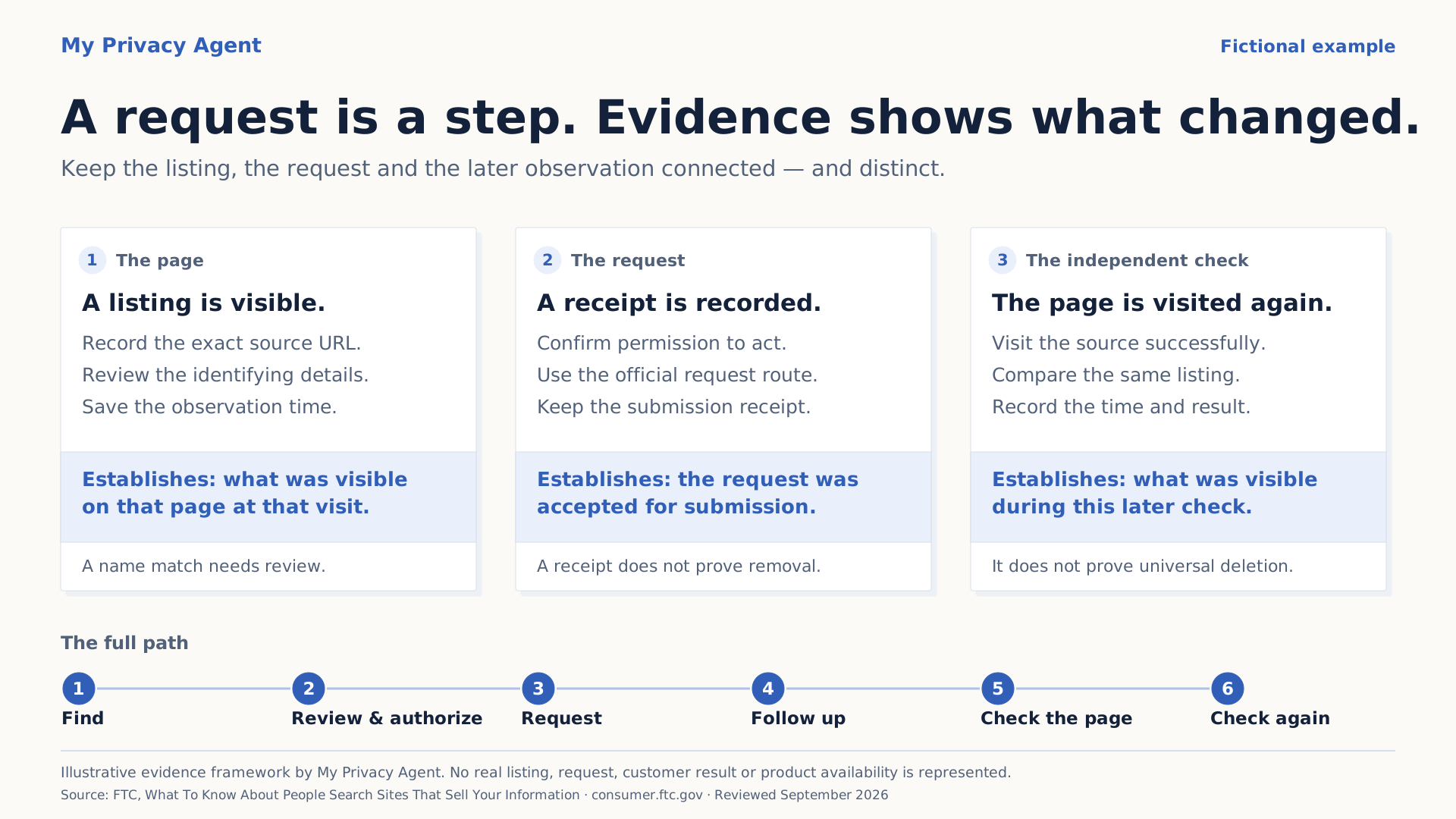
After you submit a data broker removal request, check for confirmation steps, record the operator's processing window, and recheck the public listing. A submission receipt proves a request was received. A later observation tells you whether the information is still visible on the page you checked.
Reviewed and updated September 13, 2026.
The useful timeline follows those events. There is no single turnaround time that fits every operator and request type. An opt-out, an account-data deletion request, and removal from search results can have different processes and different outcomes.
The sequence to expect
Keep a status and its supporting evidence together. The table below is a suggested tracking method, not a promise that every broker offers these statuses or follows this sequence.
| Stage | Evidence to look for | What to do next |
|---|---|---|
| Possible match | A page with details that may relate to you | Review enough matching information to identify the right listing |
| Confirmed listing | The exact public page and your matching assessment | Find the operator's official removal route |
| Submitted | A request receipt, confirmation page, or other durable submission evidence | Check whether another step is required |
| Needs you | A stated email, identity, or other confirmation requirement | Review and complete the appropriate step |
| Accepted or processing | The operator explicitly says it accepted or is processing the request | Record any stated response window |
| No longer visible when checked | A later public check of the relevant URL and search route | Keep the observation date and plan another check |
| Still visible or unable to verify | The page remains visible, or the check was inconclusive | Follow up or retry the check as appropriate |
An error, an opened form, or an action queued in software is not submission evidence. Similarly, clicking a verification link is not proof that the listing disappeared.
A fictional request, from receipt to recheck
Suppose Alex finds a public profile displaying a current home-address field. Alex confirms the match, records the URL, and submits through the operator's official process.
The page says to check email. Alex saves that result as “submitted; email confirmation needed.” After Alex completes the confirmation, the operator says the request is processing. Alex records the stated window and sets a reminder after it ends.
At the later check, the original page shows no profile. Alex also checks the same permitted name-and-city search that found it. No matching listing appears there. The record now says what was observed, when, and through which search route.
This example supplies no elapsed-day promise and describes no customer outcome. Its value is the separation between the action, the provider's response, and the later public observation.
Save a baseline before the page changes
Start a private opt-out proof log with the operator, exact listing URL, discovery date, exposed field categories, and official request URL. If you save a screenshot, keep it private and limit unnecessary personal detail.
Record enough to recognize the same listing later. “Current address visible” may be sufficient in a checklist; you do not need to duplicate the entire profile. Keep sensitive verification documents and tokenized confirmation links out of broadly shared notes.
When you act for another adult, make sure you have the authorization the process requires. A family relationship alone does not establish it.
Follow the request you actually made
Read the current instructions for the selected request type. Enformion, for example, describes identity matching for certain privacy requests but says opt-out requests do not require verification. Its policy also describes authorization requirements when an agent acts for someone. That is a provider-specific distinction, not a rule for every broker. Enformion's privacy policy.
If an email asks you to confirm a request you just made, check the sender and destination against the official process before proceeding. Our confirmation-email guide explains what to record without exposing the link's private token.
Save the operator's wording. “Received,” “identity confirmed,” and “completed” describe different events. If the operator reports completion, retain that message and still perform the public recheck.
When should you follow up?
Use the operator's stated processing window for your request. If none is provided, choose a practical reminder to inspect the status and contact the official support or privacy channel. That reminder is your follow-up plan, not an invented service deadline.
If the window passes and the listing is still visible, compare the request with the original record:
- Was the correct URL submitted?
- Was a required confirmation completed?
- Does the response identify a missing field, exception, or denial?
- Is the visible page the original listing or a different one?
- Does the operator offer a follow-up or appeal route for this request?
Keep any corrected submission linked to the first attempt. For a stated denial, use the request-denial guide to organize the reason and next step. Avoid repeatedly filing an unchanged request before checking what happened to the first.
Verify the page and the search result separately
Check the relevant public page without relying on an account-only view. Record the URL, time, search method, and visible result. A temporary outage, blocked browser, or redirect by itself is inconclusive; it needs enough context to establish what happened to the listing.
Google removal is another scope of work: its decision concerns Google Search, while the hosting website may retain the content. Google's removal guidance.
A later recheck remains useful. The FTC advises periodically checking people-search sites for new information after opting out. FTC people-search guidance. Our relisting guide explains how to distinguish a returned page from a new listing or a stale search preview.
You can start a private check and review possible matches before deciding what to address. Where supported removal help is available, review the eligible route and required authorization. A check does not itself submit requests or start ongoing monitoring.