Removal guide · 4 min read
Why Data Broker Profiles Come Back After an Opt-Out
A people-search profile can return after an opt-out. Learn to separate relisting, a new page, and stale search results, then keep evidence of each recheck.
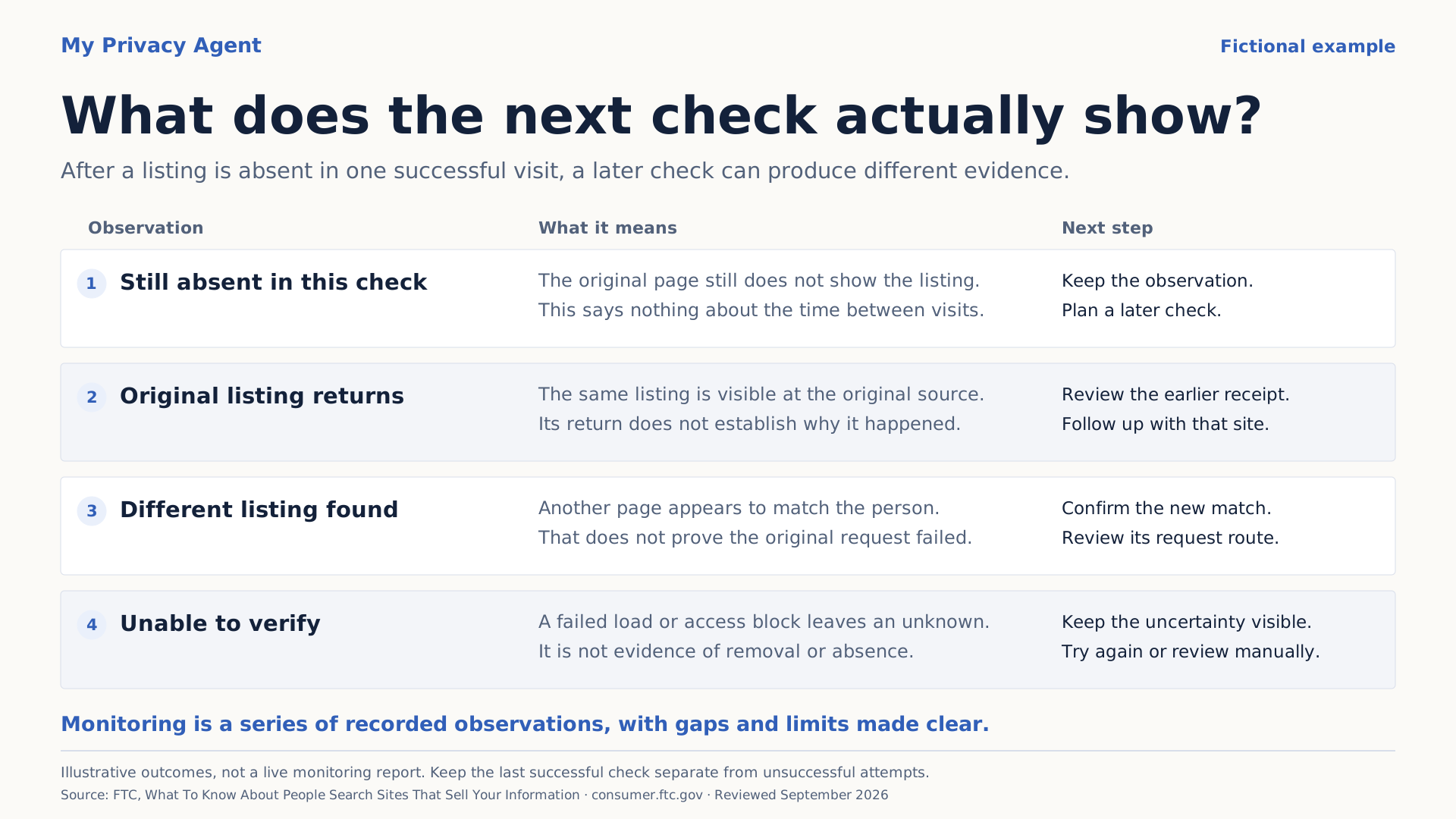
A data broker profile can come back when the operator receives new information, but an apparent return may also be a different listing or an outdated search preview. Compare the new finding with your original URL and removal evidence before deciding what to do next.
Reviewed and updated September 13, 2026.
The FTC warns that changes to public records can cause personal information to appear for sale again after an opt-out. FTC people-search guidance.
Enformion's own policy provides a concrete example: it says the company regularly receives new public records, so publicly available information may appear in its data products again. It recommends periodically refreshing an opt-out. This documents that operator's policy; it does not prove which supplier caused any particular website to publish your information. Enformion's privacy policy.
First, identify what actually returned
Open your private record of the earlier request. Compare the operator, exact URL, search method, exposed fields, and last observation with what you found today.
| What you find | Useful description | Next step |
|---|---|---|
| The original page exposes the information again | Same listing visible again | Save the new observation and reference the earlier request |
| A different URL appears to describe you | New or duplicate listing to review | Confirm the match and track the new URL separately |
| A relative's page shows the shared address | Separate household exposure | Discuss the page with that adult and use the appropriate authorized route |
| Google shows old details, but the source changed | Possibly outdated search content | Review Google's refresh process |
| The site is down or the check is blocked | Unable to verify | Preserve the last known result and check again later |
These labels keep the investigation manageable. A similar-looking page alone cannot establish that a broker reversed a prior removal, or that two companies exchange data.
A fictional example: one record, two observations
Alex files an opt-out for a fictional profile displaying a current address. After the operator's stated window, Alex checks the page and the original name-and-city search. The profile is no longer visible in those checks. Alex records the date and keeps the request confirmation.
At a later review, Alex finds a different URL with a shortened name and the same address field. Alex first confirms that this is a relevant match. The second page gets a new entry linked to the earlier request.
The first observation still matters: the original profile was no longer visible when checked. The second observation establishes another exposure that needs attention. Without both records, a report would flatten that history into “removed” or “not removed” and leave out what changed.
This is an illustration of a tracking method, not a measured relisting rate, processing-time estimate, or My Privacy Agent customer result.
Keep the first receipt and add the new evidence
Do not overwrite the earlier result. Add an observation containing:
- The date and time of the new check.
- The operator and exact page URL.
- The search route used to reach it.
- The exposed categories, such as current address or personal phone.
- Whether it matches the old page, appears to be a separate listing, or remains uncertain.
- The next action and any response to it.
Our opt-out proof log gives you a starting format. Keep it private and avoid copying more identifiers than you need to recognize the record.
If you submit another request, save its receipt separately. An earlier confirmation cannot prove that the operator received the new one. The removal timeline explains how to track submission, required confirmation, provider response, and the later public check.
Choose a recheck schedule you can maintain
Begin after the operator's stated processing window so you can assess the original request. After a clear result, decide when another check would be useful for the information involved.
For manual opt-outs, the Safety Net Project suggests checking sites every three to six months. That is guidance for maintaining a review habit, not a guarantee that a listing stays absent between checks. Safety Net's data-broker guide.
You may choose a shorter interval for a current home-address concern or make an additional review after a move. Write down the next date and the pages or searches you intend to check. A reminder without a defined scope is easy to postpone and difficult to interpret later.
When evaluating a monitoring service, ask what it actually checks, how often, and what evidence it supplies. An inaccessible website should remain an unresolved observation. A large catalog of supported sites does not tell you which of your listings were checked successfully.
Check household connections and search previews
If your own page stays absent but a family member's listing reveals the address, address that page as a separate household issue. Our relative-profile guide shows how to organize the review with each adult's permission. The existing home-address guide covers the broader cleanup priorities.
For a changed source page with old information still shown in Google, use the outdated-content process where applicable. It refreshes search information; it is not a request to a still-live source to remove a listing. Google's outdated-content guidance.
Make the next result specific
The most useful outcome is dated and scoped: the relevant listing was no longer visible through the routes checked. Later reviews can establish whether that remains true, whether another listing appeared, or whether the check could not be completed.
You can start a private check and review possible matches as a starting inventory. Any available removal assistance depends on the operator's route and your authorization. Ongoing monitoring should only be treated as active when that service has been made available and started for you; a first check alone does not establish it.