Data brokers · 4 min read
Your Address Can Appear on a Relative's Profile
Your own people-search profile can disappear while a relative's page still shows your address. Learn how to review household exposure with permission.
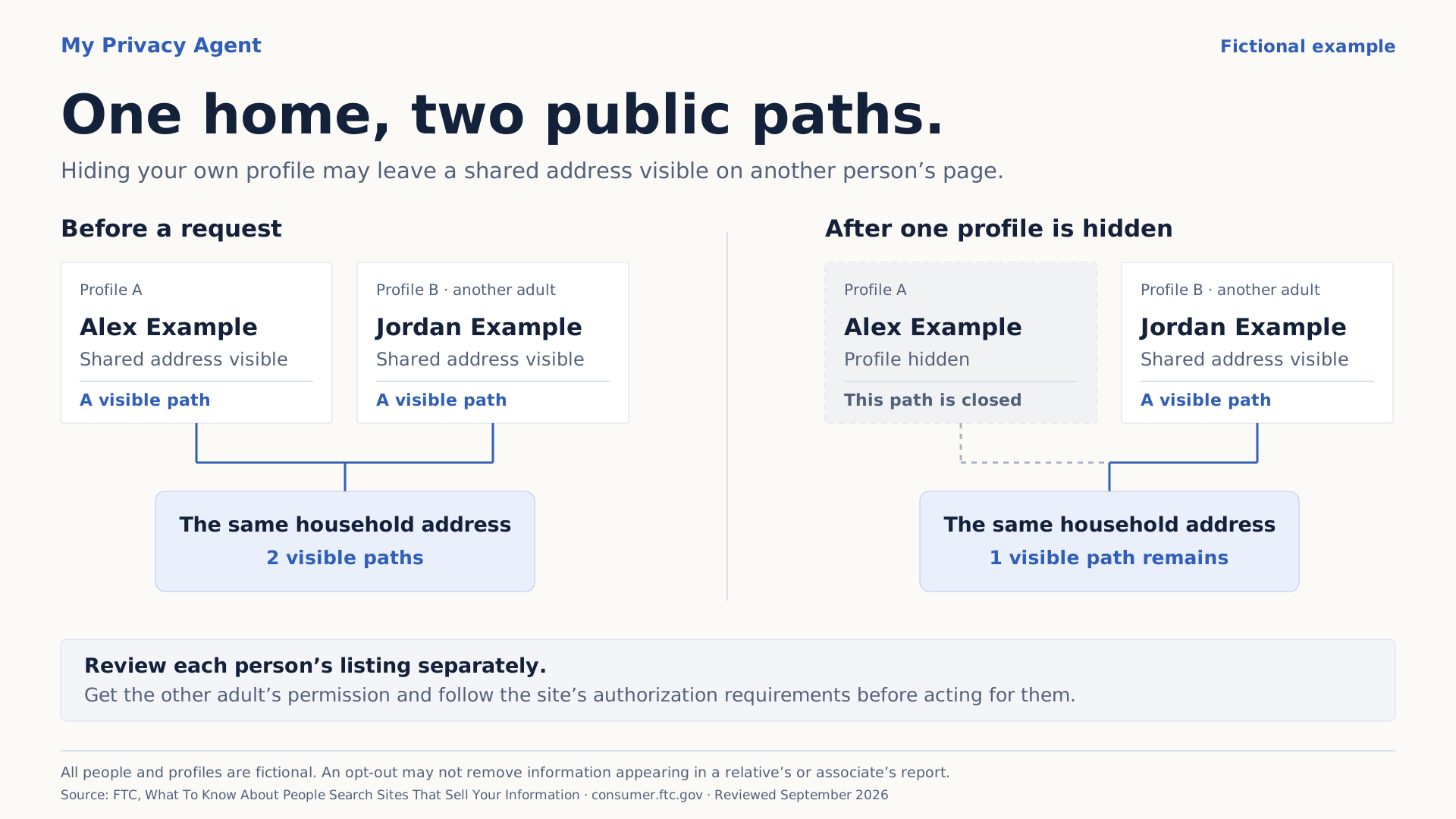
One home, two public paths
A shared address can appear on more than one person’s profile. Explore what changes when one of those profiles is hidden.
This changes the illustration only.
Alex Example
Shows the shared address
A visible pathJordan Example
Shows the shared address
A visible pathTwo fictional profiles expose a route to the same household address.
Review the household with permission
- Check which profile and exact page expose the shared information.
- Ask the other adult’s permission before acting for them, then review their listing and the site’s authorization requirements separately.
- Track each request and later page check separately. One person’s suppression may not cover another person’s profile.
Yes. Your home address may still appear on a relative's people-search page after your own profile is removed. A successful opt-out can change one listing while another page still connects your household to the same address.
The Federal Trade Commission specifically warns that information may remain in reports about relatives, neighbors, or associates after an opt-out. Broker removal also leaves the underlying public records untouched. FTC people-search guidance.
That gives a household review a clear purpose: check which public pages still reveal the information you are trying to protect, with each participating adult's permission.
One household, two separate pages
Imagine two fictional adults, Alex and Jordan, who share a home. A people-search site has a page headed “Alex” and another headed “Jordan.” Each page lists their shared address. Alex's page also names Jordan as a possible relative.
Alex submits an opt-out, completes the required confirmation, and later checks the original page. The profile is no longer visible. That is a useful result.
But Jordan's page still displays the shared address. Someone following that second page can still reach the information the household wanted to make harder to find. Alex's removal may have worked exactly as requested; Jordan's listing needs its own review.
The illustration on this page uses fictional people and generic address labels. It explains how separate listings can preserve a connection; it is not a result from a customer scan.
Start with a conversation
Agree with the adults involved on what they want checked and who will act. Being related to someone does not itself give you permission to submit a request in their name.
The National Network to End Domestic Violence's Safety Net Project recommends discussing checks with relatives, including people who used to live with you. Its guidance notes that many broker processes require you to act for yourself or someone who has authorized you. Safety Net's data-broker guide.
Keep the arrangement practical. One person might find the relevant page and send its official opt-out instructions to a parent. Another adult might prefer to handle their own searches and confirmations. Share only what each person needs for their part.
If the exposure relates to stalking or abuse, consider the wider safety situation with an advocate. A broker checklist is only one part of that work.
A focused household review
Begin with a specific question, such as “Which pages expose our current home address?” That keeps the review useful without collecting a sprawling history of everyone connected to you.
- Choose the information to protect. Prioritize the current address, a personal phone number, or a visible link between a name and the household. Keep old addresses separate so you can tell what a page actually reveals.
- Review the agreed identities. With permission, try relevant name variations and current or former cities. Check the page itself before deciding that a search result belongs to a family member.
- Record each page separately. Save the operator, URL, observation date, and a brief note such as “current address visible.” A private record can identify the problem without copying every personal detail.
- Use the official request route. Each adult should submit their own request or provide the authorization the operator requires. Record any confirmation step still outstanding.
- Recheck the same exposure. Open the original page after the operator's stated processing window. Note whether the relevant information remains visible, is no longer visible, or could not be checked.
For the broader order of work, use the existing home-address removal guide. For the evidence to keep with each request, use the opt-out proof log.
Count the exposure that changed
A household may have two successful requests and still have one important page left to address. A count alone cannot tell you whether the current home is easier or harder to find.
Use a small record that answers the question you started with:
| Page | Before the request | Latest observation | Next action |
|---|---|---|---|
| Alex's fictional profile | Shared address visible | Profile no longer visible when checked | Keep the date and recheck later |
| Jordan's fictional profile | Shared address visible | Address still visible | Jordan reviews the official route |
| Search preview for Alex's page | Old address text | Preview remains after source changed | Review the outdated-result process |
These are illustrative states, not promised results or turnaround times. If a site is unavailable, a login wall appears, or the page cannot be reliably checked, record that uncertainty. A failed check does not establish removal.
When Google still shows the address
If the source page changed but Google's preview still contains the old information, Google's outdated-content tool provides a separate refresh process. Use the exact affected URL. Google's outdated-content guidance.
If the source is still live, requesting Google removal concerns visibility in Search. It does not itself take the information off the hosting website. Google's personal-information removal guidance.
Our founder's account of finding his household in a people-search profile explains why these connections matter to My Privacy Agent. You can start a private check of your own information, review possible matches, and share relevant official guides with adults who want to participate. Any supported removal help requires the applicable authorization and available request route.