411.com opt-out: how to remove your people-search listing
Use the official Whitepages suppression form for 411.com. Search for your listing first, copy its profile URL, then open the suppression request page and paste that URL. The wizard asks you to confirm the listing, choose a reason, provide a phone number, and answer an automated call that reads a code. When we loaded the page on October 5, 2026, it also showed a "Verify you are human" Turnstile check. No completion timeline is published.
Reading current independent checks… See route evidence
411.com is operated by Whitepages; opt-outs are handled at whitepages.com (https://support.whitepages.com/hc/en-us/requests/new).
Work through this with your agent
Give your agent the published steps, sources and read-only tools. It should check the current official process and ask before taking action.
Copies public guidance only. You still approve any request your agent submits.
View or select the instructions
Remove yourself from 411.com
8 steps. Use the official site in a normal browser and follow its current instructions if a human check fails.
- 01
Find the 411.com listing
Search 411.com with your name, phone number, or address and open the matching result. Compare the location and relatives shown so you do not select someone else's record. Copy the complete profile URL from the address bar. The suppression wizard uses that URL to identify the listing you want reviewed.
- 02
Open the official Whitepages suppression page
Go to whitepages.com/suppression-requests and confirm the address bar shows whitepages.com. This is the parent-domain form listed for 411.com. You should not need to create a paid account or use a third-party removal service. Keep the 411.com profile page open in another tab so you can copy the URL again if needed.
- 03
Pass the human check
When we loaded the page on October 5, 2026, it showed a Turnstile "Verify you are human" check. Use a normal browser without a VPN, and allow the page's required scripts. If the check loops, pause privacy extensions for whitepages.com and try a fresh browser window rather than repeatedly submitting the form.
- 04
Enter the listing details
The first screen showed fields for a name, a location, and the profile URL. Enter the name and location that match the 411.com result, then paste the copied URL into the profile URL field. Review the match carefully before continuing. A wrong URL can send the wizard toward a different record.
- 05
Confirm the matching profile
Continue through the wizard and confirm that the displayed record is yours. The suppression flow includes a confirmation stage after the profile URL. If the result does not match your name, address, or relatives, stop and return to 411.com to locate the correct listing before you proceed.
- 06
Choose the reason for the request
Select the reason that best describes why you want the listing suppressed. This is a required stage in the documented Whitepages family flow. Read the options before choosing one, then continue only after the wizard still shows the correct 411.com profile and not a different search result.
- 07
Enter a phone number and take the call
Provide a phone number you can answer when the wizard asks for it. The next checkpoint is an automated call that reads a verification code. Keep the form open, answer the call yourself, and enter the code exactly as spoken. This is an automated verification step, not one completed by an agent.
- 08
Save the result and recheck
Record any on-screen confirmation and the date you completed the wizard. No completion timeline is published, so search 411.com again after the request has had time to process and compare the same profile URL. If the listing remains, contact support@whitepages.com with the profile URL and ask for the status of the suppression request.
What the 411.com opt-out page looked like when we checked
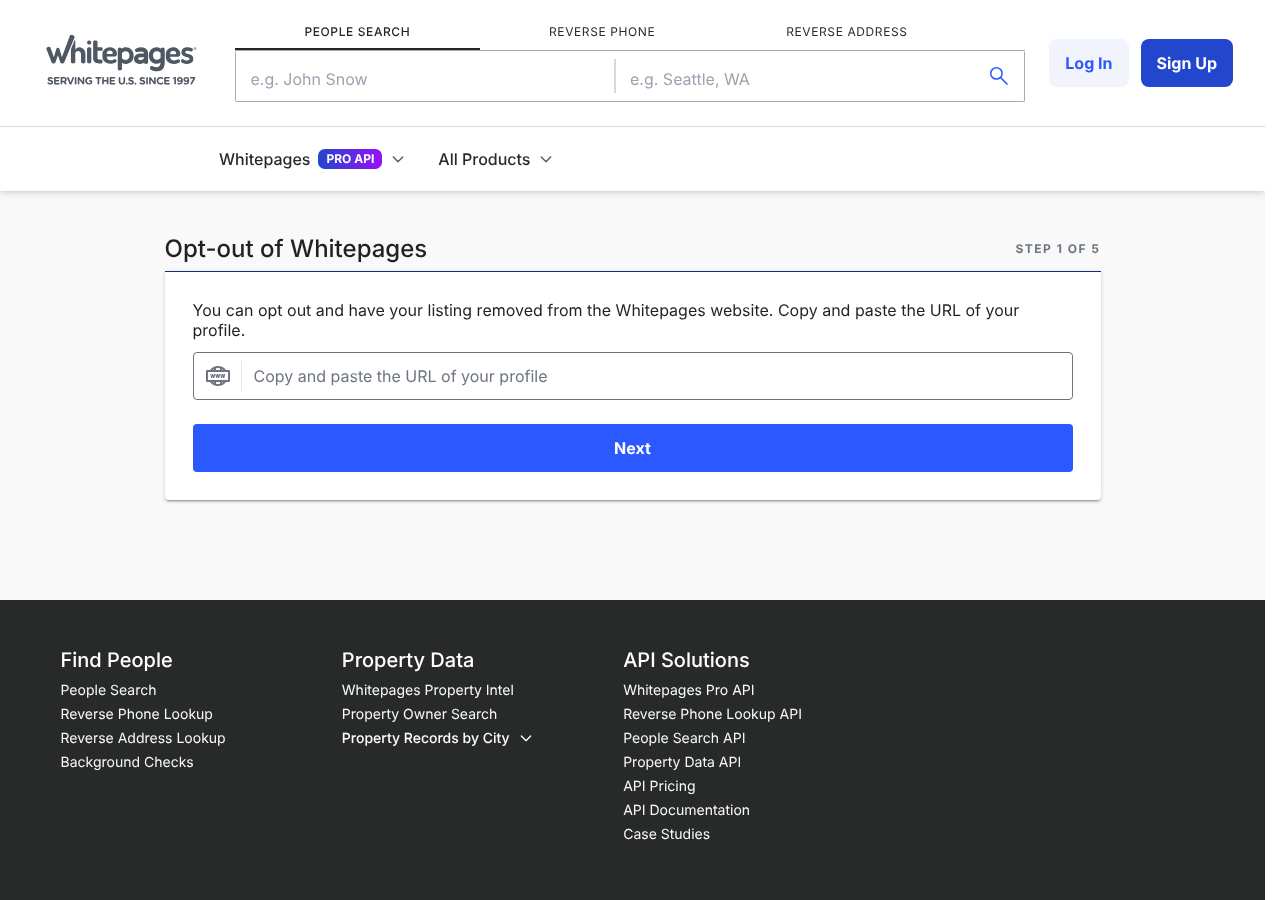
We loaded the opt-out page on whitepages.com on October 5, 2026 and it was up. The first screen asked for: e.g. John Snow, e.g. Seattle, WA, Copy and paste the URL of your profile. The page includes a Cloudflare Turnstile check.
This is a dated record of what our browser saw, not a removal. We never submit requests from this page.
Continue with your next privacy task
Found your details on another site?
- TruePeopleSearch opt-out instructions
Use this guide if you find a matching listing on TruePeopleSearch. Check that site separately; a request elsewhere does not establish removal here.
- Unmask opt-out instructions
Use this guide if you find a matching listing on Unmask. Check that site separately; a request elsewhere does not establish removal here.
The source page changed, but Google still shows it
Choose between a Google personal-info request and refreshing an outdated result.
Read the how-toYou found more than one profile
Keep separate records of each matching URL so an extra listing is not missed.
Read the how-toThe confirmation email never arrived
Check the site's requirements before retrying a request or sharing more information.
Read the how-toRemind me to recheck 411.com in 30 days
We'll send one reminder to verify the listing is actually gone. Confirm the email first; no ongoing marketing and no account required.
What is 411.com?
411.com is a people-search directory. Someone can search by a name, phone number, or address and find details such as current and past home addresses, age, relatives, and other public-record information. The site is built for looking up people rather than for a private account you knowingly created.
Directories in this category can be used by individuals, advertisers, and companies that need contact or background information. A listing may contain information you did not submit directly to 411.com. Removing a 411.com listing only addresses the copy controlled through the 411.com and Whitepages suppression flow; it does not change public records or automatically clear every other people-search service.
What a 411.com listing can show
- Full name
- Current and past home addresses
- Age
- Names of relatives
- Phone number
- Other public-record details
- Search matches based on name, phone, or address
Who runs 411.com, and which sites one request covers
411.com is part of the Whitepages family, with whitepages.com as the parent domain. The official suppression page is hosted on whitepages.com, and the support contact is support@whitepages.com. The same operator family includes peoplesearch.com and whitepages.com. No separate legal operator for 411.com is identified, so use the Whitepages suppression route rather than looking for a separate 411.com form.
Same request also covers: peoplesearch.com, whitepages.com
What is the 411.com opt-out removal process?
The 411.com flow uses the Whitepages suppression wizard. The documented process includes five stages: paste the 411.com profile URL, confirm the match, choose a reason, enter a phone number, and take an automated call that reads a code. When we loaded the official page on October 5, 2026, its first screen asked for a name, location, and profile URL and showed a Turnstile human check. You should use a normal browser without a VPN and complete the call yourself; no request was submitted during our check.
How long it takes
No timeline is published for how long 411.com or Whitepages takes to process a suppression request. Save the on-screen confirmation and the automated-call details, then re-search your name, location, and the original profile URL to check the result. If the listing is still visible, email support@whitepages.com with your name, city and state, and listing URL and ask what additional verification is needed.
411.com opt-out problems and fixes
The Verify you are human check keeps looping
Use a normal browser without a VPN, enable the page's required scripts, and try a fresh window. Temporarily pause privacy or ad-blocking extensions for whitepages.com. Do not assume the request was filed unless the wizard advances and shows a result.
I cannot find the right 411.com profile
Try the name, phone number, and address variations shown by the directory. Compare the location and relatives on each result. Copy the URL only after you have confirmed that the listing belongs to you.
The suppression form rejects my profile URL
Copy the complete URL directly from the 411.com listing and paste it into the profile URL field. Remove extra spaces and do not substitute a search-results URL. If it still fails, contact support@whitepages.com and include the listing URL.
I cannot complete the phone-call code step
Enter a phone number you can answer, keep the wizard open, and make sure unknown callers are not blocked. If the call never arrives, retry from a normal browser and then ask support@whitepages.com for help with the verification checkpoint.
The listing is still visible after I finished
Recheck the same profile URL and confirm that the wizard reached its final result. No processing timeline is published. If the record remains, email support@whitepages.com with the listing URL, the city and state, and the date you completed the phone verification.
My information appears on another people-search site
A 411.com request does not change copies controlled by unrelated services. The same operator family includes peoplesearch.com and whitepages.com, while other directories may require their own opt-out requests. Search each site separately and follow its official route.
Send this to support@whitepages.com
Subject: Privacy opt-out request for my 411.com listing
Hello, Under applicable state privacy laws, including the CCPA where it applies, I request that you delete or suppress the personal information associated with my 411.com listing and opt me out of applicable sale or sharing. Name: [Full name] Email: [Email] Location: [City, State] Listing URL: [Listing URL] Please confirm by email when the request has been processed, or tell me what verification you need. Thank you.
After you opt out of 411.com
Keep the confirmation details and the original profile URL. Search directories again after a reasonable processing interval and whenever your address or phone number changes, because people-search records can be refreshed from public and commercial data. The Whitepages family flow is associated with 411.com, peoplesearch.com, and whitepages.com, but other services still need separate requests. My Privacy Agent can help you organize recurring rechecks, but you should rely on the site's own confirmation and a later search to verify the result.
Realistic scope
This guide explains how to request the action 411.com publishes for its own site. Reading the guide or sending a request does not establish completed removal. Other sites and original public records are separate; recheck the specific 411.com page after the site's response and if the information appears again.
Not yet a filed-for-you target
This page documents 411.com's published privacy route. My Privacy Agent Patrol does not file this site automatically yet. An exposure check uses configured sources and does not confirm that this specific site is included.
411.com opt-out FAQ
Is 411.com legit, and is its opt-out safe to use?
411.com is a real people-search directory, and the listed opt-out route is the Whitepages suppression page on whitepages.com. The flow asks for the listing URL, a reason, a phone number, and a verification call. Use the official domain, do not pay a third party, and do not enter more personal information than the form requires.
How do I remove myself from 411.com?
Find your 411.com profile, copy its URL, and use the Whitepages suppression form at whitepages.com/suppression-requests. The documented flow asks you to confirm the profile, choose a reason, provide a phone number, and enter a code read during an automated call.
Is the 411.com opt-out free?
The official route includes a web suppression form and a support email, but no fee is listed. Use the official Whitepages route and avoid services that ask you to pay for access to the form.
How long does the 411.com opt-out take?
No processing timeline is published for 411.com. Save the confirmation, then search the same name, location, and profile URL again. If the listing remains, contact support@whitepages.com with the listing URL.
Why does 411.com have my address and relatives?
The directory is designed to connect names, phone numbers, addresses, ages, relatives, and other public-record details. A listing can exist even when you never created an account or sent the information directly to 411.com.
Does removing my 411.com listing remove me from Whitepages?
411.com, Whitepages, and PeopleSearch are covered by the same suppression flow. Check each domain after the request and contact support@whitepages.com if one still shows the listing.
Why is my 411.com listing still there after I opted out?
The request may still be processing, the wrong profile URL may have been used, or the phone-code checkpoint may not have completed. Recheck the exact URL, keep the confirmation, and email support@whitepages.com if the record remains.
Who runs 411.com, and which sites one request covers
411.com (411.com) is operated by Whitepages, and removal requests are processed at whitepages.com. It is listed as a people search site in our Ultimate coverage tier.
Sites in the same family:
- PeopleSearch (peoplesearch.com)
- Whitepages (whitepages.com)
Related opt-outs to clear next
Sources and review
Reviewed October 5, 2026 against 411.com's own pages and the sources below. Broker forms change often; if something here no longer matches, the official page wins.
Review and change history
A content review or directory snapshot is reference history. A historical route observation does not establish submission, provider acceptance or removal, and does not establish a current working route. Current independent evidence has its own scope and expiry.
· Guide content reviewed against the published sources. This is the recorded review baseline; no earlier editorial change log is available.
· Historical route observation: reachable (HTTP 200). This describes only the page observed on that date; later steps and today's availability were not established by that observation.
Read current independent route evidence. That record reports its own scope, date, expiry and any gaps; this history does not renew verification.