How to remove yourself from Whitepages (2026 opt-out guide)
Guide content reviewed 2026-10-05
Reading current independent checks… See route evidence
In the last recorded form review, Whitepages asked for the URL of the listing, confirmation that it was the right person, a removal reason, and phone verification with a code from an automated call. That observation is from October 5, 2026; the current form could not be rechecked. If the flow is still available, submit one listing URL at a time, save its confirmation, and recheck that page. Check Whitepages Premium and any related-domain listings separately because shared coverage has not been confirmed.
Direct link to whitepages.com. Opt-outs on this page are free; you never need to pay Whitepages or us to use them.
Work through this with your agent
Give your agent the published steps, sources and read-only tools. It should check the current official process and ask before taking action.
Copies public guidance only. You still approve any request your agent submits.
View or select the instructions
Check if you are listed on Whitepages
Type your name and state and we open Whitepages's own public search in a new tab. Your details stay in your browser; My Privacy Agent does not see or store them.
What Whitepages typically shows
- The prior guide review described possible current or past addresses, landline or mobile numbers, age, relatives, and links to property information.
- Contents vary by listing; compare location and other details to distinguish records belonging to you.
- A current Whitepages page was not rechecked in this update.
An exposure report can help organize candidate listings before you work through the site's official steps.
Remove yourself from Whitepages
7 steps. Use the official site in a normal browser and follow its current instructions if a human check fails.
- 01
Find each listing that belongs to you
Search Whitepages by name and city or state. Open likely results and compare age, locations, addresses, and relatives. Copy the full URL from each profile page that is yours; do not use a results page or a same-name person’s listing.
- 02
Open the recorded suppression route
The last review used whitepages.com/suppression-requests. It recorded the older /suppression_requests spelling as forwarding to that hyphenated route. Confirm that the page is still on whitepages.com before entering a profile URL.
- 03
Enter one profile URL
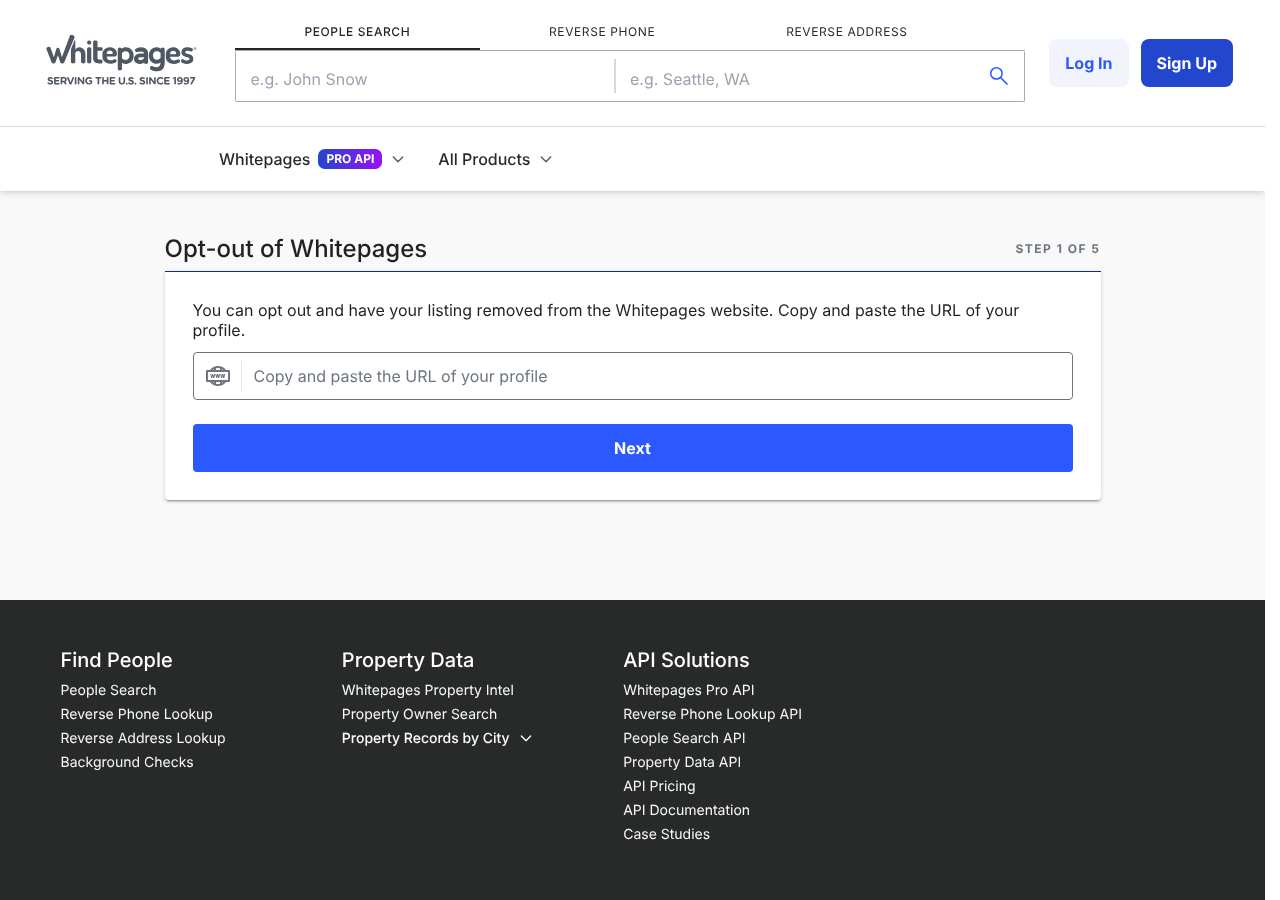
The observed first screen asked for the individual profile URL and also offered name and city search fields. Paste the specific profile URL, then continue. If you use the search fields, open and confirm your exact result before proceeding.
- 04
Confirm the record and choose a reason
Later screens in the October 5 review showed the listing for confirmation and a reason selection. Check the page details again. If it is not your record, stop and return to search before requesting suppression.
- 05
Complete phone verification if the current form asks
The previous form review described a phone number and a code read by an automated call. Use a phone you control, keep the form open, answer the call, and enter the code only on Whitepages. Complete any human-check shown on the official page yourself.
- 06
Save the confirmation and repeat for duplicates
Record the date, URL, and any on-screen confirmation. For another name spelling, address, or duplicate page, repeat with that exact URL if Whitepages’ current instructions allow it. A confirmation records the request; check the page later to see whether it changed.
- 07
Check Premium and related domains separately
Search the Whitepages Premium surface and any 411.com or PeopleSearch.com page you found. The last guide review did not verify that the same request covers them, so follow the current instructions for each remaining listing.
What the Whitepages opt-out page looked like when we checked
We loaded the opt-out page on whitepages.com on October 5, 2026 and it was up. The first screen asked for: e.g. John Snow, e.g. Seattle, WA, Copy and paste the URL of your profile. The page includes a Cloudflare Turnstile check.
This is a dated record of what our browser saw, not a removal. We never submit requests from this page.
Continue with your next privacy task
Found your details on another site?
- TruePeopleSearch opt-out instructions
Use this guide if you find a matching listing on TruePeopleSearch. Check that site separately; a request elsewhere does not establish removal here.
- Unmask opt-out instructions
Use this guide if you find a matching listing on Unmask. Check that site separately; a request elsewhere does not establish removal here.
Your address appears on a relative's profile
Understand why separate profiles need separate attention and when to ask the other person.
Read the how-toThe source page changed, but Google still shows it
Choose between a Google personal-info request and refreshing an outdated result.
Read the how-toA removed profile appeared again
Compare the old and new URLs, check the source, and record what changed.
Read the how-toRemind me to recheck Whitepages in 30 days
We'll send one reminder to verify the listing is actually gone. Confirm the email first; no ongoing marketing and no account required.
What is Whitepages?
Whitepages is a people directory with free listings and a paid Premium product. The last recorded guide review described listings with possible addresses, phone numbers, age, relatives, and property-record links; contents vary by record. Search by name plus city or state, compare multiple details, and save the exact page URL for each result that is yours. A same-name result may belong to someone else.
The October 5, 2026 form review described suppression by individual profile URL. The current form could not be rechecked, so treat those steps as the last observed flow and follow any updated official instructions. Suppressing a directory page does not establish that source records were deleted.
What a Whitepages listing can show
- The prior guide review described possible current or past addresses, landline or mobile numbers, age, relatives, and links to property information.
- Contents vary by listing; compare location and other details to distinguish records belonging to you.
- A current Whitepages page was not rechecked in this update.
Who runs Whitepages, and which sites one request covers
Whitepages operates a free directory and a paid Premium product. The October 5 guide review listed 411.com and PeopleSearch.com as related brands, but did not establish that one suppression request covers every product or domain. Check any matching listing on those services separately. Other people-search companies maintain their own records and processes.
What is the whitepages.com opt-out removal process?
The last form review, on October 5, 2026, observed the hyphenated /suppression-requests page and a profile-URL field; the underscore spelling was recorded as forwarding to it. Later screens were described as asking the user to confirm the listing, choose a reason, and verify by automated phone code. The current form could not be rechecked, and no request was submitted.
How long it takes
The prior guide suggested checking after three days and again after a week; those were follow-up reminders, not a Whitepages processing promise. No current timeline was verified. If the page remains after the current provider estimate, use a contact method presented on Whitepages’ official site and include the profile URL and request date.
Whitepages opt-out problems and fixes
The automated call or code does not arrive
Check that the number is typed correctly and can receive calls; the earlier guide noted that some internet-based numbers may not work. Keep the page open and use the form’s current resend or support instructions if available.
A human-verification check appears
Complete the check manually in the official Whitepages page. If it keeps failing, try again later or use a current contact method shown on Whitepages; do not use automated workarounds.
The profile URL is rejected
Open the individual listing first and copy its complete address-bar URL. Do not submit the search-results URL. Confirm the result still belongs to you and then follow the current page prompts.
A listing remains after the request
Save its URL and the confirmation, then compare the same page after the provider’s stated interval. Ask Whitepages about that exact URL using a contact method shown on its current official site.
A Premium, 411.com, or PeopleSearch.com result remains
Check that exact product or domain separately. The prior guide did not confirm shared suppression coverage, so follow the instructions shown for the remaining listing.
After you opt out of Whitepages
Keep the request confirmation and the URL of every listing you checked. Revisit each relevant free and Premium surface and any related domain where you found a record. A removed directory entry does not delete public source records or establish that another Whitepages product or affiliate has changed its copy.
Who does what for Whitepages
The honest split, so nothing here reads as a promise we cannot keep.
What we handle
- Opening the official Whitepages form pre-filled with your scan details.
- Tracking the request status after you complete the step only you can do.
- Re-checking whitepages.com before anything is marked removed.
What you must do
- Follow the current official Whitepages form and complete any verification it requests; the reviewed guide does not document the current requirements.
- Re-check whitepages.com after the timing stated in this guide and repeat the process if the listing returns.
Realistic scope
Keep the request confirmation and the URL of every listing you checked. Revisit each relevant free and Premium surface and any related domain where you found a record. A removed directory entry does not delete public source records or establish that another Whitepages product or affiliate has changed its copy.
My Privacy Agent opens the Whitepages form and tracks the outcome.
The requirements listed in this guide are historical; the current Whitepages form requirements could not be rechecked. Follow the current official form and complete any verification it requests. After you authorize an eligible mission, our agent opens the official form with your scan details, hands you any step only you can complete, records the request as filed only when the site confirms it, and re-checks the listing before anything is called removed. If the site blocks the agent, we provide the same instructions instead of a false status.
Current service availability and terms are listed on the pricing page. Nothing is marked removed before a provider or native action succeeds.
Whitepages opt-out FAQ
What is confirmed about the Whitepages suppression route?
The guide records an October 5, 2026 visit to Whitepages’ official suppression URL, but that route could not be freshly opened on October 22. The previously recorded profile-URL and phone-verification steps are historical observations, not a current confirmation. Confirm the instructions on whitepages.com before sharing information, and verify the exact listing after any request.
How do I submit a Whitepages suppression request?
The last recorded form flow asked for the individual profile URL, confirmation of the result, a reason, and a phone code from an automated call. That form observation is from October 5, 2026; check the current official page before proceeding.
Does a Whitepages request cover Premium, 411.com, or PeopleSearch.com?
Shared coverage was not confirmed. Check each Whitepages product and related domain where you found a listing, then follow its current instructions.
How long does Whitepages take to process a request?
No current provider timeline was verified. The earlier three-day and one-week checks are reminders only; use any current estimate Whitepages gives and verify the exact page.
What if there are several Whitepages listings for me?
Compare each result carefully and keep its individual URL. The previously observed flow used a profile URL; check the current page instructions to see how it handles duplicates and submit only records that belong to you.
Will suppression delete the source records?
No. This guide describes a request about a Whitepages listing. It does not establish that records held by public agencies, data suppliers, or other sites are deleted.
Does My Privacy Agent remove me from Whitepages automatically?
The requirements listed in this guide are historical; the current Whitepages form requirements could not be rechecked. Follow the current official form and complete any verification it requests. After you authorize an eligible mission, our agent opens the official form with your scan details, hands you any step only you can complete, records the request as filed only when the site confirms it, and re-checks the listing before anything is called removed. If the site blocks the agent, we provide the same instructions instead of a false status.
Related broker opt-outs
Related sites may hold separate records. Check each site's own instructions; shared coverage is not documented here.
Spokeo
Spokeo aggregates addresses, phone numbers, relatives, age, and social profiles into a searchable people-search listing.
Open guideTruePeopleSearch
TruePeopleSearch is a free people-search site that shows addresses, phone numbers, relatives, and associates without a paywall, which makes it one of the most visible listings in a name search.
Open guideFastPeopleSearch
FastPeopleSearch is a free directory in the TruePeopleSearch family that publishes addresses, phone numbers, and relatives.
Open guideSources and review
Reviewed October 5, 2026 against Whitepages's own pages and the sources below. Broker forms change often; if something here no longer matches, the official page wins.
This guide retains the recorded October 5, 2026 review. The official suppression and support pages could not be freshly opened on October 22, 2026, so form fields, current turnaround, and cross-site coverage are not re-confirmed here. No personal data was entered and no request was submitted.
Review and change history
A content review or directory snapshot is reference history. A historical route observation does not establish submission, provider acceptance or removal, and does not establish a current working route. Current independent evidence has its own scope and expiry.
· This guide retains the recorded October 5, 2026 review. The official suppression and support pages could not be freshly opened on October 22, 2026, so form fields, current turnaround, and cross-site coverage are not re-confirmed here. No personal data was entered and no request was submitted. This is the recorded review baseline; no earlier editorial change log is available.
· Historical route observation: reachable (HTTP 200). This describes only the page observed on that date; later steps and today's availability were not established by that observation.
· Clarified that the guide retains its October 5 review of the listing URL, identity confirmation, reason and phone-code steps, while the official suppression and support pages could not be freshly opened. Current fields, processing time and cross-site scope remain unconfirmed; no request was submitted and the historical route is not represented as a current check.
Read current independent route evidence. That record reports its own scope, date, expiry and any gaps; this history does not renew verification.