GovernmentRegistry.org opt-out: how to remove your public records listing
Go to www.governmentregistry.org/opt-out and fill in the official form: first name, last name, city and state. When we loaded it on October 5, 2026 the form had no CAPTCHA and needed no account. Our research notes put typical turnaround at 7 to 21 days. If the form stalls, email privacy@governmentregistry.org with your name, city, state and listing URL. The opt-out is free.
Reading current independent checks… See route evidence
Work through this with your agent
Give your agent the published steps, sources and read-only tools. It should check the current official process and ask before taking action.
Copies public guidance only. You still approve any request your agent submits.
View or select the instructions
Remove yourself from GovernmentRegistry.org
7 steps. Use the official site in a normal browser and follow its current instructions if a human check fails.
- 01
Open the official opt-out page in a normal browser
Go to www.governmentregistry.org/opt-out. The page is titled "Opt out of GovernmentRegistry." An automated fetch of the page was blocked by the site's robots.txt rules on September 16, 2026, so if the page looks empty or broken inside a tool or preview pane, that does not mean the site is down — open it directly in your browser.
- 02
Enter your first name, last name, city and state
Fill in the four fields the form showed when we loaded it on October 5, 2026: First Name, Last Name, City and State. Use the exact spelling of your name and the city where your listing appears; records in this family are matched on those four fields, and a typo can return no match.
- 03
Submit the form
Click the submit button. There was no CAPTCHA on the page when we loaded it on October 5, 2026. If the button stalls and nothing happens — a problem other users have reported — turn off ad blockers, VPNs and script blockers, try a different browser, and if it still fails, switch to the email route below.
- 04
Pick the record that matches you
If the form returns more than one result, choose the listing that matches your name, city and state, then confirm the removal. Our research notes for this operator family's portal describe this select-your-record step. Make sure the record is really yours before confirming; suppressing a relative's record by mistake will not help you.
- 05
Email the privacy contact if the form fails
If the form stalls or nothing changes after three weeks, email privacy@governmentregistry.org with your full name, city, state and the URL of your listing, and ask for confirmation that the record was suppressed. Our research notes also list privacy@cisnationwide.com and phone 800-309-9352 as operator contacts for this site family.
- 06
Repeat the request on the InfoTracer portal
Our research notes place GovernmentRegistry.org in the InfoTracer/Accucom family, so also use the shared opt-out portal at infotracer.com/optout: enter your name, city and state, select your record and confirm removal. Covering both routes closes the main path for your record being re-listed on the operator's other public-records brands.
- 07
Re-check after two weeks
Search your name, city and state on GovernmentRegistry.org again about two weeks after submitting. If the listing is still visible after three weeks, follow up by email with the date you submitted and the listing URL, and keep a copy of any confirmation you receive.
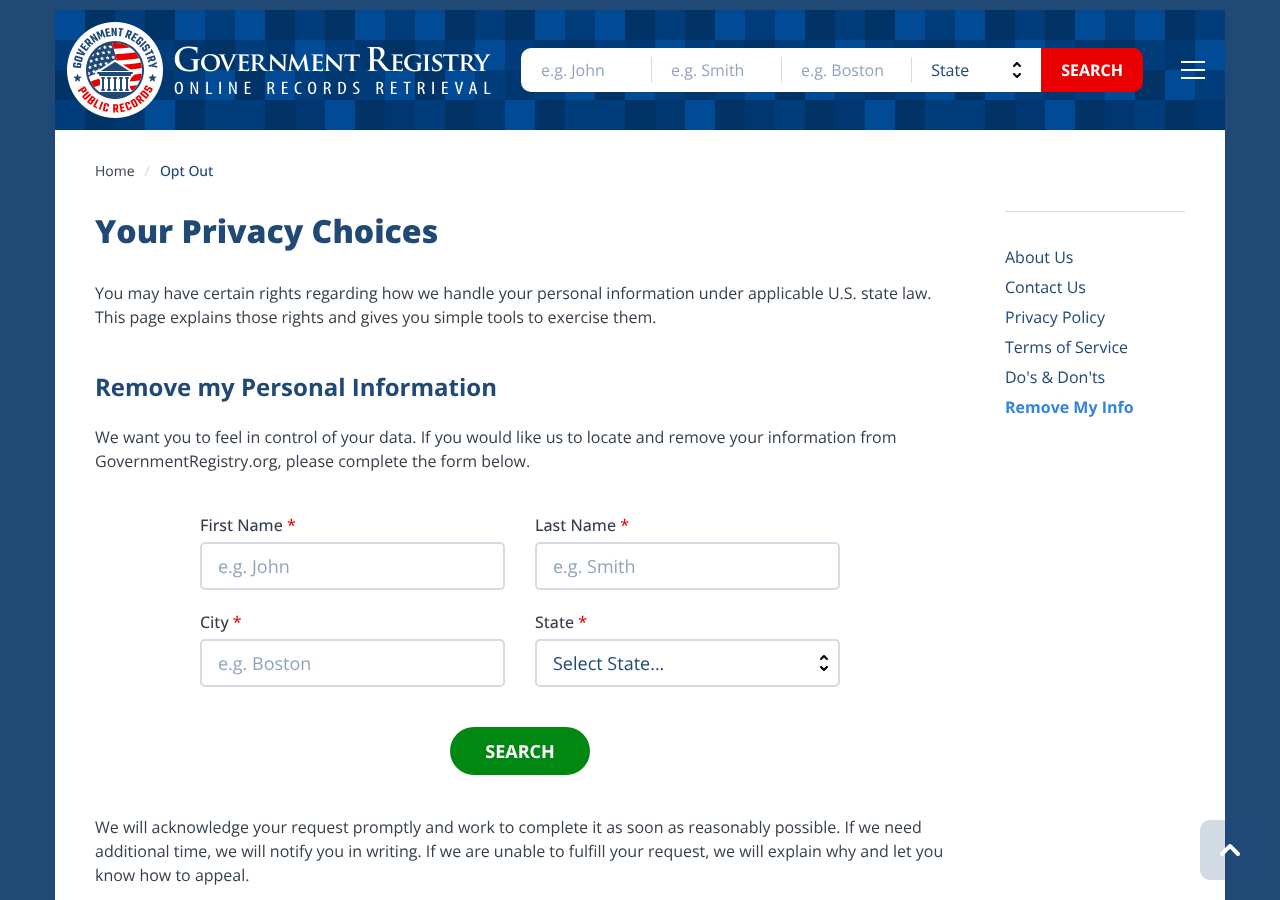
What the GovernmentRegistry.org opt-out page looked like when we checked
We loaded the opt-out page on governmentregistry.org on October 5, 2026 and it was up. The first screen asked for: First Name *, Last Name *, City *, State *.
This is a dated record of what our browser saw, not a removal. We never submit requests from this page.
Continue with your next privacy task
Found your details on another site?
- TruePeopleSearch opt-out instructions
Use this guide if you find a matching listing on TruePeopleSearch. Check that site separately; a request elsewhere does not establish removal here.
- Unmask opt-out instructions
Use this guide if you find a matching listing on Unmask. Check that site separately; a request elsewhere does not establish removal here.
The source page changed, but Google still shows it
Choose between a Google personal-info request and refreshing an outdated result.
Read the how-toYou found more than one profile
Keep separate records of each matching URL so an extra listing is not missed.
Read the how-toThe confirmation email never arrived
Check the site's requirements before retrying a request or sharing more information.
Read the how-toRemind me to recheck GovernmentRegistry.org in 30 days
We'll send one reminder to verify the listing is actually gone. Confirm the email first; no ongoing marketing and no account required.
What is GovernmentRegistry.org?
GovernmentRegistry.org is a people-search site built on public records. It sells access to background-report-style searches that pull from court records, property records, vital records and other public sources, and it shows name-based search results with identifying details before asking visitors to pay for a full report.
Our research notes link the site to the InfoTracer/Accucom family of public-records sites, and PrivacyRights.org also lists Accucom as the site's data-broker affiliation. You never signed up to be listed: profiles come from public and commercial record sources, which is why an old address, a relative's name or a past court filing can appear even if you have never visited the site.
What a GovernmentRegistry.org listing can show
- Full name, plus aliases and maiden names
- Current and past home addresses
- Phone numbers associated with your name
- Relatives and known associates
- Court and criminal records
- Marriage, divorce and other vital records
- Property and asset records
Who runs GovernmentRegistry.org, and which sites one request covers
The operator is not clearly named on the opt-out page itself. Our research notes link GovernmentRegistry.org to the InfoTracer/Accucom family of public-records sites, and PrivacyRights.org lists Accucom as its data-broker affiliation. The directory record for this site lists privacy@governmentregistry.org as the privacy contact; our research notes also record privacy@cisnationwide.com and phone 800-309-9352 as operator contacts. Because sister-site coverage is not confirmed in our research, plan on separate requests for InfoTracer and similar people-search sites.
What is the governmentregistry.org opt-out removal process?
The governmentregistry.org opt-out is a short web form on the site itself. When we loaded it on October 5, 2026, the page — titled "Opt out of GovernmentRegistry" — asked for a first name, last name, city and state, with no CAPTCHA and no account required. You submit the form, the operator locates your record, and the listing is suppressed from the site's search results; our research notes put turnaround at 7 to 21 days. Because an earlier automated fetch was blocked by the site's robots.txt rules on September 16, 2026, open the page in a normal browser rather than a tool. If the form fails, use the privacy email.
How long it takes
Our research notes put typical turnaround for this operator family at 7 to 21 days, and the site does not publish its own timeline. Re-search your name, city and state on GovernmentRegistry.org about two weeks after submitting. If the listing is still visible after three weeks, email privacy@governmentregistry.org with the date you submitted and the listing URL, and ask for a status.
GovernmentRegistry.org opt-out problems and fixes
The submit button does nothing
Other users have reported this in complaints filed with the Better Business Bureau. Turn off ad blockers, VPNs and script blockers, try a second browser, and if the form still stalls, email privacy@governmentregistry.org with your name, city, state and listing URL to file the removal that way.
The page will not load or looks broken
Our automated fetch of the opt-out page was blocked by the site's robots.txt rules on September 16, 2026, while a later browser check on October 5, 2026 loaded it fine. Open www.governmentregistry.org/opt-out in a normal browser window instead of a tool or preview pane.
The form says no record was found
Try a former city or state, a maiden name, or a common nickname — records are matched on exactly the four fields you typed. If it still finds nothing but you can see your listing in the site's search results, email the privacy contact with the listing URL.
My listing is still up after three weeks
Our research notes put turnaround at 7 to 21 days, so wait out that window first. Then email privacy@governmentregistry.org with the date you submitted the form and the listing URL, and ask for confirmation of the removal.
My listing came back months later
Public records get refreshed and re-bought constantly, so a suppressed listing can reappear. Resubmit the form, repeat the InfoTracer portal opt-out at infotracer.com/optout, and re-check every few months.
Send this to privacy@governmentregistry.org
Subject: Opt-out and removal request for my GovernmentRegistry.org listing
Hello, Under applicable state privacy laws, including the CCPA where it applies, I request that GovernmentRegistry.org remove and suppress my personal information from its search results, and that the operator stop selling or sharing it. Name: [Full name] Email: [Email] Location: [City, State] Listing URL: [Listing URL] Please confirm by email once the removal is complete. Thank you.
After you opt out of GovernmentRegistry.org
Suppression is not the same as deleting the source record: public records get re-scraped and re-bought, so a listing can come back months later, especially after a move or a new public filing. Re-check GovernmentRegistry.org every two to three months and resubmit if you reappear. Since our research ties the site to the InfoTracer/Accucom family, also keep the infotracer.com/optout opt-out current and clear other major people-search sites. That recurring re-check is what My Privacy Agent's Patrol plan automates.
Realistic scope
This guide explains how to request the action GovernmentRegistry.org publishes for its own site. Reading the guide or sending a request does not establish completed removal. Other sites and original public records are separate; recheck the specific governmentregistry.org page after the site's response and if the information appears again.
Not yet a filed-for-you target
This page documents GovernmentRegistry.org's published privacy route. My Privacy Agent Patrol does not file this site automatically yet. An exposure check uses configured sources and does not confirm that this specific site is included.
GovernmentRegistry.org opt-out FAQ
Is GovernmentRegistry.org legit, and is its opt-out safe to use?
Yes. GovernmentRegistry.org is a long-running commercial public-records search service, not a scam site, though consumer complaints filed with the Better Business Bureau include frustration with the opt-out form stalling. The official opt-out lives on the site's own domain and asks only for your name, city and state; it is free. Avoid third-party services that charge you to file this request — you can do it yourself.
How do I remove myself from GovernmentRegistry.org?
Open www.governmentregistry.org/opt-out, enter your first name, last name, city and state, and submit. The operator locates your record and suppresses it from the site's search results; our research notes put turnaround at 7 to 21 days. If the form will not submit, email privacy@governmentregistry.org with your listing details.
How long does the GovernmentRegistry.org opt-out take?
Our research notes put typical turnaround at 7 to 21 days. The site publishes no official timeline of its own. If your listing is still up after three weeks, follow up by email with the submission date and the listing URL.
Is GovernmentRegistry.org the same company as InfoTracer?
Our research notes place it in the InfoTracer/Accucom family, and PrivacyRights.org lists Accucom as the site's data-broker affiliation. Treat them as related: opt out on GovernmentRegistry.org's own form and again at infotracer.com/optout so both databases suppress your record.
Why is my GovernmentRegistry.org listing back after I opted out?
The opt-out suppresses your listing; it does not change the underlying public record. A new filing, a move, or freshly bought data can recreate the listing. Resubmit the form and repeat the InfoTracer portal opt-out, then re-check every few months.
What do I do if the GovernmentRegistry.org opt-out form won't submit?
Users have reported the submit step stalling in complaints filed with the Better Business Bureau. Disable ad blockers and script blockers, try another browser, and if it still fails, email privacy@governmentregistry.org with your full name, city, state and listing URL.
Does opting out of GovernmentRegistry.org delete my public records?
No. The opt-out removes your listing from this site's search results. Court, property and vital records remain public at the agencies that hold them; changing that requires working with each source agency directly, not with a data broker.
Related opt-outs to clear next
GOVWARRANTSEARCH.ORG
People Search · govwarrantsearch.org
Open guideGlad I Know
People Search · gladiknow.com
Open guideHouston Association of REALTORS®
People Search · har.com
Open guideGeorgiaCourtRecords.us
People Search · georgiacourtrecords.us
Open guideHawaii Arrests
People Search · hawaiiarrests.org
Open guideGeorgia Arrests
People Search · georgiaarrests.org
Open guideSources and review
Reviewed October 5, 2026 against GovernmentRegistry.org's own pages and the sources below. Broker forms change often; if something here no longer matches, the official page wins.
Review and change history
A content review or directory snapshot is reference history. A historical route observation does not establish submission, provider acceptance or removal, and does not establish a current working route. Current independent evidence has its own scope and expiry.
· Guide content reviewed against the published sources. This is the recorded review baseline; no earlier editorial change log is available.
· Historical route observation: reachable (HTTP 200). This describes only the page observed on that date; later steps and today's availability were not established by that observation.
Read current independent route evidence. That record reports its own scope, date, expiry and any gaps; this history does not renew verification.