SealedRecords opt-out: how to remove your personal information
Go to SealedRecords' official privacy-request page (sealedrecords.net/api/helper/optOutLight/search), choose "Remove My Information," and enter your email address and phone number. SealedRecords emails you a confirmation link, and nothing is removed until you click it. The site says it acknowledges requests within 10 business days and completes them within 45 calendar days. The process is free and needs no account. If the form fails, email support@sealedrecords.net or call (844) 736-6373.
Reading current independent checks… See route evidence
Work through this with your agent
Give your agent the published steps, sources and read-only tools. It should check the current official process and ask before taking action.
Copies public guidance only. You still approve any request your agent submits.
View or select the instructions
Remove yourself from SealedRecords
7 steps. Use the official site in a normal browser and follow its current instructions if a human check fails.
- 01
Open the official privacy-request page
Go to SealedRecords' privacy-request page at sealedrecords.net/api/helper/optOutLight/search. When we loaded it on October 5, 2026 the page opened fine and was titled "SealedRecords — Privacy Requests." Check the address bar shows sealedrecords.net before typing anything; opting out is free and never requires payment, an account or an install.
- 02
Pick "Remove My Information," not just privacy choices
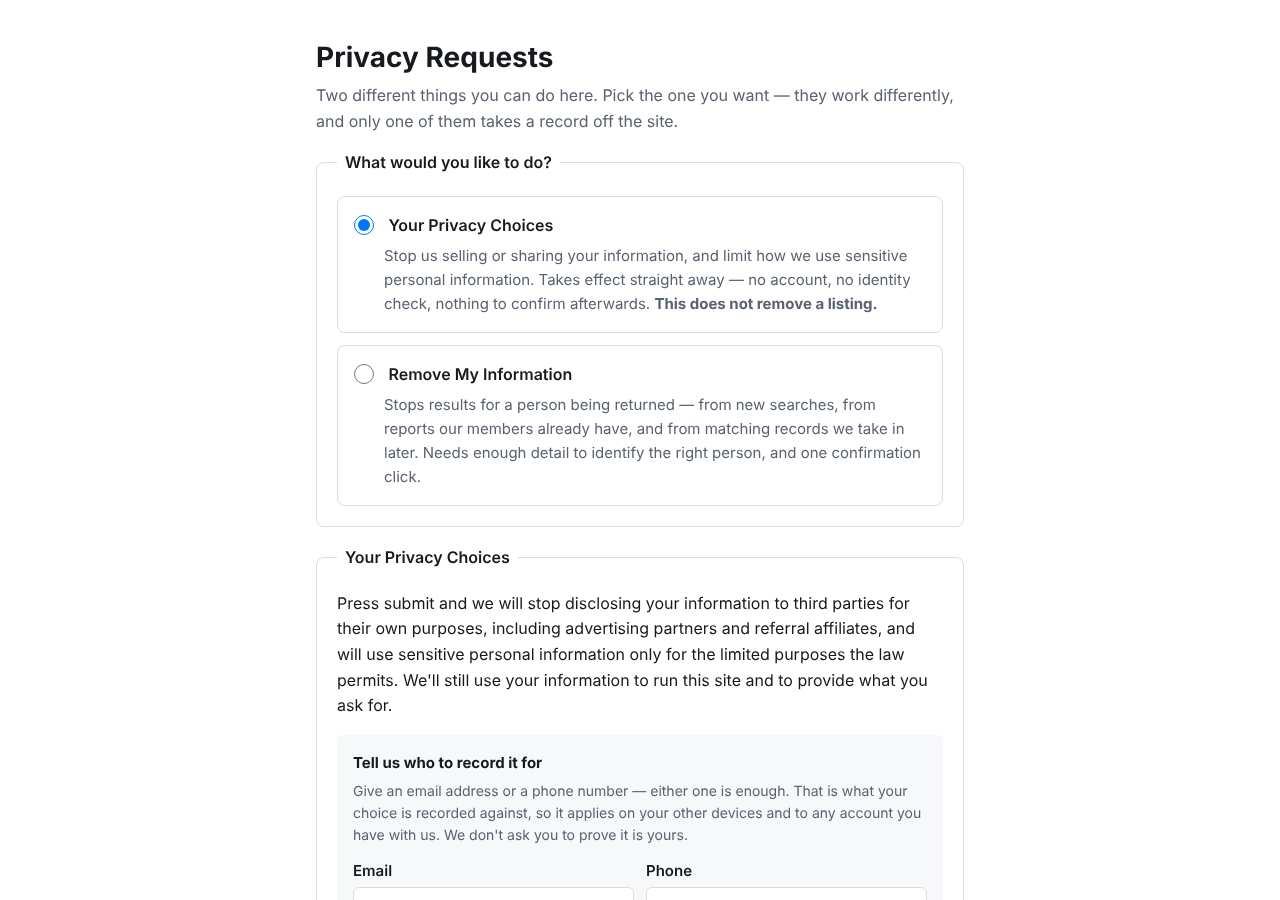
The form starts with a request-type choice. "Your Privacy Choices" records a do-not-sell/share request: the site says it applies within 15 business days but, in its own words, does not remove a listing. To take your record off the site, choose "Remove My Information." If you want both, submit each request separately.
- 03
Enter your email address and phone number
Fill in the Email and Phone fields — those are the fields we saw on the form when we loaded it on October 5, 2026. Use an inbox you actually check, because the confirmation link arrives by email. The page states that what you enter is used only to process the request, is never added to listings, and is never sold or shared.
- 04
Submit, then click the email confirmation link
After you submit, SealedRecords emails a confirmation link to the address you gave, and the request clock starts that day. Nothing is removed until you click the link, so check spam and promotions folders and click it promptly. Note the site also warns it cannot recall copies someone already downloaded.
- 05
Know the deadlines and re-check
The site says it acknowledges removal requests within 10 business days and completes them within 45 calendar days — slower than most people-search sites, so mark your calendar. Search sealedrecords.net for your name again after about six weeks. If the record still shows, email support@sealedrecords.net with your confirmation date and ask for a status update.
- 06
Handle the human check, or use phone or email
Our research records a CAPTCHA checkpoint on this family of sites, so you may see a "verify you are human" challenge; complete it in a normal browser without a VPN, and pause ad or script blockers if the form misbehaves. If you would rather not use the form at all, call (844) 736-6373 or email support@sealedrecords.net to make the request.
- 07
Repeat on the other sites in the family
SealedRecords belongs to a family of 16 people-search sites that share this same opt-out path, including backgroundcheckers.net, checksecrets.com, inmatessearcher.com, mugshotlook.com, peoplesearch123.com and peoplesearcher.com. A removal from SealedRecords covers SealedRecords only, so submit a separate request on each site where your record appears.
What the SealedRecords opt-out page looked like when we checked
We loaded the opt-out page on sealedrecords.net on October 5, 2026 and it was up. The first screen asked for: request_type, request_type, Email, Phone.
This is a dated record of what our browser saw, not a removal. We never submit requests from this page.
Continue with your next privacy task
Found your details on another site?
- TruePeopleSearch opt-out instructions
Use this guide if you find a matching listing on TruePeopleSearch. Check that site separately; a request elsewhere does not establish removal here.
- Unmask opt-out instructions
Use this guide if you find a matching listing on Unmask. Check that site separately; a request elsewhere does not establish removal here.
The source page changed, but Google still shows it
Choose between a Google personal-info request and refreshing an outdated result.
Read the how-toYou found more than one profile
Keep separate records of each matching URL so an extra listing is not missed.
Read the how-toThe confirmation email never arrived
Check the site's requirements before retrying a request or sharing more information.
Read the how-toRemind me to recheck SealedRecords in 30 days
We'll send one reminder to verify the listing is actually gone. Confirm the email first; no ongoing marketing and no account required.
What is SealedRecords?
SealedRecords is a people-search data broker. It pulls public records and other data sources into searchable profiles that anyone can look up by name, and it sells deeper access through paid reports. Despite the name, it does not hold sealed court files; it aggregates ordinary public-record data, which is why people with sealed or expunged records often find old arrests and charges resurfacing here.
A typical profile can include your age, current and past addresses, phone numbers, relatives and neighbors, marriage and divorce records, education history, bankruptcies, and criminal records. You never signed up for any of this; the site compiles it from public-record databases, court filings, property records and partner data providers.
SealedRecords sits in a family of at least 16 near-identical people-search sites that share the same backend opt-out path, so the same record often appears on several of them under different brand names.
What a SealedRecords listing can show
- Full name and age
- Current and past home addresses
- Phone numbers associated with you
- Relatives' and neighbors' names
- Marriage and divorce records
- Education history
- Bankruptcies and criminal records
- Social media details
Who runs SealedRecords, and which sites one request covers
No parent company is published for SealedRecords. The site runs on sealedrecords.net, lists support at support@sealedrecords.net, and offers a privacy-request phone line at (844) 736-6373. It belongs to a family of 16 people-search sites that all use the same opt-out form path, including backgroundcheckers.net, checksecrets.com, inmatessearcher.com, mugshotlook.com, peoplesearch123.com and peoplesearcher.com. A removal from SealedRecords covers SealedRecords only; each family site keeps its own database and needs its own request.
What is the sealedrecords.net opt-out removal process?
The sealedrecords.net opt-out is a privacy-request form, not the search-and-pick flow older guides describe for this site family. When we loaded it on October 5, 2026 it offered two request types — "Your Privacy Choices" and "Remove My Information" — plus Email and Phone fields. Choose removal, submit, then click the confirmation link SealedRecords emails you; nothing is removed until you do. The site says it acknowledges requests within 10 business days and completes them within 45 calendar days.
How long it takes
SealedRecords states it acknowledges removal requests within 10 business days and completes them within 45 calendar days, with the deadline starting the day you submit. Because that window is long, save the confirmation email and re-search your name on sealedrecords.net after about six weeks. If the record is still visible then, follow up with support@sealedrecords.net or call (844) 736-6373 and reference the date you clicked the confirmation link.
SealedRecords opt-out problems and fixes
I submitted "Your Privacy Choices" but my listing is still there
That choice only stops SealedRecords from selling or sharing your information; the site says it does not remove a listing. Submit a second request and choose "Remove My Information" this time, then click the confirmation link in the email.
The confirmation email never arrived
Check spam, promotions and any filtering rules, then resubmit the form once using the same address. If nothing comes through, email support@sealedrecords.net from that address and ask them to confirm the request manually.
The page shows a "verify you are human" challenge or the form misbehaves
Complete the challenge in a normal browser window. Our research records an unverified CAPTCHA checkpoint on this site family, so use a standard browser, turn off VPN, and disable ad or script blockers for the page before retrying.
My record came back months after removal
People-search sites keep re-aggregating public data, and the same record often resurfaces on a sister brand. Search again, resubmit the removal request, and keep your first confirmation as proof of the earlier request.
The form looks different from older step-by-step guides
The flow changed. Older guides describe a name-plus-state search where you pick your record; when we loaded the page on October 5, 2026 it was a privacy-request form with a request-type choice and Email and Phone fields instead.
I want someone else to submit the request for me
The page allows an authorized agent to submit either request type; for "Remove My Information" it asks for your signed permission, attached to the submission. You can also complete the request yourself by phone at (844) 736-6373.
Send this to support@sealedrecords.net
Subject: Deletion and do-not-sell request for my SealedRecords listing
Hello, Under applicable state privacy laws, including the CCPA where it applies, I request that SealedRecords delete my personal information and stop selling or sharing it. Name: [Full name] Email address: [Email] Location: [City, State] Listing URL: [Listing URL] Please confirm by email once the removal is complete. Thank you.
After you opt out of SealedRecords
Save the confirmation screen and email as your record. SealedRecords says a confirmed removal stops it from returning results for you, including matching records it takes in later — but the wider family of sites re-aggregates public data, so your record can reappear under a different brand. Re-check SealedRecords about six weeks after your request, then every few months, and clear the other family sites one by one; ongoing re-checking is what My Privacy Agent's Patrol plan automates.
Realistic scope
This guide explains how to request the action SealedRecords publishes for its own site. Reading the guide or sending a request does not establish completed removal. Other sites and original public records are separate; recheck the specific sealedrecords.net page after the site's response and if the information appears again.
Not yet a filed-for-you target
This page documents SealedRecords's published privacy route. My Privacy Agent Patrol does not file this site automatically yet. An exposure check uses configured sources and does not confirm that this specific site is included.
SealedRecords opt-out FAQ
Is SealedRecords legit, and is its opt-out safe to use?
SealedRecords is a real people-search data broker, not a scam, and its opt-out page is hosted on its own domain and costs nothing. Be wary of lookalike removal services that charge a fee to submit this exact form for you. Keep expectations realistic: opting out stops SealedRecords from showing and sharing your record, but the site cannot recall reports someone already downloaded, and other brokers can re-aggregate the same public data.
How do I remove my information from SealedRecords?
Use the official privacy-request page on sealedrecords.net, choose "Remove My Information," and enter your email address and phone number. SealedRecords emails a confirmation link; click it, because nothing is removed until you do. It is free and requires no account.
Is the SealedRecords opt-out free?
Yes. The online form, the support@sealedrecords.net email route and the phone line at (844) 736-6373 are all free. You never need to buy a report or a subscription to remove your own information.
How long does SealedRecords take to remove my information?
The site says it acknowledges removal requests within 10 business days and completes them within 45 calendar days. Re-check your name on the site after about six weeks, and follow up by email or phone if the record is still there.
What is the difference between "Remove My Information" and "Your Privacy Choices"?
"Your Privacy Choices" is a do-not-sell/share request: the site applies it within 15 business days but states it does not remove a listing. "Remove My Information" deletes your record and is the one that needs the email confirmation link. You can submit both.
Why is my SealedRecords listing back after I opted out?
These sites continuously re-aggregate public records, and your profile can be rebuilt from a fresh data source or republished on a sister site in the same family. Search again every few months and resubmit the request if needed; keep your confirmation email as proof.
Does opting out of SealedRecords remove me from peoplesearcher.com and its other sister sites?
No. The family sites share the same opt-out form path but keep separate databases, and no sister sites covered by a SealedRecords request. Submit a separate removal on each site where your record appears, such as peoplesearcher.com, backgroundcheckers.net or checksecrets.com.
Can I opt out of SealedRecords without using the website?
Yes. The privacy-request page lists a phone line at (844) 736-6373 where the site will complete the request with you, and you can also email support@sealedrecords.net with your name, location and listing URL to ask for deletion.
Related opt-outs to clear next
Searchbug, Inc.
People Search · searchbug.com
Open guideSouth Dakota Arrests
People Search · sdarrests.org
Open guideSearchPeopleFree
People Search · searchpeoplefree.com
Open guideSouth Carolina Arrests
People Search · scarrests.org
Open guideSearchPeopleFree.net
People Search · searchpeoplefree.net
Open guideRhode Island Arrests
People Search · riarrests.org
Open guideSources and review
Reviewed October 5, 2026 against SealedRecords's own pages and the sources below. Broker forms change often; if something here no longer matches, the official page wins.
Review and change history
A content review or directory snapshot is reference history. A historical route observation does not establish submission, provider acceptance or removal, and does not establish a current working route. Current independent evidence has its own scope and expiry.
· Guide content reviewed against the published sources. This is the recorded review baseline; no earlier editorial change log is available.
· Historical route observation: reachable (HTTP 200). This describes only the page observed on that date; later steps and today's availability were not established by that observation.
Read current independent route evidence. That record reports its own scope, date, expiry and any gaps; this history does not renew verification.