Searchbug opt-out: how to remove your information from Searchbug reports
Searchbug's opt-out runs through the privacy-rights page at searchbug.com/ccpa.aspx, which points to a Contact Us form. You choose a request reason and subject, enter your name, email and phone, describe the record you want suppressed, and upload a photo of a government ID. Searchbug requires the ID to verify you, and says CCPA requests can take up to 45 days. The opt-out stops your non-public information from appearing in Searchbug reports; it does not delete the underlying public records.
Reading current independent checks… See route evidence
Work through this with your agent
Give your agent the published steps, sources and read-only tools. It should check the current official process and ask before taking action.
Copies public guidance only. You still approve any request your agent submits.
View or select the instructions
Remove yourself from Searchbug, Inc.
7 steps. Use the official site in a normal browser and follow its current instructions if a human check fails.
- 01
Find your records on Searchbug
Search Searchbug for your name, phone numbers and addresses, and note any report URLs that match you. You do not need to buy a report to request removal. Note exactly how your name and address appear, because Searchbug matches your request against the address on your ID.
- 02
Open the CCPA rights page
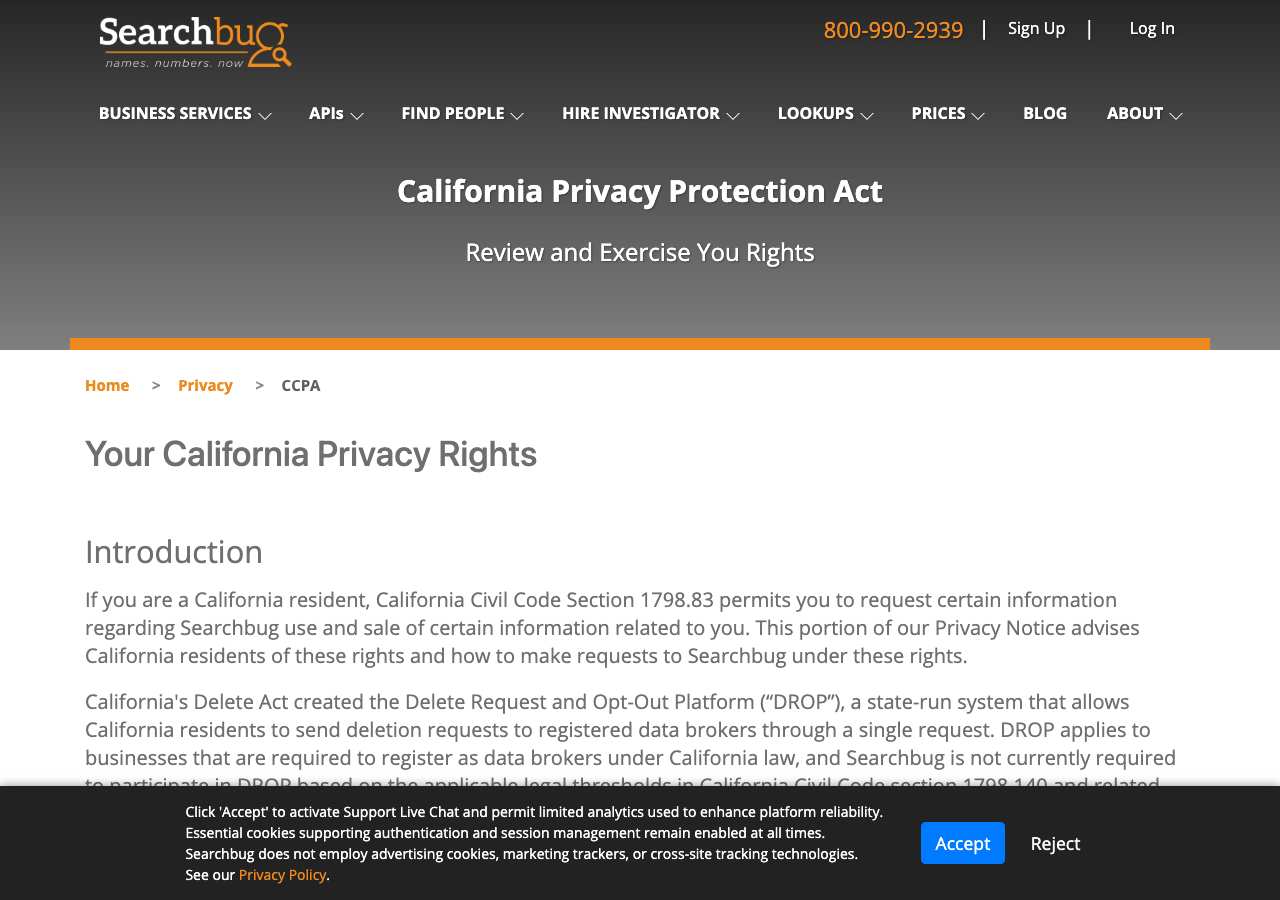
Go to searchbug.com/ccpa.aspx. When we loaded it on October 5, 2026 the page opened directly, titled "Your rights under California Privacy Protection Act at Searchbug," with no CAPTCHA or "verify you are human" step. Read the deletion and opt-out sections, then use the submit button to reach the request form.
- 03
Choose the right reason and subject
For a deletion request, select "CCPA Request" as the Reason and "Record Deletion" as the Subject. For a do-not-sell request, use Reason "CCPA Request" in California or "Opt-Out Request" elsewhere, with Subject "Do Not Sell." Searchbug says requests sent by email, mail or phone get redirected to this form.
- 04
Enter your identifying details
Fill in your name, email and phone number. In the description, give the address exactly as it appears on your government ID or legal document, and include the Searchbug report URL you want suppressed. Matching the address on your ID is what lets Searchbug find the right record and avoid confusing you with someone of the same name.
- 05
Upload your ID
Attach a photo of your driver's license or government ID; Searchbug requires it to verify your identity, and notes that authorized agents must provide similar verification for themselves. Adding screenshots with your records highlighted is optional but makes the request easier to process.
- 06
Respond to verification
Searchbug states that, at a minimum, you must submit a copy of your driver's license and verify your phone number and/or email address. Watch for a verification message after submitting and respond promptly; an unverified request will stall.
- 07
Follow up and re-check
Searchbug says CCPA requests may take up to 45 days, so keep your submission date and any ticket number. After about two weeks, search Searchbug again for your name and phone number. If the record still appears after 45 days, submit a follow-up through the same form or email support@searchbug.zohodesk.com referencing your original request.
What the Searchbug, Inc. opt-out page looked like when we checked
We loaded the opt-out page on searchbug.com on October 5, 2026 and it was up.
This is a dated record of what our browser saw, not a removal. We never submit requests from this page.
Continue with your next privacy task
Found your details on another site?
- TruePeopleSearch opt-out instructions
Use this guide if you find a matching listing on TruePeopleSearch. Check that site separately; a request elsewhere does not establish removal here.
- Unmask opt-out instructions
Use this guide if you find a matching listing on Unmask. Check that site separately; a request elsewhere does not establish removal here.
The source page changed, but Google still shows it
Choose between a Google personal-info request and refreshing an outdated result.
Read the how-toYou found more than one profile
Keep separate records of each matching URL so an extra listing is not missed.
Read the how-toThe confirmation email never arrived
Check the site's requirements before retrying a request or sharing more information.
Read the how-toRemind me to recheck Searchbug, Inc. in 30 days
We'll send one reminder to verify the listing is actually gone. Confirm the email first; no ongoing marketing and no account required.
What is Searchbug, Inc.?
Searchbug is a people-search and public-records lookup site. Anyone can search a name, phone number or address and buy reports built from public records and third-party data providers: property records, criminal and arrest records, relatives and associates, liens, judgments, evictions, bankruptcies, foreclosures, phone numbers and email addresses. Businesses use it for things like fraud prevention and identifying unknown callers; individuals use it to look up numbers that contact them.
One thing matters for your expectations: Searchbug says it does not collect, store or delete the original source records behind its reports. Those live with government agencies and upstream data brokers. Searchbug's opt-out suppresses your information from appearing in Searchbug reports, which is why the page directs people with deeper concerns to the original sources too.
What a Searchbug, Inc. listing can show
- Full name, age or birthdate, and date of death where applicable
- Current and past addresses
- Property records
- Criminal and arrest records
- Relatives and associates linked by name or address
- Liens, judgments, evictions, bankruptcies and foreclosures
- Phone numbers and email addresses
Who runs Searchbug, Inc., and which sites one request covers
Searchbug is operated by Searchbug, Inc., a data broker based in Carlsbad, California, that is listed in the California Attorney General's data broker registry with support@searchbug.zohodesk.com as its contact. No parent company or sister sites are published, so a Searchbug removal covers Searchbug only. Because its reports are assembled from third-party providers, your information is likely also sitting with the upstream public-record and data-broker sources Searchbug draws from, each of which has its own opt-out process.
What is the searchbug.com opt-out removal process?
The searchbug.com removal process is a verified request through the Contact Us form, reached from the site's CCPA rights page. There is no standalone one-field opt-out form: you select a request reason and subject, provide your name, email and phone, describe the record, and upload a photo of your driver's license or other government ID, because Searchbug requires identity verification to prevent fraudulent requests. Searchbug states CCPA requests may take up to 45 days, and notes that the opt-out suppresses your information from its reports rather than deleting source records held elsewhere. When we loaded the page on October 5, 2026 it opened without a bot check.
How long it takes
Searchbug publishes that CCPA requests may take up to 45 days. Verification happens first: your ID must match the address you give, and you need to confirm your phone and/or email. To confirm the opt-out worked, re-search your name, phone number and address on Searchbug after a couple of weeks and again after 45 days. If the record is still visible, follow up through the same form or by email with your original request date.
Searchbug, Inc. opt-out problems and fixes
The page says CCPA requests are only for registered users
Searchbug limits account-data requests to registered users because it says it does not collect identifiable information from visitors without an account. You can still submit an opt-out request through the same form by uploading your government ID; suppression of your record from reports does not require an account.
I'm not comfortable uploading my driver's license
Searchbug requires a government ID to prevent fraudulent requests and says it cannot reliably identify you or block the right records without it. The address on the ID must match the address you want removed. If you decline, the request cannot be verified.
I emailed and got no response
Searchbug's CCPA page states that requests made by email, postal mail or phone are directed to the Contact Us form, so email alone goes nowhere. Submit through the form linked from the CCPA page, then email support@searchbug.zohodesk.com only as a follow-up that references your submitted request.
My record came back after the opt-out
Searchbug does not store the source records; it assembles reports from public records and third-party providers that keep refreshing. If a provider re-feeds your data, the record can reappear. Submit a new suppression request and, for lasting results, opt out at the public-record and data-broker sources behind the report.
Someone with my name got removed instead of me
Searchbug flags this exact risk for common names. Make sure the address in your form description matches the address on your ID and the address shown on the record, and attach screenshots with your record highlighted so they can distinguish you from namesakes.
My info still shows on other people-search sites
A Searchbug opt-out covers Searchbug only. Its reports are built from upstream providers, so work through the other people-search sites and data brokers that display your information; each runs its own opt-out process.
Send this to support@searchbug.zohodesk.com
Subject: CCPA deletion and opt-out request - follow-up to submitted form request
Hello, Under applicable state privacy laws, including the CCPA where it applies, I request that Searchbug delete my non-public personal information and stop selling or sharing it, and that my record be suppressed from Searchbug reports. I submitted the request through your online form on [Date] (Reason: CCPA Request / Opt-Out Request, Subject: Record Deletion / Do Not Sell). My details: Name: [Full name] Email: [Email] Phone: [Phone] Location: [City, State] Record URL: [Listing URL] Please confirm by email once the suppression is in place. Thank you.
After you opt out of Searchbug, Inc.
Keep a copy of your request, the date you submitted it, and any confirmation or ticket number. Because Searchbug re-assembles reports from public records and third-party providers that keep updating, a suppressed record can surface again. Re-check Searchbug every few months and after any move, and work through the upstream sources in parallel. Ongoing re-checking across brokers is what My Privacy Agent's Patrol plan automates.
Realistic scope
This guide explains how to request the action Searchbug, Inc. publishes for its own site. Reading the guide or sending a request does not establish completed removal. Other sites and original public records are separate; recheck the specific searchbug.com page after the site's response and if the information appears again.
Not yet a filed-for-you target
This page documents Searchbug, Inc.'s published privacy route. My Privacy Agent Patrol does not file this site automatically yet. An exposure check uses configured sources and does not confirm that this specific site is included.
Searchbug, Inc. opt-out FAQ
Is Searchbug legit, and is its opt-out safe to use?
Yes. Searchbug, Inc. is a real company registered in California's data broker registry, and the CCPA rights page on its own domain is the official opt-out route. The ID upload looks intrusive but is a standard anti-fraud verification step that Searchbug applies to everyone. Do not pay a third party to remove you from Searchbug; the official request is free.
How do I remove my information from Searchbug?
Use the CCPA rights page at searchbug.com/ccpa.aspx and submit through the Contact Us form: choose Reason "CCPA Request" and Subject "Record Deletion" (or "Do Not Sell" for the sale opt-out), enter your name, email and phone, describe the record, and upload a photo of your government ID. Searchbug may take up to 45 days.
Is the Searchbug opt-out free?
Yes. Submitting a deletion or opt-out request through Searchbug's form costs nothing, and you do not need to buy a report first. Be wary of third-party sites that charge to remove you from Searchbug.
How long does the Searchbug opt-out take?
Searchbug states CCPA requests may take up to 45 days. Verification of your ID and contact details comes first, so respond quickly to any verification message, then re-search for your record after a couple of weeks and again after the 45-day window.
Does opting out of Searchbug delete my public records?
No. Searchbug says it does not collect, store or delete the original source records behind its reports; those stay with government agencies and upstream data providers. The opt-out suppresses your non-public information from appearing in Searchbug reports, so you may also want to contact the original sources directly.
Do I have to live in California to opt out of Searchbug?
No. The form uses Reason "CCPA Request" for California residents and "Opt-Out Request" for people outside California, and Searchbug says you may exercise these rights under the CCPA or any other applicable county, state or federal law.
Why is my Searchbug listing back after I opted out?
Searchbug rebuilds reports from public records and third-party data providers that continuously refresh their files. If a provider re-supplies your information, the record can reappear. Submit a fresh suppression request through the form, and opt out at the upstream sources to reduce re-listing.
Related opt-outs to clear next
SearchPeopleFree
People Search · searchpeoplefree.com
Open guideSealedRecords
People Search · sealedrecords.net
Open guideSearchPeopleFree.net
People Search · searchpeoplefree.net
Open guideSouth Dakota Arrests
People Search · sdarrests.org
Open guideSearchPublicRecords.com
People Search · searchpublicrecords.com
Open guideSouth Carolina Arrests
People Search · scarrests.org
Open guideSources and review
Reviewed October 5, 2026 against Searchbug, Inc.'s own pages and the sources below. Broker forms change often; if something here no longer matches, the official page wins.
Review and change history
A content review or directory snapshot is reference history. A historical route observation does not establish submission, provider acceptance or removal, and does not establish a current working route. Current independent evidence has its own scope and expiry.
· Guide content reviewed against the published sources. This is the recorded review baseline; no earlier editorial change log is available.
· Historical route observation: reachable (HTTP 200). This describes only the page observed on that date; later steps and today's availability were not established by that observation.
Read current independent route evidence. That record reports its own scope, date, expiry and any gaps; this history does not renew verification.