Apollo opt-out: how to remove your profile from the B2B lead database
Go to apollo.io/privacy-policy/remove and enter your work email address in the "Work email" field. Click the "Get verification information" button. Apollo will send a verification email to confirm you control that address. Click the link in that email to file your deletion and do-not-sell request. The form requires a CAPTCHA verification. Apollo says most removal requests are processed within a few business days, though their policy does not publish a specific timeline.
Reading current independent checks… See route evidence
Work through this with your agent
Give your agent the published steps, sources and read-only tools. It should check the current official process and ask before taking action.
Copies public guidance only. You still approve any request your agent submits.
View or select the instructions
Remove your professional profile from Apollo
Apollo is used for business contact, recruiting, or sales research. Removing this profile is separate from opting out of consumer people-search sites.
Use the published privacy route above to identify the sales-intelligence profile you want addressed. Share only the information that route requires, complete any verification it requests, and save the response. Recheck the original profile separately; sending a request does not establish that it was removed.
Remove yourself from Apollo
7 steps. Use the official site in a normal browser and follow its current instructions if a human check fails.
- 01
Find which email Apollo has on file
Search apollo.io for your name and current employer to see what profile comes up. Note all email addresses shown on the profile, even if partially masked. Use the address that matches when you submit the form; it helps Apollo locate your exact record faster.
- 02
Go to the official removal page
Navigate to apollo.io/privacy-policy/remove. Check the address bar confirms you are on apollo.io; bookmark this page so you can find it again if needed. You never need a paid Apollo subscription or account to opt out.
- 03
Enter your work email
Type the email address into the "Work email" field. Choose the address that appears on your profile. Apollo says it uses this email only to verify you control the profile and to maintain your opt-out preference; it does not create an account.
- 04
Solve the CAPTCHA
Complete the reCAPTCHA verification that appears below the email field. This protects Apollo from automated removal requests. Check the "I'm not a robot" box and follow any image-selection prompts that appear.
- 05
Submit the removal request
Click "Get verification information." Apollo will display a confirmation message and send a verification email to the address you entered. The form may take a few seconds to process.
- 06
Click the verification link
Check your inbox and spam folder for an email from Apollo. Open it and click the verification link inside. That click completes your removal request. Do not close your browser tab or navigate away until you see the final confirmation on-screen.
- 07
Check your removal status
After a few business days, search Apollo again for your profile. If it is gone, your removal worked. Keep the verification email as proof in case you need to follow up. If the profile is still visible after a week, email privacy@apollo.io with the confirmation details.
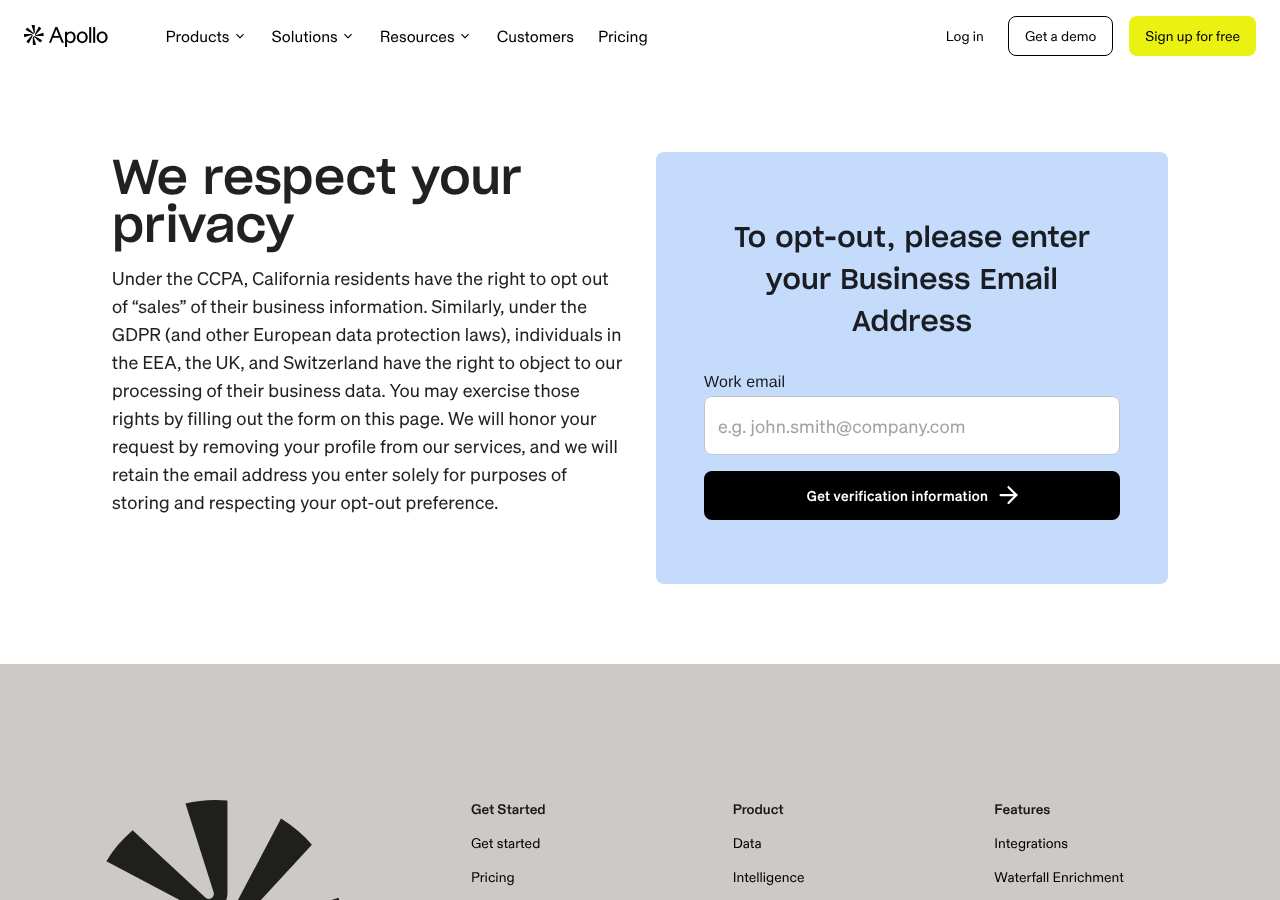
What the Apollo opt-out page looked like when we checked
We loaded the opt-out page on apollo.io on October 5, 2026 and it was up. The first screen asked for: Work email. The page includes a reCAPTCHA check.
This is a dated record of what our browser saw, not a removal. We never submit requests from this page.
Continue with your next privacy task
Found your details on another site?
- RocketReach opt-out instructions
Use this guide if you find a matching listing on RocketReach. Check that site separately; a request elsewhere does not establish removal here.
- Success.ai opt-out instructions
Use this guide if you find a matching listing on Success.ai. Check that site separately; a request elsewhere does not establish removal here.
Reduce exposed contact details before a job search
Review professional profiles while keeping a way for intended employers to contact you.
Read the how-toThe confirmation email never arrived
Check the site's requirements before retrying a request or sharing more information.
Read the how-toThe source page changed, but Google still shows it
Choose between a Google personal-info request and refreshing an outdated result.
Read the how-toRemind me to recheck Apollo in 30 days
We'll send one reminder to verify the listing is actually gone. Confirm the email first; no ongoing marketing and no account required.
What is Apollo?
Apollo.io is a B2B lead-generation and sales-intelligence platform that maintains a database of over 275 million business contact records. Sales, recruiting, and business development teams use Apollo to search for professionals, verify email addresses, find direct phone numbers, and identify buying signals. Apollo combines data from public websites, professional directories, regulatory sources, customer submissions, and third-party data providers.
You do not need to have an Apollo account to be in their database. Apollo builds profiles by scanning the web, social media, and company websites, then enriches that data with information from licensed data vendors and business partners. That is why Apollo may have contact details you never gave them directly.
What a Apollo listing can show
- Full name and current job title
- Current and past employers
- Work email addresses (personal and business)
- Direct phone numbers
- LinkedIn and social media profiles
- Job change history and seniority level
- Company size and industry
Who runs Apollo, and which sites one request covers
Apollo.io is operated by ZenLeads, Inc. d/b/a Apollo.io, a standalone B2B sales platform that is not part of a broader people-search network. It maintains separate operations from consumer people-search sites like Spokeo, TruthFinder, or WhitePages. However, Apollo is not the only B2B contact database; similar platforms like ZoomInfo, RocketReach, SignalHire, and ContactOut also maintain large professional-contact databases and will need separate opt-out requests.
What is the apollo.io opt-out removal process?
The apollo.io removal process is a single-field web form plus email verification. You enter your work email address on the official privacy-policy/remove page, solve a CAPTCHA, and click "Get verification information." Apollo emails you a verification link. Clicking that link from the email confirms you own the account and files your deletion and do-not-sell request. When we loaded the page on October 5, 2026 it showed a single input field, a CAPTCHA check, and a submit button, with no signup or account required.
How long it takes
Apollo does not publish a specific response timeframe in its privacy policy; it states it will respond "without undue delay and within the timeframe required by applicable law." In practice, allow 3 to 5 business days for removal to take effect. Re-search your name after that time to confirm the profile is gone. If it remains visible after a week, follow up with privacy@apollo.io.
Apollo opt-out problems and fixes
The verification email did not arrive
Check spam, promotions, and email filters. If it still does not arrive, go back to the form and resubmit using a different email address if you have multiple addresses on the profile. If you still see nothing, email privacy@apollo.io directly with your name and the email address you used.
The CAPTCHA will not load or does not work
Disable VPN, ad blockers, and script blockers for apollo.io, or try a different browser. Refresh the page and try again. If the reCAPTCHA still fails, you can email privacy@apollo.io instead and request manual processing.
I have multiple profiles on Apollo
Repeat the removal process for each email address that appears on a separate profile. Search apollo.io for variations of your name (middle initial, nickname, former employer) to find all profiles, and remove each one.
My profile came back months later
Apollo re-scrapes the web and receives fresh data from partners, so profiles can reappear if your information is published again. Search every few months and repeat the removal if needed. Keep your verification email as proof of your original request.
The removal page says my request was denied
This can happen if the email you entered does not match any profile on file, or if Apollo cannot verify the address. Email privacy@apollo.io with your name, the email you tried, and ask them to search for your profile and process the removal manually.
Send this to privacy@apollo.io
Subject: Deletion and do-not-sell request for my Apollo.io profile
Hello, Under applicable state privacy laws, including the CCPA where it applies, I request that Apollo delete all personal information it holds about me and stop selling or sharing it. Name: [Full name] Work email address(es) on the profile: [Email] Current or recent employer: [Company name] Please confirm by email once the deletion is complete. Thank you.
After you opt out of Apollo
Keep your verification email. Apollo says it will stop selling or sharing your information once your removal is processed, but B2B contact databases frequently receive fresh data and can rebuild profiles. Re-check Apollo every two to three months, and remember that other B2B platforms like ZoomInfo, RocketReach, SignalHire, and ContactOut have their own separate databases and need individual opt-out requests.
Realistic scope
This guide explains how to request the action Apollo publishes for its own site. Reading the guide or sending a request does not establish completed removal. Other sites and original public records are separate; recheck the specific apollo.io page after the site's response and if the information appears again.
Not yet a filed-for-you target
This page documents Apollo's published privacy route. My Privacy Agent Patrol does not file this site automatically yet. An exposure check uses configured sources and does not confirm that this specific site is included.
Apollo opt-out FAQ
Is Apollo.io legit, and is its opt-out safe to use?
Yes. Apollo.io is a real, widely used B2B sales platform trusted by many corporations. Its removal form is the official opt-out and only asks for your work email to verify you own the profile. Do not use third-party sites offering to remove you from Apollo for a fee; the official form at apollo.io/privacy-policy/remove is free. Be cautious of phishing emails claiming to be from Apollo; always verify the sender address is privacy@apollo.io.
How do I remove myself from Apollo.io?
Use the official removal form at apollo.io/privacy-policy/remove. Enter your work email address, solve the CAPTCHA, and click "Get verification information." Click the verification link in the email Apollo sends. That completes your removal request. No account or payment is required.
Is the Apollo removal form free?
Yes. Both the web form at apollo.io/privacy-policy/remove and the email contact at privacy@apollo.io are free. You do not need to pay or subscribe to Apollo to opt out.
How long does Apollo take to remove my profile?
Apollo does not publish a specific timeline, but most removals take 3 to 5 business days. Search your name again after a week; if the profile is still visible, email privacy@apollo.io with your verification confirmation.
Does removing me from Apollo also remove me from ZoomInfo or RocketReach?
No. Apollo, ZoomInfo, RocketReach, SignalHire, and ContactOut each maintain their own separate databases. You must submit a removal request to each one individually.
Can I opt out without using the online form?
Yes. You can email privacy@apollo.io with your name, work email address, and employer, and ask them to remove your profile. Include any profile URLs if you can find them. They may still ask you to verify via email.
Why does Apollo have my personal phone number?
Apollo says it sources data from public websites, professional directories, and data vendors. Your phone number may have come from a business directory, a company website listing, or a data broker Apollo partners with, rather than from something you gave Apollo directly.
What if I do not know which email Apollo has on file?
Use the Apollo search to look up your name and employer and see what email addresses appear on the profile. If you have multiple addresses on file, submit removal requests for each one. You can also email privacy@apollo.io and ask them to tell you which addresses they have before you remove them.
Related opt-outs to clear next
AroundDeal
B2B Lead Generation · arounddeal.com
Open guideAMF Internet Services Limited
B2B Lead Generation · anymailfinder.com
Open guideBuzzfile Media, LLC
B2B Lead Generation · buzzfile.com
Open guideAndrews Wharton
B2B Lead Generation · andrewswharton.com
Open guideCatalyze AI
B2B Lead Generation · catalyzeai.com
Open guideAnalyticsIQ
B2B Lead Generation · analytics-iq.com
Open guideSources and review
Reviewed October 5, 2026 against Apollo's own pages and the sources below. Broker forms change often; if something here no longer matches, the official page wins.
Review and change history
A content review or directory snapshot is reference history. A historical route observation does not establish submission, provider acceptance or removal, and does not establish a current working route. Current independent evidence has its own scope and expiry.
· Guide content reviewed against the published sources. This is the recorded review baseline; no earlier editorial change log is available.
· Historical route observation: reachable (HTTP 200). This describes only the page observed on that date; later steps and today's availability were not established by that observation.
Read current independent route evidence. That record reports its own scope, date, expiry and any gaps; this history does not renew verification.