PeopleSearchUSA opt-out: how to remove your listing from peoplesearchusa.org
Go to PeopleSearchUSA's official removal page at peoplesearchusa.org/api/helper/optOutLight/search, enter your first name, last name, and state, and pick your record from the results. Then complete the removal form with an email address you control and finish any verification step it sends. The site does not publish a processing time, so re-check after a few days. If the form fails, email support@peoplesearchusa.org.
Reading current independent checks… See route evidence
Work through this with your agent
Give your agent the published steps, sources and read-only tools. It should check the current official process and ask before taking action.
Copies public guidance only. You still approve any request your agent submits.
View or select the instructions
Remove yourself from PeopleSearchUSA
7 steps. Use the official site in a normal browser and follow its current instructions if a human check fails.
- 01
Open the official opt-out page
Go to peoplesearchusa.org/api/helper/optOutLight/search, the removal search PeopleSearchUSA runs on its own domain and links to from its privacy policy. Check the address bar before typing anything: look-alike sites with similar names are different companies with different databases. You never need to pay, create an account, or buy a report to opt out.
- 02
Search by name and state
Enter your first name, last name, and state, then run the search. If nothing comes up, try the state of a previous address, a middle initial, an alternate spelling, or an old last name. Listings in this family of sites often sit under outdated name variants, and the search only matches what its own database contains.
- 03
Pick the record that is you
The results page shows matching records. Open each candidate and compare age, cities, relatives, and address history — previewing is free and you do not need to buy a report to submit a removal. If two records both describe you, an old address and a current one, plan to remove each one separately; suppressing one copy does not affect the other.
- 04
Complete the removal form
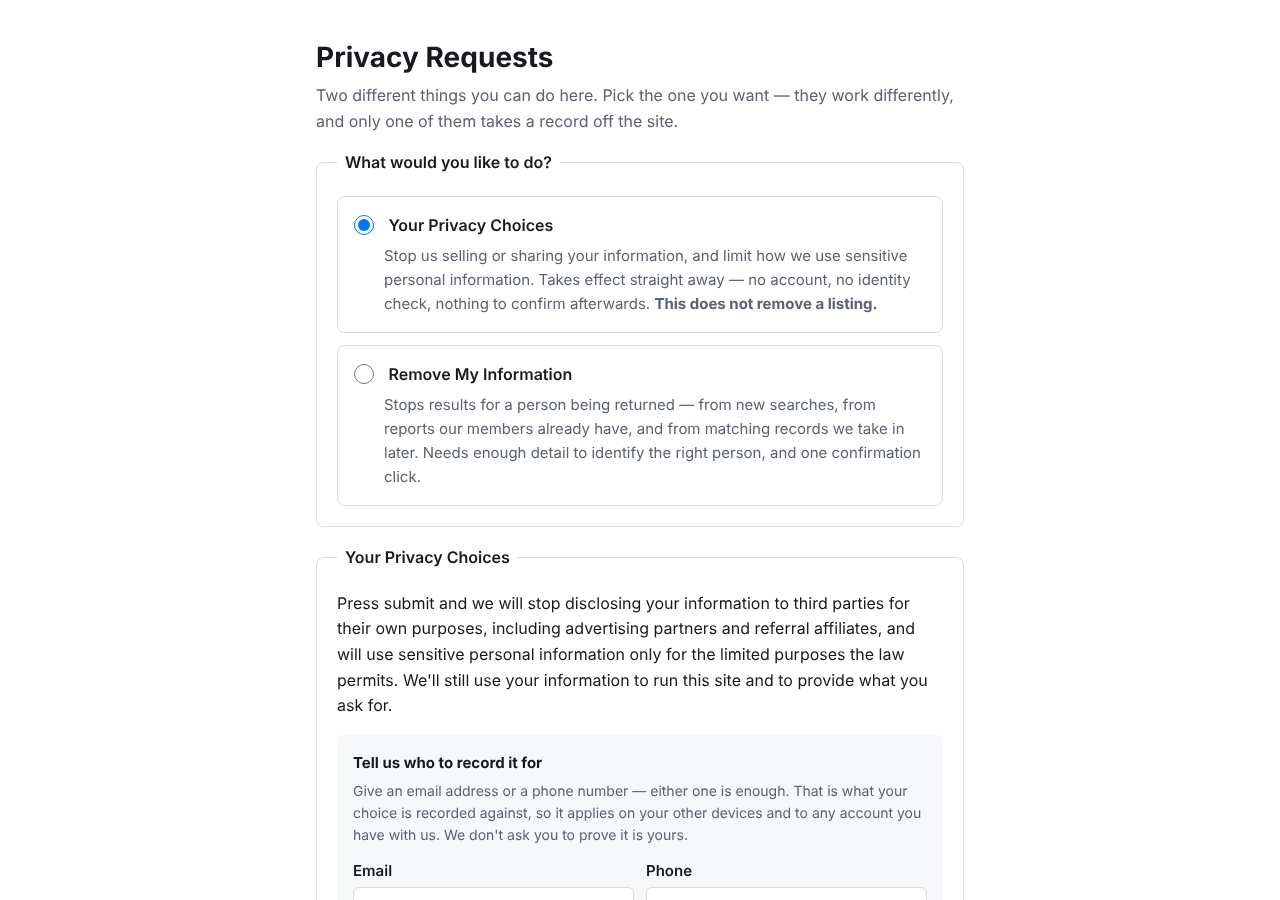
When we loaded the opt-out page on October 5, 2026 it presented a request-type selector plus Email and Phone fields, and it loaded without a bot wall from our check. Fill in the fields with contact details you control, read every checkbox before agreeing, and complete any "Verify you are human" challenge yourself — VPNs and privacy extensions can break it, so use a normal browser window.
- 05
Finish the email verification
Sites in this family typically send a confirmation or verification link to the email address you entered, and the request may not be processed until you click it. Watch the inbox, including spam and promotions, for a message from peoplesearchusa.org, and click the link promptly from the same device. Save the confirmation page or email with its date.
- 06
Email support if the form stalls
If the page errors, never returns your results, or the submit step fails, email support@peoplesearchusa.org. Give your full name, city and state, and the listing URL, state that you are exercising your right to opt out and request deletion under applicable state privacy law, and ask for written confirmation. The email template below is ready to adapt.
- 07
Confirm the listing is gone
PeopleSearchUSA.org does not publish a fixed removal window, so wait a few days and then repeat the same name-and-state search in a private browser window. If the record still appears after about a week, reply to your confirmation thread or email support again with the submission date and record URL. Note the date in a removal log so you know when you last checked.
What the PeopleSearchUSA opt-out page looked like when we checked
We loaded the opt-out page on peoplesearchusa.org on October 5, 2026 and it was up. The first screen asked for: request_type, request_type, Email, Phone.
This is a dated record of what our browser saw, not a removal. We never submit requests from this page.
Continue with your next privacy task
Found your details on another site?
- TruePeopleSearch opt-out instructions
Use this guide if you find a matching listing on TruePeopleSearch. Check that site separately; a request elsewhere does not establish removal here.
- Unmask opt-out instructions
Use this guide if you find a matching listing on Unmask. Check that site separately; a request elsewhere does not establish removal here.
The source page changed, but Google still shows it
Choose between a Google personal-info request and refreshing an outdated result.
Read the how-toYou found more than one profile
Keep separate records of each matching URL so an extra listing is not missed.
Read the how-toThe confirmation email never arrived
Check the site's requirements before retrying a request or sharing more information.
Read the how-toRemind me to recheck PeopleSearchUSA in 30 days
We'll send one reminder to verify the listing is actually gone. Confirm the email first; no ongoing marketing and no account required.
What is PeopleSearchUSA?
PeopleSearchUSA.org is a US people-search and public-records lookup site. Type in a name and state and it returns matching profiles built from public records — voter files, property and court records, address histories — combined with data licensed from commercial providers and gathered from websites and social networks. Visitors can preview a profile for free and pay for a fuller report with contact details, relatives, and address history.
You do not need an account, and you never had to visit the site, to be listed; profiles are assembled automatically from public and commercial sources. PeopleSearchUSA.org also sits in a family of near-identical people-search brands that share the same search and opt-out code, which is why its listings often duplicate what shows up on sites like peoplesearcher.com and backgroundcheckers.net.
What a PeopleSearchUSA listing can show
- Full name, age, and known aliases
- Current and past home addresses
- Phone numbers, including cell numbers
- Email addresses associated with the record
- Relatives, associates, and household members
- Address history and property-record pointers
- Court or criminal-record pointers
Who runs PeopleSearchUSA, and which sites one request covers
PeopleSearchUSA.org is operated by Truth Now LLC, the entity named in its privacy policy, according to independent opt-out research published in 2026. No parent company is listed in our research. What is notable is the shared code: at least 16 people-search domains — including peoplesearcher.com, peoplesearch123.com, backgroundcheckers.net, checksecrets.com, mugshotlook.com, and inmatessearcher.com — run the same opt-out path. A removal from PeopleSearchUSA.org does not extend to those sites; each keeps its own database and needs its own request.
What is the peoplesearchusa.org opt-out removal process?
The peoplesearchusa.org opt-out is a search-based removal flow. You enter a first name, last name, and state, get back matching records, select the one that is you, and complete a record-specific removal form. When we loaded the page on October 5, 2026 it returned a working form with a request-type selector plus Email and Phone fields, and no bot wall appeared from our check. The final submission step has not been fully observed, and a human-verification check may appear, so complete any challenge yourself in a normal browser without a VPN.
How long it takes
PeopleSearchUSA.org does not publish a fixed removal window on its suppression page, and independent guides that checked it in 2026 report the same. Give the request about 3 to 5 days, then re-search your name and state in a private window to confirm the record no longer appears. If it is still visible after a week or two, follow up with support@peoplesearchusa.org and include the submission date, the record URL, and your confirmation email if you received one.
PeopleSearchUSA opt-out problems and fixes
The search cannot find my record
Try an earlier state, a middle initial, alternate spellings, or a former last name. Records in this family of sites are often stored under old address or name variants, so widen the search before assuming you are not listed.
A "Verify you are human" check appears and fails
Turn off your VPN and disable ad blockers or script blockers for peoplesearchusa.org, then reload in a standard browser window and complete the challenge yourself. Automated tools cannot pass these checks, which is one reason the removal step is marked unverified in our research.
Several results share my name
Narrow the match by age, city, relatives, and address history before picking. If more than one record is genuinely you, submit a removal for each record; opting out of one copy leaves the others searchable.
No confirmation or verification email arrived
Check spam and promotions folders first, confirm the address was typed correctly, and resubmit once. If nothing arrives after that, email support@peoplesearchusa.org from the same address and ask them to process the request manually.
My listing came back months later
PeopleSearchUSA.org refreshes its data from public and commercial sources, so a suppressed profile can be recreated. Submit a new request with the fresh record URL, keep your old confirmation as proof, and re-check every few months.
Send this to support@peoplesearchusa.org
Subject: Opt-out and deletion request for my PeopleSearchUSA listing
Hello, I am writing to opt out and request deletion of my personal information under applicable state privacy laws, including the CCPA where it applies. Name: [Full name] Email address: [Email] Location: [City, State] Listing URL: [Listing URL] Please remove this record from your public search results and stop selling or sharing my personal information, and confirm by email once the removal is complete. Thank you.
After you opt out of PeopleSearchUSA
Keep the confirmation email or screenshot with its date. PeopleSearchUSA.org pulls from live public and commercial sources, so a suppressed profile can reappear after a source refreshes, a move, or a phone-number change. Re-check every two to three months, and work through the other sites in its code family — peoplesearcher.com, backgroundcheckers.net, and the rest — since each keeps a separate database; keeping all of them re-checked over time is what My Privacy Agent's Patrol plan automates.
Realistic scope
This guide explains how to request the action PeopleSearchUSA publishes for its own site. Reading the guide or sending a request does not establish completed removal. Other sites and original public records are separate; recheck the specific peoplesearchusa.org page after the site's response and if the information appears again.
Not yet a filed-for-you target
This page documents PeopleSearchUSA's published privacy route. My Privacy Agent Patrol does not file this site automatically yet. An exposure check uses configured sources and does not confirm that this specific site is included.
PeopleSearchUSA opt-out FAQ
Is PeopleSearchUSA legit, and is its opt-out safe to use?
Yes. PeopleSearchUSA.org is a real people-search site in the business of selling public-records-based reports, and the removal form lives on its own domain. The opt-out is free and does not require buying a report or creating an account. Note that it is not a credit bureau: opting out suppresses its public listing, not the underlying government or public records it drew from.
How do I remove myself from PeopleSearchUSA?
Use the official removal search at peoplesearchusa.org/api/helper/optOutLight/search: enter your name and state, pick your record from the results, and complete the removal form with an email address you control. Finish any verification email it sends, then re-check after a few days.
Is the PeopleSearchUSA opt-out free?
Yes. The removal form and the support@peoplesearchusa.org email route are both free. You never need to buy a report or subscribe to remove yourself, and you should avoid third-party sites that charge to file this request for you.
How long does the PeopleSearchUSA opt-out take?
The site does not publish a fixed processing time. Give it about 3 to 5 days, then repeat your name-and-state search. If the record is still visible after a week or two, email support@peoplesearchusa.org with the submission date and record URL.
Why is my PeopleSearchUSA listing back?
PeopleSearchUSA.org refreshes its data from public and commercial sources, so a new source update can recreate a profile under your name — especially after a move, name change, or new public filing. Re-submit the request with the fresh record URL and keep a removal log with dates.
Does opting out of PeopleSearchUSA remove me from peoplesearcher.com or backgroundcheckers.net?
No. Those sites share the same opt-out code but keep separate databases. Each one needs its own request, so repeat the same name-and-state search and removal flow on each domain where your record appears.
Why does PeopleSearchUSA have my phone number and address?
Its profiles are assembled from public records — voter files, property and court records, address histories — plus data licensed from commercial providers and gathered from websites and social networks. You never gave it to PeopleSearchUSA directly; it was compiled from sources that already held it.
Related opt-outs to clear next
PeopleSmart
People Search · peoplesmart.com
Open guidePeopleSearchNow
People Search · peoplesearchnow.com
Open guidePeopleWhiz.com
People Search · peoplewhiz.com
Open guidePeople Search Expert
People Search · peoplesearchexpert.com
Open guidepeoplewhizr.com
People Search · peoplewhizr.com
Open guidePeopleSearcher
People Search · peoplesearcher.com
Open guideSources and review
Reviewed October 5, 2026 against PeopleSearchUSA's own pages and the sources below. Broker forms change often; if something here no longer matches, the official page wins.
Review and change history
A content review or directory snapshot is reference history. A historical route observation does not establish submission, provider acceptance or removal, and does not establish a current working route. Current independent evidence has its own scope and expiry.
· Guide content reviewed against the published sources. This is the recorded review baseline; no earlier editorial change log is available.
· Historical route observation: reachable (HTTP 200). This describes only the page observed on that date; later steps and today's availability were not established by that observation.
Read current independent route evidence. That record reports its own scope, date, expiry and any gaps; this history does not renew verification.