SignalHire opt-out: how to remove your profile from their job search database
Go to signalhire.com/do-not-sell, enter your business email address and zip code (both required), and click Submit. You may optionally include the URL of your profile on SignalHire if you find it. There is no CAPTCHA or account required. SignalHire will process your request and add your email to their do-not-sell list. The process typically takes a few business days.
Reading current independent checks… See route evidence
Work through this with your agent
Give your agent the published steps, sources and read-only tools. It should check the current official process and ask before taking action.
Copies public guidance only. You still approve any request your agent submits.
View or select the instructions
Remove your professional profile from SignalHire
SignalHire is used for business contact, recruiting, or sales research. Removing this profile is separate from opting out of consumer people-search sites.
Use the published privacy route above to identify the recruiting contact profile you want addressed. Share only the information that route requires, complete any verification it requests, and save the response. Recheck the original profile separately; sending a request does not establish that it was removed.
Remove yourself from SignalHire
7 steps. Use the official site in a normal browser and follow its current instructions if a human check fails.
- 01
Open the SignalHire do-not-sell page
Go to signalhire.com/do-not-sell. The page should load directly without a login. Confirm the URL in your address bar shows signalhire.com before entering any personal data.
- 02
Enter your business email address
Type your business email address into the email field. This is the primary email SignalHire will add to its do-not-sell list. If you have multiple emails on your profile, you may need to submit the form for each one separately.
- 03
Enter your zip code
Type your zip code into the zip code field. This helps SignalHire locate and verify your record. Use your current zip code or the one most likely associated with your profile on SignalHire.
- 04
Optional: provide your profile URL
If you found your profile on SignalHire, copy the URL from the address bar and paste it into the 'Page url to remove' field. The example format is signalhire.com/profiles/john-doe/[ID]. This helps SignalHire quickly locate your exact record, though it is not required.
- 05
Confirm you are authorized
Check the box or statement confirming you are the person requesting the opt-out or an authorized representative. You are certifying that you have the right to request removal of this information.
- 06
Submit the request
Click the Submit button. There is no CAPTCHA. You should see a confirmation message indicating your request was received. Keep this confirmation for your records.
- 07
Wait for processing
SignalHire will add your email to its do-not-sell list over the next few business days. Your information will no longer be sold or shared with new customers, though existing customers may retain copies they already purchased.
What the SignalHire opt-out page looked like when we checked
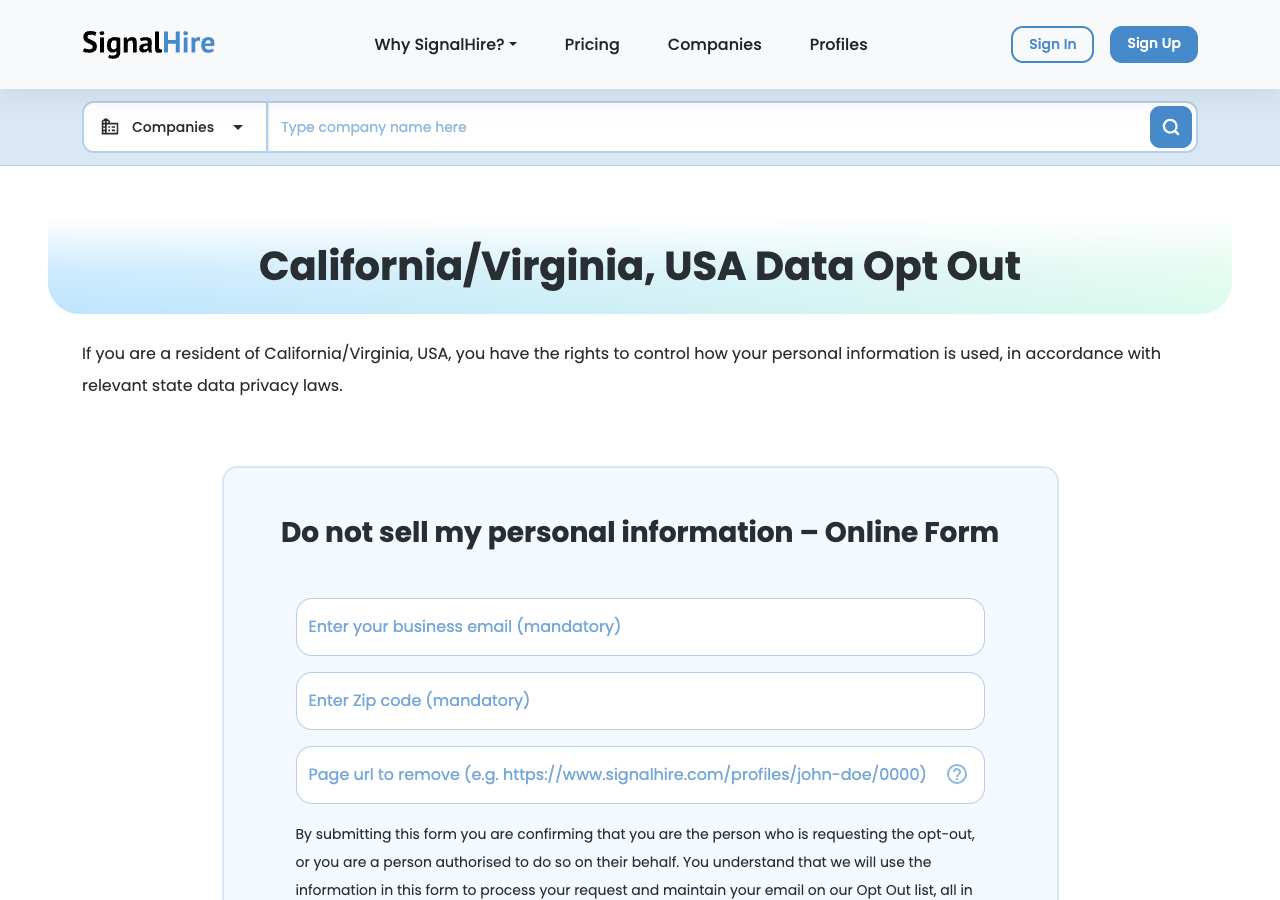
We loaded the opt-out page on signalhire.com on October 5, 2026 and it was up. The first screen asked for: Type company name here, Enter your business email (mandatory), Enter Zip code (mandatory), Page url to remove (e.g. https://www.signalhire.com/profiles.
This is a dated record of what our browser saw, not a removal. We never submit requests from this page.
Continue with your next privacy task
Found your details on another site?
- RocketReach opt-out instructions
Use this guide if you find a matching listing on RocketReach. Check that site separately; a request elsewhere does not establish removal here.
- Success.ai opt-out instructions
Use this guide if you find a matching listing on Success.ai. Check that site separately; a request elsewhere does not establish removal here.
Reduce exposed contact details before a job search
Review professional profiles while keeping a way for intended employers to contact you.
Read the how-toThe confirmation email never arrived
Check the site's requirements before retrying a request or sharing more information.
Read the how-toThe source page changed, but Google still shows it
Choose between a Google personal-info request and refreshing an outdated result.
Read the how-toRemind me to recheck SignalHire in 30 days
We'll send one reminder to verify the listing is actually gone. Confirm the email first; no ongoing marketing and no account required.
What is SignalHire?
SignalHire is a global B2B contact and lead database that serves recruiters, sales teams, and marketers. Unlike consumer people-search sites, SignalHire is designed for business use and maintains a database of over 850 million verified business and personal contact records, including emails, phone numbers, and social media profiles for professionals and companies.
The data comes from public sources, corporate directories, and professional networks. SignalHire sells access to this database to business users, and your profile may appear if you are listed in public professional records, on LinkedIn, or in business directories.
What a SignalHire listing can show
- Full name and professional title
- Business and personal email addresses
- Phone numbers (direct and mobile)
- Company name and industry
- Social media profiles and links
- Skills and keywords from professional profiles
Who runs SignalHire, and which sites one request covers
SignalHire is operated by SignalHire, a global B2B lead-generation platform based outside the US. It is not part of a larger parent company or consumer people-search network. SignalHire maintains its own database independent of other brokers, so opting out of SignalHire only affects SignalHire. Your data may still appear on other B2B databases like ZoomInfo, Apollo, and RocketReach, each of which requires a separate removal request.
What is the signalhire.com opt-out removal process?
SignalHire uses a direct web form at signalhire.com/do-not-sell. When we loaded it on October 5, 2026, the form displayed three fields: business email address (mandatory), zip code (mandatory), and page URL to remove (optional). No CAPTCHA is present, and no login or account is required. Submitting the form adds your email to SignalHire's do-not-sell list, which prevents your information from being sold or shared going forward.
How long it takes
SignalHire processes do-not-sell requests within a few business days. Your email will be added to their do-not-sell list, which prevents future sales and sharing. Existing customers of SignalHire who already purchased your contact information may retain it; the opt-out stops new sales going forward. Allow one to two weeks, then search SignalHire for your name to verify your profile is no longer publicly available.
SignalHire opt-out problems and fixes
The form says 'Enter your business email (mandatory)' but I only have a personal email
Try submitting with your personal email anyway. The field label says 'business email' but is likely asking for any email associated with your professional profile. If SignalHire has your personal email on record, that should work.
I cannot find my profile URL on SignalHire
The profile URL field is optional. Submit the form with just your email and zip code; SignalHire should be able to locate and remove your record. If you do have the URL, including it may speed up processing.
The form will not submit or shows an error
Ensure your email address is valid and your zip code is numeric (5 digits in the US). If the form still fails, disable ad blockers and privacy extensions for signalhire.com and try again in a regular browser.
My profile is still searchable after a week
Allow up to two weeks for the opt-out to take effect. SignalHire's do-not-sell list may take time to propagate. After two weeks, email support@signalhire.com with your request or search again to verify removal.
I submitted the form but did not receive a confirmation email
The page should show a confirmation message upon successful submission; you may not receive an email. If no message appeared, resubmit the form. If the issue persists, email support@signalhire.com.
Send this to support@signalhire.com
Subject: Request for deletion and do-not-sell opt-out from SignalHire database
Hello, I request that SignalHire delete my contact information and add my email address to your do-not-sell list, so that my information is no longer sold, shared, or used for outreach. Name: [Full name] Email address(es): [Email] Zip code: [Zip code] Profile URL if available: [Listing URL] I make this request under applicable state privacy and consumer protection laws. Please confirm by email once my record is removed and my email is added to your do-not-sell list. Thank you.
After you opt out of SignalHire
Your email address will be added to SignalHire's do-not-sell list, which stops new sales and sharing of your information going forward. Existing customers who previously purchased your contact data may retain it; the opt-out affects only future transactions. Re-check SignalHire every few months to ensure your profile is not re-listed, especially if your contact information changes. If you also sell or pitch your services via email or phone, file opt-outs with other B2B contact databases like ZoomInfo, Apollo, RocketReach, and ContactOut.
Realistic scope
This guide explains how to request the action SignalHire publishes for its own site. Reading the guide or sending a request does not establish completed removal. Other sites and original public records are separate; recheck the specific signalhire.com page after the site's response and if the information appears again.
Not yet a filed-for-you target
This page documents SignalHire's published privacy route. My Privacy Agent Patrol does not file this site automatically yet. An exposure check uses configured sources and does not confirm that this specific site is included.
SignalHire opt-out FAQ
Is SignalHire legit and is its do-not-sell form safe to use?
Yes. SignalHire is a legitimate B2B lead database used by recruiters and sales teams worldwide. Its do-not-sell form is the official opt-out and is safe to use. The form only collects your email and zip code, which it uses to locate and remove your record from future sales. Avoid paying third-party services for SignalHire removal; the official form is free and direct.
How do I remove myself from SignalHire?
Use the do-not-sell form at signalhire.com/do-not-sell: enter your business email address and zip code, optionally include your profile URL, and click Submit. Your email will be added to SignalHire's do-not-sell list within a few business days.
Is the SignalHire do-not-sell form free?
Yes. The do-not-sell form is free and open to anyone. You do not need a SignalHire account or subscription to opt out.
What happens when I submit the do-not-sell form?
SignalHire adds your email address to its do-not-sell list, which prevents your information from being sold or shared with new customers going forward. Existing customers who already purchased your data may retain it; the opt-out stops future sales.
How long does SignalHire take to process my opt-out request?
SignalHire typically processes do-not-sell requests within a few business days. Allow one to two weeks for the change to propagate through their system, then search SignalHire for your name to verify your profile is no longer publicly available.
Will opting out of SignalHire remove me from ZoomInfo or Apollo?
No. SignalHire maintains its own database independent of other B2B contact platforms. You need separate opt-out requests for ZoomInfo, Apollo, RocketReach, and other B2B databases.
What if I have multiple email addresses on SignalHire?
Submit the do-not-sell form for each email address you have on record. Repeat the process for every email address that appears in your SignalHire profile.
Can I opt out without a profile URL?
Yes. The profile URL field is optional. Submitting with just your email and zip code should be sufficient for SignalHire to locate and remove your record.
Related opt-outs to clear next
Snov.io
B2B Lead Generation · snov.io
Open guideShortlyst
B2B Lead Generation · shortlyst.ai
Open guideSpeedeon Data
B2B Lead Generation · speedeondata.com
Open guideShadow Inc.
B2B Lead Generation · shadowinc.io
Open guideSprouts.ai
B2B Lead Generation · sprouts.ai
Open guideSeekOut
B2B Lead Generation · seekout.com
Open guideSources and review
Reviewed October 5, 2026 against SignalHire's own pages and the sources below. Broker forms change often; if something here no longer matches, the official page wins.
Review and change history
A content review or directory snapshot is reference history. A historical route observation does not establish submission, provider acceptance or removal, and does not establish a current working route. Current independent evidence has its own scope and expiry.
· Guide content reviewed against the published sources. This is the recorded review baseline; no earlier editorial change log is available.
· Historical route observation: reachable (HTTP 200). This describes only the page observed on that date; later steps and today's availability were not established by that observation.
Read current independent route evidence. That record reports its own scope, date, expiry and any gaps; this history does not renew verification.