ContactOut opt-out: how to remove your email and phone number
Go to ContactOut's official opt-out page (contactout.com/optout), enter the email address ContactOut has on you, and verify your email when ContactOut sends the link. ContactOut says it deletes the matching profile within 24 hours. The form showed a Cloudflare-style human check when we loaded it on October 5, 2026, so use a normal browser without a VPN. If it fails, email support@contactout.com.
Reading current independent checks… See route evidence
Work through this with your agent
Give your agent the published steps, sources and read-only tools. It should check the current official process and ask before taking action.
Copies public guidance only. You still approve any request your agent submits.
View or select the instructions
Remove your professional profile from ContactOut
ContactOut is used for business contact, recruiting, or sales research. Removing this profile is separate from opting out of consumer people-search sites.
Use the published privacy route above to identify the recruiting contact profile you want addressed. Share only the information that route requires, complete any verification it requests, and save the response. Recheck the original profile separately; sending a request does not establish that it was removed.
Remove yourself from ContactOut
7 steps. Use the official site in a normal browser and follow its current instructions if a human check fails.
- 01
Open the official opt-out page
Go to contactout.com/optout. Check the address bar before you type anything: the official form is on contactout.com itself, and you never need to pay, sign up or install anything to opt out.
- 02
Enter the email address on your profile
Type the email address into the "Enter your email" field. ContactOut says it uses your details only to identify your record. If both a personal and a work address appear on your profile, start with the one most likely to be the primary record.
- 03
Pass the human check and submit
Complete the Turnstile verification and submit the form. When we loaded it on October 5, 2026 the check was a standard "verify you are human" widget. If it will not pass, turn off your VPN and ad or script blockers, or switch to another browser.
- 04
Click the verification link
ContactOut emails you a verification link to confirm the address is yours. Nothing is processed until you click it. Check spam and promotions folders, and request a fresh link if the first email does not arrive within an hour.
- 05
Wait for the deletion
ContactOut states on the opt-out page that it deletes the matching profile within the next 24 hours. Do not re-submit repeatedly during that window; give the request a day or two to work through.
- 06
Follow up by email if needed
If your details still surface after several days, email support@contactout.com from the address you verified, with the date you submitted and the email used, and ask for confirmation that the record was deleted.
- 07
Repeat for your other addresses
Contact data brokers key records to email addresses. If your profile listed more than one, or you appear under both a personal and a work identity, run the form once per address and verify each email.
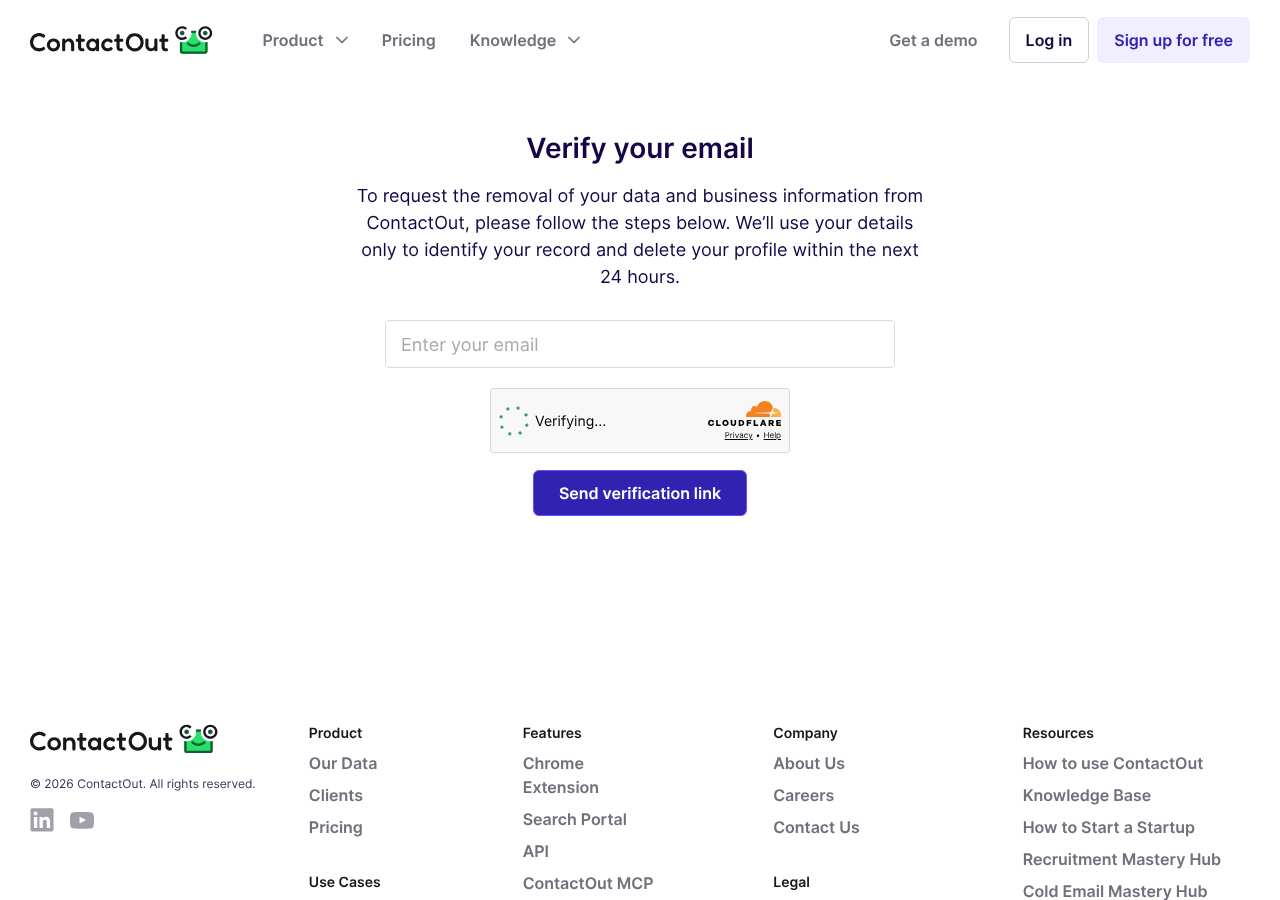
What the ContactOut opt-out page looked like when we checked
We loaded the opt-out page on contactout.com on October 5, 2026 and it was up. The first screen asked for: Enter your email. The page includes a Cloudflare Turnstile check.
This is a dated record of what our browser saw, not a removal. We never submit requests from this page.
Continue with your next privacy task
Found your details on another site?
- RocketReach opt-out instructions
Use this guide if you find a matching listing on RocketReach. Check that site separately; a request elsewhere does not establish removal here.
- Success.ai opt-out instructions
Use this guide if you find a matching listing on Success.ai. Check that site separately; a request elsewhere does not establish removal here.
Reduce exposed contact details before a job search
Review professional profiles while keeping a way for intended employers to contact you.
Read the how-toThe confirmation email never arrived
Check the site's requirements before retrying a request or sharing more information.
Read the how-toThe source page changed, but Google still shows it
Choose between a Google personal-info request and refreshing an outdated result.
Read the how-toRemind me to recheck ContactOut in 30 days
We'll send one reminder to verify the listing is actually gone. Confirm the email first; no ongoing marketing and no account required.
What is ContactOut?
ContactOut is a B2B contact-finding platform. Recruiters, salespeople and marketers use it to look up professionals: its database covers hundreds of millions of professionals at tens of millions of companies, and its Chrome extension reveals email addresses and phone numbers while you browse LinkedIn. Customers can search by job title, company, location, skills and the technologies a business uses.
You do not need to have signed up to be in it. ContactOut says it crawls and indexes publicly available email addresses and phone numbers from websites and social media, and that it triple-verifies each contact and refreshes its database hourly. That is why your current work email, or a personal number you posted years ago, can show up in a prospecting list you never joined.
What a ContactOut listing can show
- Full name, photo and current job title
- Personal and business email addresses
- Mobile and direct-dial phone numbers
- Current employer and work history
- LinkedIn profile link
- Location
Who runs ContactOut, and which sites one request covers
ContactOut is a standalone, privately held US company; it does not publish a parent company, and it is not one brand in a people-search network, so a ContactOut removal covers ContactOut only. The same contact details usually also sit in similar B2B databases such as ZoomInfo, RocketReach, Apollo and SignalHire, and each of those needs its own opt-out. ContactOut lists support@contactout.com as its contact for privacy and account questions.
What is the contactout.com opt-out removal process?
The contactout.com opt-out is an email-verification flow. The page at contactout.com/optout asks for one thing — the email address on your profile — and shows a Cloudflare Turnstile human check. When we loaded it on October 5, 2026 it displayed a single "Enter your email" field. You submit, click the verification link ContactOut emails you, and ContactOut says it deletes the matching profile within 24 hours. If the form fails, email support@contactout.com.
How long it takes
ContactOut says on the opt-out page that it deletes your profile within 24 hours of verification. In practice, give it two to three days, then re-check: search ContactOut for your name while logged out, or preview your profile through its Chrome extension. If your details still appear after a week, email support@contactout.com with the verification date and the address you used, and ask for a confirmation.
ContactOut opt-out problems and fixes
The verification email never arrived
Check spam, promotions and any filtering rules, then resubmit the form once. If a second attempt also produces nothing, email support@contactout.com from the same address and ask them to verify and process the request manually.
The human-verification check keeps failing
Turnstile often fails behind a VPN, proxy or aggressive privacy extensions. When we loaded the page on October 5, 2026 it showed that check; load it in a normal browser window, extensions off, VPN off.
My profile shows an email I no longer control
Submit the form with an address you do control, then email support@contactout.com explaining the old address is yours and naming your current employer or LinkedIn URL so they can match the right record.
My details are still visible after 24 hours
Wait two to three days total — caches and customer exports take time to clear. If a week passes, email support@contactout.com with your verification date and ask for confirmation of deletion.
My phone number still shows up on other sites
ContactOut only controls ContactOut. The same number is usually also in ZoomInfo, RocketReach, Apollo and SignalHire; opt out of each one separately.
My profile came back months later
ContactOut re-crawls public websites and social media, so anything you re-post publicly can be re-indexed. Repeat the opt-out and review what you publish publicly on your profiles.
Send this to support@contactout.com
Subject: Request to remove my personal data from ContactOut
Hello, Under applicable state privacy laws, including the CCPA where it applies, I request that ContactOut remove my personal information from its database and stop making it available to customers. Name: [Full name] Email address on the profile: [Email] Location: [City, State] Profile or LinkedIn URL: [Listing URL] I completed the opt-out form on [date]. Please confirm by email once the removal is done. Thank you.
After you opt out of ContactOut
Save the verification and confirmation emails. Because ContactOut continuously re-crawls public sources, your profile can be rebuilt from anything still public about you — especially after a job change. Re-check ContactOut every two to three months, and clear the same contact details from the other B2B databases; that ongoing re-checking is what My Privacy Agent's Patrol plan automates.
Realistic scope
This guide explains how to request the action ContactOut publishes for its own site. Reading the guide or sending a request does not establish completed removal. Other sites and original public records are separate; recheck the specific contactout.com page after the site's response and if the information appears again.
Not yet a filed-for-you target
This page documents ContactOut's published privacy route. My Privacy Agent Patrol does not file this site automatically yet. An exposure check uses configured sources and does not confirm that this specific site is included.
ContactOut opt-out FAQ
Is ContactOut legit, and is its opt-out safe to use?
Yes. ContactOut is a real, established B2B contact-data company used by recruiters and sales teams, and it says it is SOC 2 certified. The opt-out form on contactout.com is the official route, it is free, and it asks only for an email address to identify your record. Do not pay third-party sites that offer to remove you from ContactOut.
How do I remove my data from ContactOut?
Use the official form at contactout.com/optout: enter the email address on your profile, pass the human check, and click the verification link ContactOut emails you. That deletes the matching profile. The alternative is emailing support@contactout.com.
Is the ContactOut opt-out free?
Yes. The opt-out form and the support@contactout.com email route are both free, and neither requires a ContactOut subscription or account.
How long does ContactOut take to remove my profile?
ContactOut states on the opt-out page that it deletes the identified profile within 24 hours of verification. Allow two to three days before re-checking, and follow up by email if your details are still visible after a week.
Why does ContactOut have my personal email address?
ContactOut says it crawls and indexes publicly available email addresses and phone numbers from websites and social media. If your address appeared on a public profile, company page or old post, it likely entered the database that way.
Does removing myself from ContactOut remove me from ZoomInfo or RocketReach?
No. Each B2B contact database builds and stores its own copy. You need separate opt-out requests for ZoomInfo, RocketReach, Apollo, SignalHire and similar services.
Can I opt out if I no longer control the email on my profile?
Yes. Submit the form with a current address you control, then email support@contactout.com explaining the situation and giving your name, employer and LinkedIn URL so they can locate the record.
Related opt-outs to clear next
Cortera, Inc.
B2B Lead Generation · cortera.com
Open guideCommercial List
B2B Lead Generation · companydirectorylist.com
Open guideCommercial Real Estate Exchange, Inc.
B2B Lead Generation · crexi.com
Open guideCognism
B2B Lead Generation · cognism.com
Open guideCyndx
B2B Lead Generation · cyndx.com
Open guideClosely
B2B Lead Generation · closelyhq.com
Open guideSources and review
Reviewed October 5, 2026 against ContactOut's own pages and the sources below. Broker forms change often; if something here no longer matches, the official page wins.
Review and change history
A content review or directory snapshot is reference history. A historical route observation does not establish submission, provider acceptance or removal, and does not establish a current working route. Current independent evidence has its own scope and expiry.
· Guide content reviewed against the published sources. This is the recorded review baseline; no earlier editorial change log is available.
· Historical route observation: reachable (HTTP 200). This describes only the page observed on that date; later steps and today's availability were not established by that observation.
Read current independent route evidence. That record reports its own scope, date, expiry and any gaps; this history does not renew verification.