How to remove yourself from Intelius (2026 opt-out guide)
Guide content reviewed 2026-10-22
Reading current independent checks… See route evidence
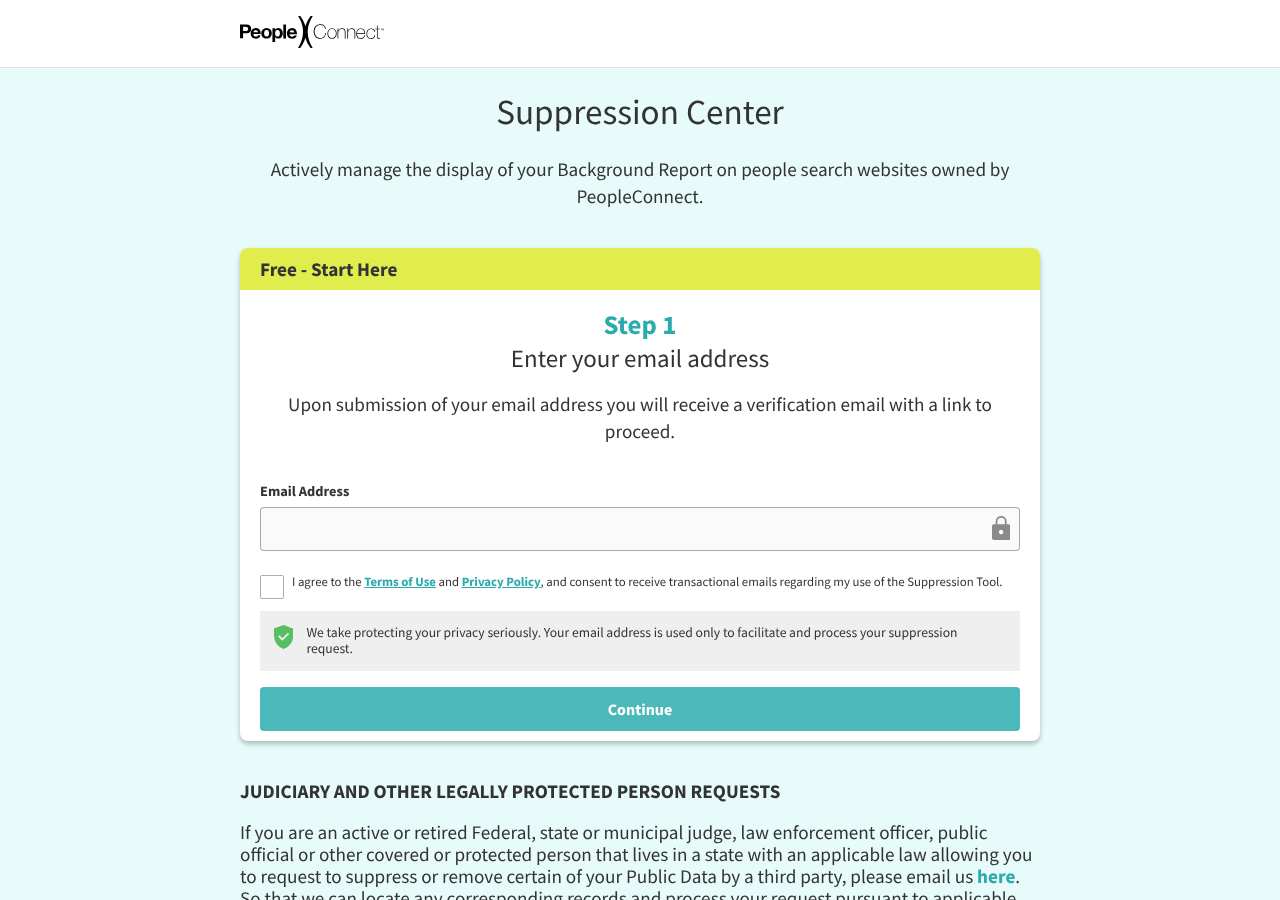
Intelius links to PeopleConnect’s Suppression Center. The official Center says its free tool manages display of a public Background Report returned by a name search on Intelius, TruthFinder, Instant Checkmate, and US Search. Start with an email address, accept the displayed terms and privacy notice, and follow the emailed verification link. This controls a defined PeopleConnect report display; it does not delete source records or cover every kind of information or search.
Direct link to suppression.peopleconnect.us. Opt-outs on this page are free; you never need to pay Intelius or us to use them.
Work through this with your agent
Give your agent the published steps, sources and read-only tools. It should check the current official process and ask before taking action.
Copies public guidance only. You still approve any request your agent submits.
View or select the instructions
Check if you are listed on Intelius
Intelius does not expose a stable public search URL we can prefill, so find your listing directly: open intelius.com, search your full name plus your state (and previous states), and copy the URL of the record that is you. The opt-out form usually asks for that URL or the same name and location.
What Intelius typically shows
- Public Background Reports returned in response to name searches; this review did not inspect an individual report.
An exposure report can help organize candidate listings before you work through the site's official steps.
Remove yourself from Intelius
8 steps. Use the official site in a normal browser and follow its current instructions if a human check fails.
- 01
Open the PeopleConnect Suppression Center
Use https://suppression.peopleconnect.us/. The official page names Intelius as one of the covered people-search sites. Check the address bar before entering information.
- 02
Understand the scope before continuing
The tool manages display of the public Background Report returned by a name search on Intelius and the other three named sites. It does not cover User Data, Classmates.com, or third-party source records, and some other search features may still display information.
- 03
Enter an email address you can access
The first screen asks for an “Email Address.” PeopleConnect says it uses the address to facilitate and process the request and will email a verification link. Use an inbox you control.
- 04
Review and accept the displayed terms if you choose to proceed
The checkbox accepts the Terms of Use and Privacy Policy and consents to transactional emails regarding use of the tool. Read those notices before checking the box; continue only if you agree.
- 05
Verify your email and follow the portal prompts
Open the verification message and use its link to return to the official Center. Later screens were not publicly documented in the review, so provide only what the authenticated tool asks for to locate your own report. Do not select a record if its identity is uncertain.
- 06
Keep the suppression account information
PeopleConnect’s Privacy Center says deleting your user data also deletes suppressions associated with that user. If you want a suppression to remain, do not use the user-data deletion control for that account.
- 07
Save the confirmation and check covered name-search reports
Keep any confirmation and note the date and sites you checked. The tool is described as controlling name-search display, not deleting source records. If public data remains on PeopleConnect sites after using the tool, the Center says to contact PeopleConnect for help.
- 08
Use the separate authorized-agent route only when its conditions apply
PeopleConnect’s Privacy Center says certain laws permit authorized agents to submit privacy-rights requests. It publishes two verification paths: a consumer-signed written authorization listing the consumer’s full name, address, telephone number, and valid email used with PeopleConnect, plus the agent’s certificate of good standing from its state of organization; or a valid power of attorney signed by the consumer and a valid consumer email used with PeopleConnect. PeopleConnect says it will separately verify the consumer’s email. This is a provider-specific process for qualifying requests under certain laws, not a general entitlement. An AI assistant may help prepare material for the consumer to review, but do not assume that an AI assistant qualifies as an authorized agent; the consumer must review and explicitly authorize any external action, and PeopleConnect’s verification still applies.
What the Intelius opt-out page looked like when we checked
We loaded the opt-out page on suppression.peopleconnect.us on October 5, 2026 and it was up. The first screen asked for: Email Address, I agree to the Terms of Use and Privacy Policy, and consent .
This is a dated record of what our browser saw, not a removal. We never submit requests from this page.
Continue with your next privacy task
Found your details on another site?
- TruePeopleSearch opt-out instructions
Use this guide if you find a matching listing on TruePeopleSearch. Check that site separately; a request elsewhere does not establish removal here.
- Unmask opt-out instructions
Use this guide if you find a matching listing on Unmask. Check that site separately; a request elsewhere does not establish removal here.
The source page changed, but Google still shows it
Choose between a Google personal-info request and refreshing an outdated result.
Read the how-toYou found more than one profile
Keep separate records of each matching URL so an extra listing is not missed.
Read the how-toThe confirmation email never arrived
Check the site's requirements before retrying a request or sharing more information.
Read the how-toRemind me to recheck Intelius in 30 days
We'll send one reminder to verify the listing is actually gone. Confirm the email first; no ongoing marketing and no account required.
What is Intelius?
Intelius is a PeopleConnect people-search brand. PeopleConnect’s Suppression Center identifies Intelius, TruthFinder, Instant Checkmate, and US Search as the sites where its tool manages display of a Background Report returned by name search. This named four-brand scope is the one documented here; it is not a promise that every PeopleConnect property or affiliated site is covered.
PeopleConnect calls the covered information “Public Data” and distinguishes it from “User Data” collected by the sites. Its public page says the tool does not cover User Data, Classmates.com, or third-party source information. It also warns that details may remain visible through phone, address, or email search features and registered-sex-offender lists, and that small data mismatches can make it difficult to locate everything associated with a person.
What a Intelius listing can show
- Public Background Reports returned in response to name searches; this review did not inspect an individual report.
Who runs Intelius, and which sites one request covers
PeopleConnect operates Intelius and the Suppression Center. The Center names TruthFinder, Instant Checkmate, Intelius, and US Search as the people-search sites whose name-search Background Reports the tool can manage. The company also lists Classmates.com in its family but expressly says this tool does not apply there. Treat the four named people-search sites as the documented coverage, and check the Center for any change before acting.
Same request also covers: intelius.com, truthfinder.com, instantcheckmate.com, ussearch.com
What is the intelius.com opt-out removal process?
The official PeopleConnect Suppression Center starts with an “Email Address” field, a checkbox accepting its Terms of Use and Privacy Policy and consenting to transactional emails, and a Continue button. The page says it will email a verification link. After that, use the authenticated Center’s current prompts to manage the display of your own name-search Background Report. The public page reviewed here does not document later identity fields or completion controls; no personal data was entered and no request was submitted.
How long it takes
The public Suppression Center and Privacy Center reviewed on October 22, 2026 do not state a processing-time promise for this tool. A verification email is the first step, not confirmation that suppression has been completed. Save any final confirmation and check the name-search reports on the covered sites later. If public data remains after using the tool, PeopleConnect says to contact it for help.
Intelius opt-out problems and fixes
The verification email does not arrive
Check that the email address was entered correctly and look in spam or promotions. The public page says a verification link is sent after email submission; it does not state an arrival time. Use the Center’s displayed instructions or contact privacy@peopleconnect.us if you cannot continue.
The portal shows a record that may not be yours
Do not proceed based on a name match alone. Use only details the authenticated portal provides to distinguish your own report, and stop if you cannot tell. Contact PeopleConnect through the official privacy contact for help.
Information still appears after suppression
Check what kind of result remains. The tool covers Public Data generated in response to name searches on the named people-search sites; it does not control third-party sources or User Data, and PeopleConnect says information may remain through phone, address, or email searches and registered-sex-offender lists. Contact PeopleConnect if covered public data remains.
You want to delete your Suppression Center user data
Read the Privacy Center notice first: PeopleConnect says deleting user data also deletes any suppressions associated with that user. Do not use that control if maintaining a suppression is your goal.
The portal asks for unexpected information
Pause and review the Center’s linked terms and privacy notice. The public page reviewed here exposed only the email-and-consent entry step; it did not establish what later fields may be requested. Contact PeopleConnect if a prompt is unclear.
Send this to privacy@peopleconnect.us
Subject: Help with PeopleConnect Suppression Center
Hello, I need help using the PeopleConnect Suppression Center to manage the display of a public Background Report in name-search results. Please tell me the current steps and what information you need to locate the correct record. Email used in the Center: [Email] Relevant PeopleConnect site: Intelius Report URL, if available: [URL] I understand this message is not confirmation that a suppression has been completed. Thank you.
After you opt out of Intelius
Keep any confirmation and preserve the Suppression Center user information associated with it; PeopleConnect says deleting that user data also deletes associated suppressions. The documented control covers the public Background Report returned by name search on Intelius, TruthFinder, Instant Checkmate, and US Search. It does not delete third-party source records or User Data, and may not remove information shown through other search features. Handle unrelated people-search sites through their own published privacy controls.
Who does what for Intelius
The honest split, so nothing here reads as a promise we cannot keep.
What we handle
- Opening the official Intelius form pre-filled with your scan details.
- Tracking the request status after you complete the step only you can do.
- Re-checking intelius.com before anything is marked removed.
What you must do
- Complete the step Intelius requires from you directly: email confirmation.
- Open the confirmation email and click the link -- the request is not filed until you do.
- Re-check intelius.com after the timing stated in this guide and repeat the process if the listing returns.
Realistic scope
Keep any confirmation and preserve the Suppression Center user information associated with it; PeopleConnect says deleting that user data also deletes associated suppressions. The documented control covers the public Background Report returned by name search on Intelius, TruthFinder, Instant Checkmate, and US Search. It does not delete third-party source records or User Data, and may not remove information shown through other search features. Handle unrelated people-search sites through their own published privacy controls.
My Privacy Agent opens the Intelius form and tracks the outcome.
Intelius requires a step only you can do (email confirmation). After you authorize a mission, our agent opens the official form with your scan details, hands you that step, records the request as filed only when the site confirms it, and re-checks the listing before anything is called removed. If the site blocks the agent, you get the same instructions above instead of a fake status.
Current service availability and terms are listed on the pricing page. Nothing is marked removed before a provider or native action succeeds.
Intelius opt-out FAQ
What does the Intelius suppression tool cover?
PeopleConnect’s official Center describes a free tool that manages display of public Background Reports returned by name search on Intelius, TruthFinder, Instant Checkmate, and US Search. It excludes User Data, Classmates.com, and third-party source information, and warns that some phone, address, or email search results and registered-sex-offender listings may remain.
How do I opt out of Intelius?
Open PeopleConnect’s Suppression Center, enter an email address, review and accept the displayed terms if you agree, and follow the emailed verification link. Then use the authenticated Center’s current prompts for your own Intelius name-search report.
Which sites are named as covered?
The Center names Intelius, TruthFinder, Instant Checkmate, and US Search. It expressly excludes Classmates.com; do not assume unnamed affiliated or unrelated sites are covered.
Does this delete my information from the source?
No. PeopleConnect says the tool does not affect third-party sources. It manages the display of a public Background Report returned by name search on the covered people-search sites.
Can information still appear in other searches?
It may. PeopleConnect warns that information may continue to appear through phone, address, or email report features and registered-sex-offender lists.
How long does Intelius suppression take?
The public Center reviewed for this guide does not state a processing timeline. The emailed link is a verification step, not proof that suppression has been completed.
What happens if I delete my Suppression Center user data?
PeopleConnect’s Privacy Center says deleting your user data also deletes suppressions associated with that user. Preserve the account information if you want the suppression to remain.
Can an authorized agent submit a privacy request for me?
PeopleConnect says certain laws permit authorized agents to submit privacy-rights requests. Its Privacy Center publishes a route using a signed written authorization that must include the consumer’s full name, address, telephone number, and valid PeopleConnect email, plus the agent’s state certificate of good standing; alternatively it accepts a valid power of attorney signed by the consumer and a valid consumer email. PeopleConnect says it will separately verify the consumer’s email. These are PeopleConnect’s conditions for its published agent-request path, not a general legal entitlement. An AI assistant may help prepare material for the consumer to review, but do not assume that an AI assistant qualifies as an authorized agent; the consumer must review and explicitly authorize any external action, and provider verification still applies.
Does My Privacy Agent remove me from Intelius automatically?
Intelius requires a step only you can do (email confirmation). After you authorize a mission, our agent opens the official form with your scan details, hands you that step, records the request as filed only when the site confirms it, and re-checks the listing before anything is called removed. If the site blocks the agent, you get the same instructions above instead of a fake status.
Related broker opt-outs
The reviewed shared suppression scope names intelius.com, truthfinder.com, instantcheckmate.com, ussearch.com; other related sites need separate checks.
TruthFinder
TruthFinder is a paid background-report service owned by PeopleConnect.
Open guideInstant Checkmate
Instant Checkmate is a PeopleConnect background-report brand.
Open guideZabaSearch
ZabaSearch is a free people-search front end owned by PeopleConnect (Intelius).
Open guideUS Search
US Search is one of the oldest people-search brands and now belongs to PeopleConnect.
Open guideSources and review
Reviewed October 22, 2026 against Intelius's own pages and the sources below. Broker forms change often; if something here no longer matches, the official page wins.
Reviewed the public PeopleConnect Suppression Center and Privacy Center in an ordinary browser on October 22, 2026, including the email-and-consent entry step, named people-search brands, stated limitations, user-data deletion effect, and published authorized-agent conditions for certain privacy-rights requests. The verification email was not requested or followed; no personal data was entered, and no individual record was inspected or request submitted.
Review and change history
A content review or directory snapshot is reference history. A historical route observation does not establish submission, provider acceptance or removal, and does not establish a current working route. Current independent evidence has its own scope and expiry.
· Historical route observation: reachable (HTTP 200). This describes only the page observed on that date; later steps and today's availability were not established by that observation.
· Reviewed the public PeopleConnect Suppression Center and Privacy Center in an ordinary browser on October 22, 2026, including the email-and-consent entry step, named people-search brands, stated limitations, user-data deletion effect, and published authorized-agent conditions for certain privacy-rights requests. The verification email was not requested or followed; no personal data was entered, and no individual record was inspected or request submitted. This is the recorded review baseline; no earlier editorial change log is available.
· Reviewed the rendered PeopleConnect Suppression Center and Privacy Center. Narrowed coverage to the four named name-search services, documented excluded search types and source records, removed unsourced processing times, and explained that deleting suppression-account data also deletes associated suppressions. Added the published authorized-agent conditions and separate consumer verification without implying that an AI qualifies or that a request was submitted.
Read current independent route evidence. That record reports its own scope, date, expiry and any gaps; this history does not renew verification.