How to remove yourself from US Search (2026 opt-out guide)
Guide content reviewed 2026-10-05
Reading current independent checks… See route evidence
Open the US Search Privacy Center and follow its link to the PeopleConnect Suppression Center. Enter an email address you control, agree to the portal terms, and complete the emailed verification step. Then search for your name, select the correct US Search report, and submit suppression for that record. An earlier estimate of 72 hours exists, but the current portal does not show a processing time. Re-check the listing after the request is processed.
Direct link to ussearch.com. Opt-outs on this page are free; you never need to pay US Search or us to use them.
Work through this with your agent
Give your agent the published steps, sources and read-only tools. It should check the current official process and ask before taking action.
Copies public guidance only. You still approve any request your agent submits.
View or select the instructions
Check if you are listed on US Search
US Search does not expose a stable public search URL we can prefill, so find your listing directly: open ussearch.com, search your full name plus your state (and previous states), and copy the URL of the record that is you. The opt-out form usually asks for that URL or the same name and location.
What US Search typically shows
- Full name and age
- Current and previous home addresses
- Phone numbers
- Names of relatives and associates
- Property and home-value information
- Employment and social-profile details
- Public-record and background-report information
An exposure report can help organize candidate listings before you work through the site's official steps.
Remove yourself from US Search
8 steps. Use the official site in a normal browser and follow its current instructions if a human check fails.
- 01
Find the US Search report
Search US Search for your full name and a current or former city. Compare the address history, age, relatives and phone details with your own information. Note the report or profile details you want suppressed. This helps you choose the right record later when the PeopleConnect portal shows matching reports.
- 02
Open the official Privacy Center
Start at the US Search Privacy Center. The older opt-out address redirects to the PeopleConnect Suppression Center, so a different domain in the address bar can be expected. Confirm that the page is the PeopleConnect suppression service before entering your email. You do not need to buy a report to request suppression.
- 03
Enter an email address you control
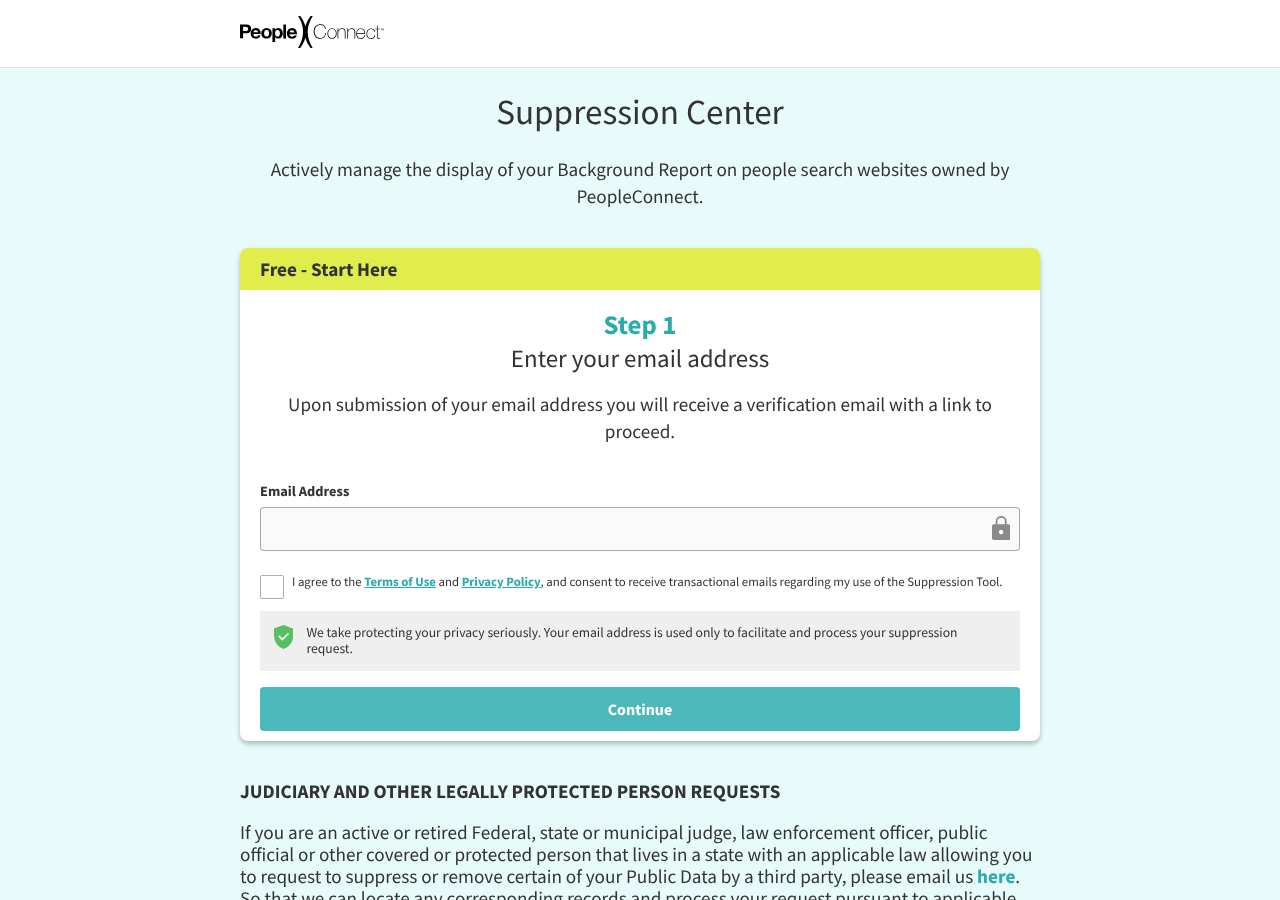
At the first portal screen, enter an email address that you can open. When we loaded it on October 5, 2026, the screen showed an Email Address field and a consent checkbox. Use an address that lets you receive the verification message. Avoid entering someone else's address or an address you cannot access.
- 04
Accept the portal terms and continue
Read the Terms of Use and Privacy Policy link, select the consent checkbox, and continue. The portal uses this email-login stage to identify the request before it displays the suppression workflow. If the page does not respond, reload it in a normal browser and check that scripts are enabled.
- 05
Complete the emailed verification
Open the verification email from PeopleConnect and follow its link or enter its code, depending on what the message requests. Check spam, promotions and filtering rules first. The request is not ready for record selection until this verification step succeeds. Keep the message until you confirm the listing is no longer shown.
- 06
Search for and select your record
After verification, search for your name and review the candidate reports. Select the US Search record that matches your address history, age, relatives or other identifying details. If multiple records belong to you, select each applicable record. Do not select a stranger's report just because the name is similar.
- 07
Submit suppression and save the confirmation
Use the portal's suppression control for the selected report and wait for its confirmation. Save the confirmation screen or email and note the date. A successful email-login step alone does not show that a report was selected or suppressed. If the portal offers more than one brand record, repeat the selection for each record you own.
- 08
Check US Search again
Search US Search again after the request has had time to process. Check the exact report details you recorded, not only a general name search. If the listing remains visible, keep your confirmation and contact support@ussearch.com with your name, the email used, the date of the request and the listing URL.
What the US Search opt-out page looked like when we checked
We loaded the opt-out page on suppression.peopleconnect.us on October 5, 2026 and it was up. The first screen asked for: Email Address, I agree to the Terms of Use and Privacy Policy, and consent .
This is a dated record of what our browser saw, not a removal. We never submit requests from this page.
Continue with your next privacy task
Found your details on another site?
- TruePeopleSearch opt-out instructions
Use this guide if you find a matching listing on TruePeopleSearch. Check that site separately; a request elsewhere does not establish removal here.
- Unmask opt-out instructions
Use this guide if you find a matching listing on Unmask. Check that site separately; a request elsewhere does not establish removal here.
The source page changed, but Google still shows it
Choose between a Google personal-info request and refreshing an outdated result.
Read the how-toYou found more than one profile
Keep separate records of each matching URL so an extra listing is not missed.
Read the how-toThe confirmation email never arrived
Check the site's requirements before retrying a request or sharing more information.
Read the how-toRemind me to recheck US Search in 30 days
We'll send one reminder to verify the listing is actually gone. Confirm the email first; no ongoing marketing and no account required.
What is US Search?
US Search is a people-search and public-records service. It lets customers look up people by name and find a report that may combine contact details, address history, age, relatives, property information, employment details, social-profile links and other public-record information. A report can be created even if you never opened an account with US Search.
US Search is part of the PeopleConnect operator family. PeopleConnect runs a shared suppression portal for several of its people-search brands. That matters because the portal can let you find and suppress records across the family, but it does not control unrelated data brokers. Removing a US Search report will not automatically remove matching records at every other people-search service. New records can also appear when the underlying data is refreshed.
What a US Search listing can show
- Full name and age
- Current and previous home addresses
- Phone numbers
- Names of relatives and associates
- Property and home-value information
- Employment and social-profile details
- Public-record and background-report information
Who runs US Search, and which sites one request covers
US Search is a PeopleConnect people-search brand. The current opt-out route redirects to PeopleConnect's shared Suppression Center, which covers US Search, Intelius, TruthFinder, Instant Checkmate, ZabaSearch and other PeopleConnect-family domains. US Search lists support@ussearch.com as its support contact. Treat the shared portal as a family suppression route, not as a control for unrelated brokers such as other background-report or contact-search services.
Same request also covers: addresses.com, anywho.com, backgroundhawk.com, criminal.com, criminaldatacheck.com, criminalrecords.com, easybackgroundchecks.com, instantcheckmate.com, instantcheckspy.com, intelius.com, northcarolinapublicrecords.org, peopleconnect.us, peoplefind.com, peoplefinder.com, privateeye.com, publiclibraries.com, publicrecords.com, recordspage.org, recordsquarry.com, reversephonelookup.com, sheriffsdepartment.net, snoopstation.com, southcarolinapublicrecords.com, truthfinder.com, zabasearch.com
What is the ussearch.com opt-out removal process?
The current US Search route is a redirect into a shared PeopleConnect email-login portal. When we loaded it on October 5, 2026, the first screen was reachable and showed an Email Address field plus a checkbox agreeing to the Terms of Use and Privacy Policy. The portal then uses emailed verification before you search for your name, pick the matching report and request suppression. No CAPTCHA or processing-time estimate was shown. You should complete the record-selection step; an email submission by itself is not proof that the report was suppressed.
How long it takes
The current PeopleConnect portal did not display a processing-time estimate when we loaded it on October 5, 2026. An earlier estimate of 72 hours exists, but treat that as a prior estimate rather than a promise about the current portal. Re-check after several days using the same name and location details. If the report remains, contact support@ussearch.com and include the confirmation from the suppression request.
US Search opt-out problems and fixes
The US Search link sends me to another domain
That redirect is expected for the current PeopleConnect-family flow. Confirm that the destination is the PeopleConnect Suppression Center and that the page asks for an email address and consent. Do not enter information on an unrelated lookalike site.
The verification email or code did not arrive
Check spam, promotions, quarantine and mail filters, then request the message again once. Make sure the email address was typed correctly. If the message still does not arrive, contact support@ussearch.com and explain that the portal verification did not reach you.
I cannot tell which report is mine
Compare the candidate reports with your age, current and past addresses, relatives and phone details. If the information is not enough to distinguish two records, do not choose at random. Save the report details and ask support@ussearch.com for help identifying the correct record.
The portal is blank or the continue button does nothing
The suppression service is a client-rendered page. Try a current browser with JavaScript enabled, a private window or another browser. Disable a script blocker just for the official page, and try without a VPN if the page keeps failing. No CAPTCHA was shown when we loaded it on October 5, 2026.
My US Search report is still visible after I submitted
Confirm that you completed email verification, selected the matching report and received a suppression confirmation. Search again after several days. If it is still live, email support@ussearch.com with the confirmation, request date and listing URL. Do not submit a stranger's record.
The report disappeared and later came back
People-search records can be rebuilt from refreshed public-record and third-party data. Repeat the suppression request for the new record and retain the earlier confirmation. Check the other PeopleConnect-family domains in the covered-sites list and submit separate requests to unrelated brokers.
Send this to support@ussearch.com
Subject: Privacy opt-out request for my US Search listing
Hello, Under applicable state privacy laws, including the CCPA where it applies, I request that US Search delete the personal information it holds about me and stop selling or sharing it. Name: [Full name] Email used for the request: [Email] Location: [City, State] Listing URL: [Listing URL] Please confirm by email when the request has been processed and let me know if you need anything else to identify the correct listing. Thank you.
After you opt out of US Search
Keep the verification and suppression confirmations. Search US Search again every few months, especially after a move, job change or new public record. The shared PeopleConnect route may cover the family domains listed above, but other brokers maintain separate copies and need their own opt-outs. Fresh data can recreate a report.
Who does what for US Search
The honest split, so nothing here reads as a promise we cannot keep.
What we handle
- Opening the official US Search form pre-filled with your scan details.
- Tracking the request status after you complete the step only you can do.
- Re-checking ussearch.com before anything is marked removed.
What you must do
- Complete the step US Search requires from you directly: email confirmation.
- Open the confirmation email and click the link -- the request is not filed until you do.
- Re-check ussearch.com after The current PeopleConnect portal did not display a processing-time estimate when we loaded it on October 5, 2026. An earlier estimate of 72 hours exists, but treat that as a prior estimate rather than a promise about the current portal. Re-check after several days using the same name and location details. If the report remains, contact support@ussearch.com and include the confirmation from the suppression request. and repeat the process if the listing returns.
Realistic scope
This guide removes this one US Search listing once you complete the step only you can do. It does not touch US Search's other data products, other brokers that buy data from US Search, or the public records the listing was built from -- those need their own opt-outs. Most people-search sites re-ingest data on their own schedule, so plan on re-checking ussearch.com every few months even after a successful removal.
My Privacy Agent opens the US Search form and tracks the outcome.
US Search requires a step only you can do (email confirmation). After you authorize a mission, our agent opens the official form with your scan details, hands you that step, records the request as filed only when the site confirms it, and re-checks the listing before anything is called removed. If the site blocks the agent, you get the same instructions above instead of a fake status.
Current service availability and terms are listed on the pricing page. Nothing is marked removed before a provider or native action succeeds.
US Search opt-out FAQ
Is US Search a legitimate company, and is its opt-out safe?
US Search is a real people-search service, and the route through its Privacy Center to the PeopleConnect Suppression Center is the official flow. The first screen asks for an email address and consent, followed by verification and record selection. Use the official domains, avoid paid third-party removal offers, and do not provide an identity document or sensitive information unless the official support route specifically explains why it is needed.
How do I remove myself from US Search?
Open the US Search Privacy Center and continue to the PeopleConnect Suppression Center. Enter an email address you control, complete verification, search for your name, select the matching report and submit suppression. Save the confirmation and check the report again after several days.
Is the US Search opt-out free?
The official Privacy Center and PeopleConnect suppression flow do not require you to buy a report or subscription. Be cautious with services that ask for payment to access the official US Search opt-out.
How long does the US Search opt-out take?
The current portal did not publish a processing time when we loaded it on October 5, 2026. An earlier estimate lists 72 hours. Re-check after several days, and contact support@ussearch.com if the listing remains after you have a suppression confirmation.
Does the US Search opt-out remove me from Intelius or TruthFinder?
The PeopleConnect suppression portal is shared across the family, covering Intelius, TruthFinder, Instant Checkmate, ZabaSearch and other listed domains. Select every record that belongs to you. Unrelated people-search sites still need separate requests.
Why is my US Search listing still visible after opt-out?
The request may still be processing, email verification or record selection may not have finished, or a refreshed record may have been created. Check the confirmation, search the same identifying details again, and contact support@ussearch.com with the listing URL if it remains.
What information does US Search show about people?
Reports may combine a name, age, current and prior addresses, phone numbers, relatives, property details, employment information, social-profile links and other public-record data. The exact fields vary by report and by the data available for that person.
Does My Privacy Agent remove me from US Search automatically?
US Search requires a step only you can do (email confirmation). After you authorize a mission, our agent opens the official form with your scan details, hands you that step, records the request as filed only when the site confirms it, and re-checks the listing before anything is called removed. If the site blocks the agent, you get the same instructions above instead of a fake status.
Related broker opt-outs
US Search shares data or an opt-out flow with Intelius, TruthFinder, Instant Checkmate, ZabaSearch, BackgroundCheckGateway.
Intelius
Intelius is the flagship PeopleConnect background-report brand.
Open guideTruthFinder
TruthFinder is a paid background-report service owned by PeopleConnect.
Open guideInstant Checkmate
Instant Checkmate is a PeopleConnect background-report brand.
Open guideZabaSearch
ZabaSearch is a free people-search front end owned by PeopleConnect (Intelius).
Open guideSources and review
Reviewed October 5, 2026 against US Search's own pages and the sources below. Broker forms change often; if something here no longer matches, the official page wins.
Review and change history
A content review or directory snapshot is reference history. A historical route observation does not establish submission, provider acceptance or removal, and does not establish a current working route. Current independent evidence has its own scope and expiry.
· Guide content reviewed against the published sources. This is the recorded review baseline; no earlier editorial change log is available.
· Historical route observation: reachable (HTTP 200). This describes only the page observed on that date; later steps and today's availability were not established by that observation.
Read current independent route evidence. That record reports its own scope, date, expiry and any gaps; this history does not renew verification.