How to remove yourself from TruthFinder (2026 opt-out guide)
Guide content reviewed 2026-10-22
Reading current independent checks… See route evidence
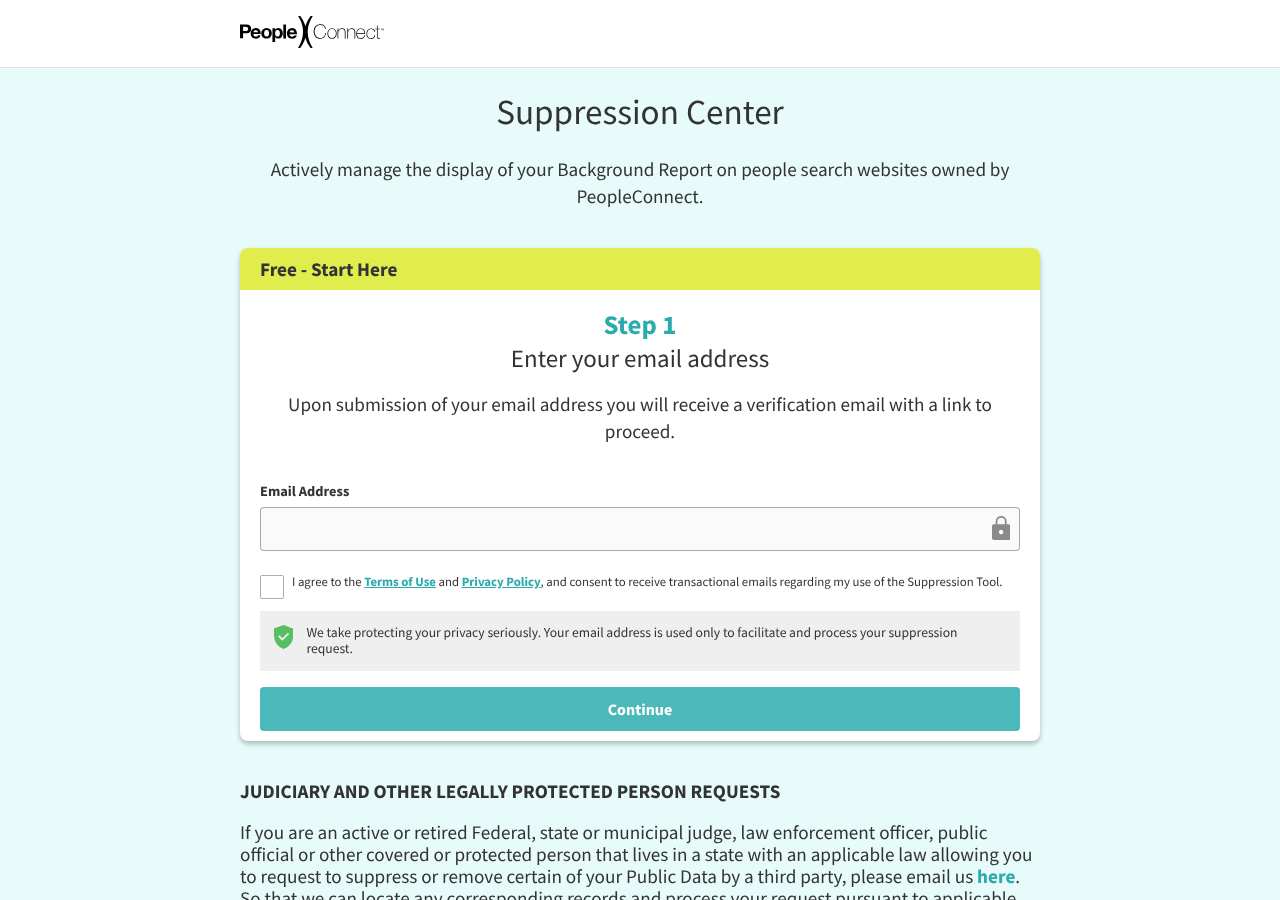
TruthFinder directs people to the PeopleConnect Suppression Center. Its official page says the free tool manages the display of public background reports returned by name search across the PeopleConnect people-search family, naming TruthFinder, Instant Checkmate, Intelius and US Search. The first page asks for an email address and consent to the tool's terms and transactional messages; PeopleConnect says it emails a verification link. This is suppression of specified public-data report displays, not deletion of source records or a universal removal of every data type.
Direct link to suppression.peopleconnect.us. Opt-outs on this page are free; you never need to pay TruthFinder or us to use them.
Work through this with your agent
Give your agent the published steps, sources and read-only tools. It should check the current official process and ask before taking action.
Copies public guidance only. You still approve any request your agent submits.
View or select the instructions
Check if you are listed on TruthFinder
TruthFinder does not expose a stable public search URL we can prefill, so find your listing directly: open truthfinder.com, search your full name plus your state (and previous states), and copy the URL of the record that is you. The opt-out form usually asks for that URL or the same name and location.
What TruthFinder typically shows
- PeopleConnect describes the covered item as a public background report returned when someone searches a covered people-search site by name.
- The tool applies to the public-data name-search display, not account or other user data collected by the sites.
- PeopleConnect says information may remain in phone, address, or email search features and certain legally protected listings.
- The exact records linked to an individual are shown only after the user authenticates; this review did not access or inspect any personal record.
An exposure report can help organize candidate listings before you work through the site's official steps.
Remove yourself from TruthFinder
7 steps. Use the official site in a normal browser and follow its current instructions if a human check fails.
- 01
Use the PeopleConnect Suppression Center
Open https://suppression.peopleconnect.us/ from TruthFinder’s opt-out entry point. Check the address bar before entering information. The Center is the shared route described by PeopleConnect for its people-search brands.
- 02
Read the current scope and terms
PeopleConnect describes suppression as managing public background reports returned by name search on its people-search sites. Read the linked Terms of Use and Privacy Policy before checking the consent box; the screen also says you consent to transactional emails about use of the tool.
- 03
Enter an email address you can access
The official first step asks for an email address and says it will send a verification link. Use an inbox you control. This review did not request that link or test whether an alias is accepted.
- 04
Verify your email and continue in the official portal
Open the message and follow its link only if it points to the PeopleConnect Suppression Center. Do not share the link or code with anyone. The next screens were not inspected in this review, so follow their current prompts and provide only the information they request to locate your own record.
- 05
Check identity carefully before applying suppression
If the authenticated tool presents records, compare the available details and select only records that belong to you. Stop if the identity is ambiguous and contact privacy@peopleconnect.us for help; this guide has not accessed a person’s records or tested the selection controls.
- 06
Save the outcome and check the stated scope
Keep the email and any on-screen confirmation, including the date. A confirmation that a suppression setting was saved is evidence of that action, not proof that all records or source copies were deleted. Revisit the official Center for status and current instructions.
- 07
Review other PeopleConnect surfaces separately
The tool does not apply to Classmates.com or user data, and PeopleConnect says some phone, address, and email search features or protected listings may still show information. Use the relevant site’s own privacy controls or contact channel for those separate scopes.
What the TruthFinder opt-out page looked like when we checked
We loaded the opt-out page on suppression.peopleconnect.us on October 5, 2026 and it was up. The first screen asked for: Email Address, I agree to the Terms of Use and Privacy Policy, and consent .
This is a dated record of what our browser saw, not a removal. We never submit requests from this page.
Continue with your next privacy task
Found your details on another site?
- TruePeopleSearch opt-out instructions
Use this guide if you find a matching listing on TruePeopleSearch. Check that site separately; a request elsewhere does not establish removal here.
- Unmask opt-out instructions
Use this guide if you find a matching listing on Unmask. Check that site separately; a request elsewhere does not establish removal here.
The source page changed, but Google still shows it
Choose between a Google personal-info request and refreshing an outdated result.
Read the how-toYou found more than one profile
Keep separate records of each matching URL so an extra listing is not missed.
Read the how-toThe confirmation email never arrived
Check the site's requirements before retrying a request or sharing more information.
Read the how-toRemind me to recheck TruthFinder in 30 days
We'll send one reminder to verify the listing is actually gone. Confirm the email first; no ongoing marketing and no account required.
What is TruthFinder?
TruthFinder is a PeopleConnect people-search service. The available Suppression Center is shared across the named PeopleConnect people-search brands, so you can manage those public background-report displays through one account flow rather than filing unrelated requests at each of those four brands. Confirm the brand list and instructions shown by PeopleConnect when you act; the company can change the tool.
PeopleConnect defines the tool narrowly: it suppresses public data generated in response to a name search on its people-search sites. It does not cover user data collected by those sites, Classmates.com, or information held by third-party sources. The company also warns that data may remain visible through phone, address, or email searches and some legally required or protected-record features. A successful name-search suppression therefore does not mean all information about you has been deleted or is no longer available.
What a TruthFinder listing can show
- PeopleConnect describes the covered item as a public background report returned when someone searches a covered people-search site by name.
- The tool applies to the public-data name-search display, not account or other user data collected by the sites.
- PeopleConnect says information may remain in phone, address, or email search features and certain legally protected listings.
- The exact records linked to an individual are shown only after the user authenticates; this review did not access or inspect any personal record.
Who runs TruthFinder, and which sites one request covers
TruthFinder links to the PeopleConnect Suppression Center at suppression.peopleconnect.us. The Center explicitly names TruthFinder, Instant Checkmate, Intelius and US Search as covered people-search sites. It expressly excludes Classmates.com and says the tool does not affect third-party source data. Treat the named coverage as the official scope observed on October 22, 2026, and check the Center itself for changes before relying on it.
Same request also covers: truthfinder.com, instantcheckmate.com, intelius.com, ussearch.com
What is the truthfinder.com opt-out removal process?
The official entry screen asks for an email address and a checkbox accepting the Terms of Use and Privacy Policy and consenting to transactional emails; it says a verification link will be sent. After that point, authenticate only on the official PeopleConnect host and follow the current in-product steps. The public page reviewed here does not document the later record-search fields or final controls, so this guide does not assume a required date of birth, a particular result-selection layout, or a specific completion message.
How long it takes
PeopleConnect's public Suppression Center page reviewed on October 22, 2026 does not give a processing-time promise. It says the tool manages whether a public background report is displayed in response to name searches. Save any confirmation and check the covered name-search surfaces later; do not treat an elapsed number of days or an email verification step as proof of completed suppression.
TruthFinder opt-out problems and fixes
The verification email does not arrive
Check spam, promotions, and address spelling, then use the Center’s current instructions. Do not create repeated requests if the portal shows one pending. Contact privacy@peopleconnect.us if the issue persists.
The portal shows no record or an uncertain match
Do not select another person’s record based on name alone. Use any identity details the portal itself offers to distinguish the record; if it remains ambiguous, contact privacy@peopleconnect.us and ask how to proceed.
A name-search report is suppressed but information still appears elsewhere
PeopleConnect says suppression does not apply to user data, Classmates.com, third-party source records, and may not remove information accessible through phone, address, or email searches or certain protected listings. Identify the exact surface and use the relevant separate control or source.
I want to undo a suppression or delete my portal account
The official Privacy Center says identity settings can be used while authenticated to manage a suppression. It also says deleting user data removes associated suppressions, so do not use account deletion if you want a suppression to remain.
The portal asks for information I did not expect
Pause and reread the official tool’s scope and terms. This review only observed the email-and-consent entry screen; it did not inspect or validate later identity fields. Ask privacy@peopleconnect.us if a later request is unclear.
Send this to privacy@peopleconnect.us
Subject: Help with my PeopleConnect Suppression Center request
Hello, I am having trouble using the PeopleConnect Suppression Center for a record that appears to be mine. Please tell me the current steps for managing its display in name-search results and what information you need to locate the correct record. Name: [Name] Email used in the Suppression Center: [Email] Relevant PeopleConnect site: [Site] Record URL, if available: [URL] Please do not treat this message as confirmation that any suppression has been completed. Please let me know the request status and any next step. Thank you.
After you opt out of TruthFinder
Keep the confirmation and note which PeopleConnect name-search surfaces you checked. Suppression governs display of the covered public background report in response to name searches; it does not erase the underlying third-party records, remove account/user data, cover Classmates.com, or assurance that other search modes show nothing. Re-check the exact covered surfaces and handle any remaining data through the appropriate separate route.
Who does what for TruthFinder
The honest split, so nothing here reads as a promise we cannot keep.
What we handle
- Opening the official TruthFinder form pre-filled with your scan details.
- Tracking the request status after you complete the step only you can do.
- Re-checking truthfinder.com before anything is marked removed.
What you must do
- Complete the step TruthFinder requires from you directly: email confirmation.
- Open the confirmation email and click the link -- the request is not filed until you do.
- Re-check truthfinder.com after the timing stated in this guide and repeat the process if the listing returns.
Realistic scope
Keep the confirmation and note which PeopleConnect name-search surfaces you checked. Suppression governs display of the covered public background report in response to name searches; it does not erase the underlying third-party records, remove account/user data, cover Classmates.com, or assurance that other search modes show nothing. Re-check the exact covered surfaces and handle any remaining data through the appropriate separate route.
My Privacy Agent opens the TruthFinder form and tracks the outcome.
TruthFinder requires a step only you can do (email confirmation). After you authorize a mission, our agent opens the official form with your scan details, hands you that step, records the request as filed only when the site confirms it, and re-checks the listing before anything is called removed. If the site blocks the agent, you get the same instructions above instead of a fake status.
Current service availability and terms are listed on the pricing page. Nothing is marked removed before a provider or native action succeeds.
TruthFinder opt-out FAQ
What exactly does the PeopleConnect suppression tool cover?
PeopleConnect’s official Center describes a free tool for public background reports returned by name searches on TruthFinder, Instant Checkmate, Intelius and US Search. It says the tool does not cover user data or Classmates.com, does not affect third-party source records, and may leave information available in phone, address or email search features and certain protected listings. It is a display-suppression control, not universal deletion.
Does the TruthFinder opt-out delete my information?
The official PeopleConnect tool is described as suppressing the display of public background reports returned by name search on covered PeopleConnect people-search sites. It does not delete source records, and it does not cover all information or search modes.
Which sites does the shared PeopleConnect tool name?
The official Center names TruthFinder, Instant Checkmate, Intelius and US Search. Check the current Center because PeopleConnect may change the scope. Classmates.com is expressly excluded.
Is the PeopleConnect Suppression Center free?
PeopleConnect says its Suppression Tool is free. Review its terms and privacy notice before using it; the first step also asks you to consent to transactional email related to the tool.
Will information still appear in phone or address searches?
It may. PeopleConnect says the tool applies to reports returned by name search and warns information may continue to appear in phone, address or email report features and certain protected listings.
Does suppressing a report remove public records at their source?
No. PeopleConnect says suppression does not affect third-party sources. A public-record publisher or other source must be handled separately.
How long does suppression take?
The public Center page reviewed for this guide does not state a processing timeline. Keep the confirmation and check the covered name-search surfaces later; the email verification step alone does not confirm suppression.
Does My Privacy Agent remove me from TruthFinder automatically?
TruthFinder requires a step only you can do (email confirmation). After you authorize a mission, our agent opens the official form with your scan details, hands you that step, records the request as filed only when the site confirms it, and re-checks the listing before anything is called removed. If the site blocks the agent, you get the same instructions above instead of a fake status.
Related broker opt-outs
The reviewed shared suppression scope names truthfinder.com, instantcheckmate.com, intelius.com, ussearch.com; other related sites need separate checks.
Intelius
Intelius is the flagship PeopleConnect background-report brand.
Open guideInstant Checkmate
Instant Checkmate is a PeopleConnect background-report brand.
Open guideUS Search
US Search is one of the oldest people-search brands and now belongs to PeopleConnect.
Open guideZabaSearch
ZabaSearch is a free people-search front end owned by PeopleConnect (Intelius).
Open guideSources and review
Reviewed October 22, 2026 against TruthFinder's own pages and the sources below. Broker forms change often; if something here no longer matches, the official page wins.
Reviewed PeopleConnect's public Suppression Center on October 22, 2026, including its first-step fields, stated purpose, named site family, limitations, and privacy-center controls. The email verification link was not requested or followed; no name or personal data was entered, and no individual record selection, submission, acceptance, or suppression was tested.
Review and change history
A content review or directory snapshot is reference history. A historical route observation does not establish submission, provider acceptance or removal, and does not establish a current working route. Current independent evidence has its own scope and expiry.
· Historical route observation: reachable (HTTP 200). This describes only the page observed on that date; later steps and today's availability were not established by that observation.
· Reviewed PeopleConnect's public Suppression Center on October 22, 2026, including its first-step fields, stated purpose, named site family, limitations, and privacy-center controls. The email verification link was not requested or followed; no name or personal data was entered, and no individual record selection, submission, acceptance, or suppression was tested. This is the recorded review baseline; no earlier editorial change log is available.
· Expanded TruthFinder with the official PeopleConnect Suppression Center's first-step email and consent fields, its stated public-report suppression purpose, the named PeopleConnect site family and limits between public search results and other data uses. Read only the published page and controls; no email verification, profile search, record selection or request was completed.
Read current independent route evidence. That record reports its own scope, date, expiry and any gaps; this history does not renew verification.